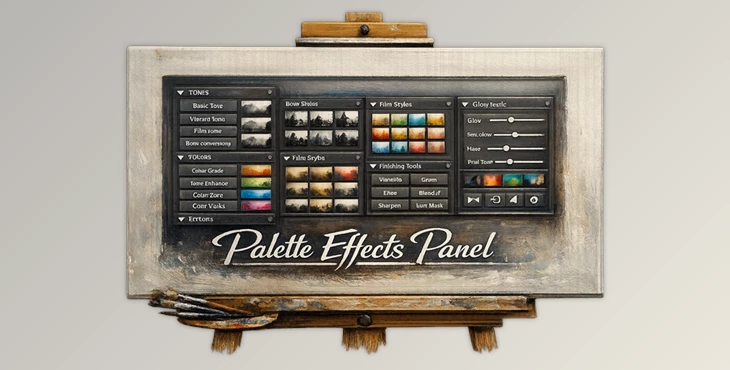
Downloadable Files
You can download the Palette Effects Panel for free at the end of this page.
Unlock a New Approach to Color and Tone
Have you ever looked at your photograph after adjusting the colors in Photoshop and felt like something was missing? Getting the perfect balance of color and tone in your photography can be challenging.
This Panel was created to give photographers and digital artists who work in Photoshop a new and intuitive approach to color grading that is rooted in color theory. Palette Effects Panel allows users to learn more about color theory and to apply these concepts to their photography to produce visually appealing images.
Whether you are into landscape, portrait, or fine art photography, this digital tool will allow you to enhance your digital images.
What Is the Palette Effects Panel and Why Is It Useful?
This tool includes a combination of professional color grading tools and color theory education within Photoshop. Instead of simply providing color grading tools to users, the Palette Effects Panel provides the knowledge behind color theory to help photographers and digital artists learn more about why certain colors work within an image as compared to others.
The benefits of using the Palette Effects Panel include the ability to:
- Create color palettes that visually appeal to viewers
- Produce visually engaging color schemes for your digital projects
- Enhance your black and white photography skills
- Build your own artistic color photography style
- Master the skills needed for professional color grading within digital imaging software
Whether you are a landscape photographer or an amateur portrait and fine art digital photographer, the Palette Effects Panel will allow you to produce visually balanced and impactful digital projects.
Meet Palette Effects Panel
Compared to other Photoshop plugins that may focus primarily on giving users quick tools to apply various effects to their digital projects, the Palette Effects Panel was created with an emphasis on giving users more control and knowledge over color theory within their projects.
Created by a former painter, the Palette Effects Panel was designed to provide the same freedom of expression to digital photographers as painters have within their own mediums. The non-destructive editing process allows photographers to experiment with various settings while still maintaining their original digital images.
Overall, the Palette Effects Panel allows users not just to enhance their digital photographs but also to learn more about the color theory that goes into creating visually balanced digital art projects.
Features
Advanced Tone Control
The panel provides powerful tools for adjusting tonal relationships throughout an image. Users can fine-tune contrast, brightness, and tonal balance to create stronger visual depth and atmosphere.
This is particularly useful when creating dramatic landscape scenes or subtle fine-art photography.
Professional Black & White Conversion
Creating compelling monochrome photographs becomes significantly easier with dedicated tone-based controls.
Instead of relying on basic desaturation methods, users can carefully shape tonal contrast and separation, resulting in richer black-and-white images with greater emotional impact.
Intelligent Color Correction
Color correction is often one of the most time-consuming parts of post-production. Palette Effects Panel streamlines the process by helping users make informed color adjustments based on color theory principles.
This leads to more accurate colors, cleaner images, and a more consistent editing style.
Creative Color Grading Engine
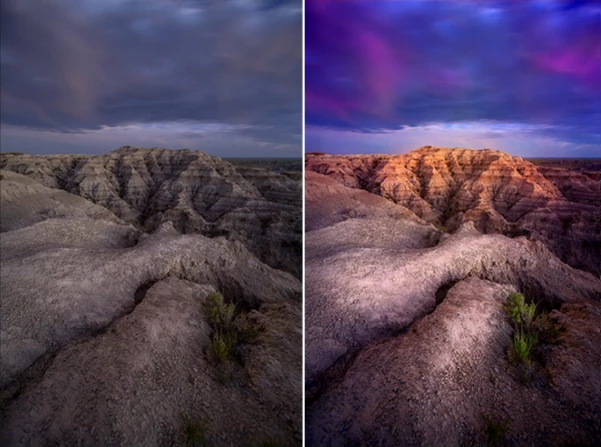
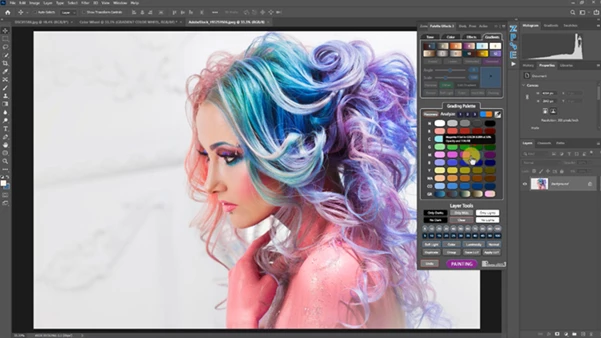
The handcrafted grading palette allows simultaneous color correction and artistic color grading.
Photographers can quickly experiment with different moods and atmospheres while maintaining natural-looking results.
Painting Palette System
Inspired by traditional painting techniques, the Painting Palette introduces a more artistic way to work with color.
This feature enables users to push creativity further and explore unique visual styles that go beyond standard photography edits.
Integrated Color Theory Education
One of the most valuable aspects of the Palette Effects Panel is its educational component.
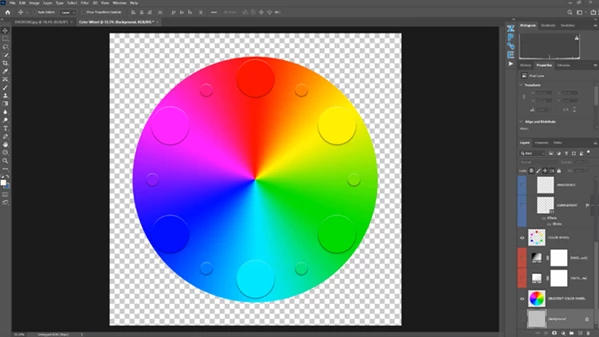
Users learn how complementary colors, color harmony, contrast relationships, and visual balance affect image perception. Over time, these concepts become intuitive and improve every editing decision.
Non-Destructive Workflow
All adjustments are designed to work within a non-destructive editing framework, allowing photographers to revisit and refine their edits at any stage of the creative process.
Pro Tips for Better Results
Learn the Color Theory First
Palette Effects Panel includes color theory education for a reason - learn as much as you can about color theory concepts before using the software to enhance your digital projects.
Build Consistent Color Styles
Palette Effects Panel allows photographers to build their own color correction styles that can be applied to any project, giving photographers control over their editing process.
Start With Color Correction
Before you begin any creative color grading processes with the Palette Effects Panel, first perform color correction on your digital projects.
Use Black & White Strategically
Palette Effects Panel allows photographers to easily create black and white photography projects. Some projects may benefit from dramatic contrast and tonal editing in black and white modes.
Experiment Without Fear
Palette Effects Panel allows photographers to experiment with various color settings and color correction techniques without ever destroying their original digital projects.
Final Thoughts
Palette Effects Panel offers photographers and digital artists a combination of color grading tools and color theory education that can enhance digital projects of any type.
By helping photographers to understand the artistic color theory behind the various color grading tools within the software, the Palette Effects Panel allows photographers of all experience levels to transform the color correction and grading processes into a creative outlet for the photographers themselves.
For those looking to enhance their digital projects and to learn the color theory behind the color grading of their digital content, the Palette Effects Panel is a valuable tool to own and edit their digital projects with.

Files Password : gfxplugin.com OR 123456