Downloadable Files
You can download CenterLine for free at the end of this page.
Bring Your Drawings to Life
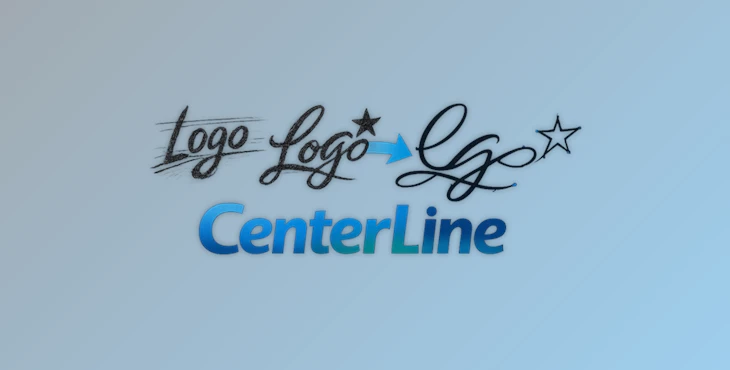
Have you ever tried to animate a drawing in After Effects only to struggle with the numerous anchor points that make up the vector paths? CenterLine was made to solve this very problem. Instead of creating a path based on the drawing’s vector layers, like other techniques, CenterLine will extract the skeletal path that lies within the drawing and create a much lighter, cleaner shape layer that is perfect for a variety of After Effects functions.
Whether you are working with pencil drawings, architectural diagrams, handwritten signatures, or logos, CenterLine will transform your raster artwork into editable, animated vector paths in just a few seconds.
What Is CenterLine and Why Is It Useful?
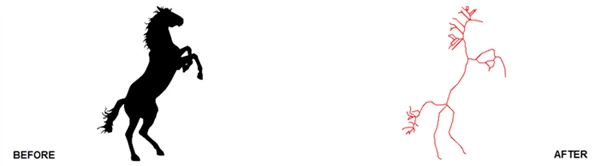
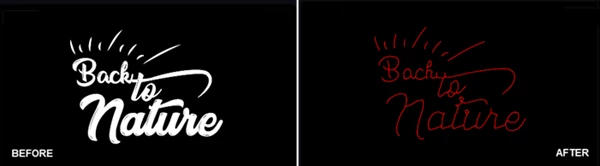
This tool is an After Effects plugin that will convert your bitmap images into a single-line vector path. Unlike other techniques that will create two separate vectors (or “walls”) for your drawn artwork, CenterLine will extract the center of the drawing and create a much lighter vector path.
With CenterLine, you can enjoy several benefits:
- Cleaner paths for Trim Paths and write-on animations
- Fewer anchor points in your paths
- Smoothen curves in your drawn artwork
- A significantly reduced complexity of your After Effects project
- More accurate representation of your hand-drawn artwork
For example, if you have a signature that was created by a human, tracing tools will typically create two separate paths surrounding the signature. With CenterLine, however, only one path will be created that passes through the signature’s center.
This same benefit can be applied to the following types of drawings:
- Logo outlines
- Hand-drawn illustrations
- Architectural drawings
- Technical diagrams
- Calligraphy
- Motion graphics
The advantage of using these vector paths created by CenterLine is that they are much lighter and easier to work with within After Effects.
Meet CenterLine: Professional Vector Extraction for After Effects
This product combines Zhang-Suen thinning, Schneider Bezier curve fitting, Ramer-Douglas-Peucker path optimization, variable-width mapping, interactive width controls, subpixel precision, and SVG export to give you professional results for any type of design project.
Features
Zhang-Suen Thinning Technology Zhang-Suen thinning will analyze your artwork and extract the skeletal path in the middle of your drawings. Benefits include:
- Accurate extraction of the skeletal path in the center of your drawing
- Preservation of the structure of the original drawing
- The ability to work with complex drawings and artwork with overlapping strokes
- Useful for those working with scanned sketches, ink drawings, and other forms of hand-created artwork
Schneider Bezier Curve Fitting Once the skeletal path is extracted, Schneider’s algorithm converts raw pixel chains into smooth third-order Bezier curves. Advantages include:
- Smooth professional curves
- Significantly fewer anchor points
- Easier path editing
- Better animation performance
Instead of receiving thousands of unnecessary points, artists get elegant curves that remain faithful to the original design. Ramer-Douglas-Peucker Optimization CenterLine further refines generated paths by removing redundant nodes while maintaining shape accuracy. Benefits:
- Lighter Shape Layers
- Faster viewport performance
- Reduced rendering overhead
- Easier manual adjustments
This optimization is particularly valuable for large illustrations and complex drawings. Variable Width Mapping CenterLine doesn’t simply extract a center path. It also analyzes the original stroke thickness and maps that information back onto the vector result. This allows:
- Natural-looking calligraphy
- Dynamic stroke thickness
- Organic hand-drawn aesthetics
- More realistic write-on animations
The final output feels much closer to the original artwork. Interactive Width Controls Artists can place up to eight independent control points to influence stroke thickness across the design. This provides:
- Creative flexibility
- Better artistic control
- Customized visual styling
- Fine-tuned animation results
Subpixel Precision Animation CenterLine uses subpixel calculations to produce smoother tapered lines and cleaner reveals. The result is:
- Pixel-perfect animations
- Reduced stepping artifacts
- Professional-quality motion
- Fluid write-on effects
Instant Shape Layer and SVG Export. After processing, users can immediately:
- Create native After Effects Shape Layers
- Copy SVG paths
- Continue editing inside After Effects
- Integrate vectors into larger workflows
This dramatically speeds up production and eliminates unnecessary conversion steps.
Real-World Examples
There are several different projects in which you can apply CenterLine’s functionality:
- Handwritten titles for documentaries
- Logo reveals
- Architectural drawings
- Whiteboard animations
- Technical illustrations
- Calligraphy animations using Trim Paths
Instead of spending hours manually tracing your artwork into vectors within After Effects, CenterLine will create those vectors in mere seconds.
Pro Tips for Better Results
Start with Clean Artwork
The best results will be experienced when your initial artwork is as clean as possible. Steps to take before processing your artwork:
- Remove any noise from the image
- Increase the contrast of your artwork
- Ensure that your lines are defined
Adjust Threshold Carefully
The threshold controls how the program separates your artwork’s background from its foreground. An appropriately adjusted threshold will allow your program to:
- Correctly separate artwork from its background
- Preserve the important details of your drawing
- Ensure that your extracted path remains intact and does not break
Use the Correct Channel
CenterLine allows processing through:
- Luminance
- Red
- Green
- Blue
- Alpha
Selecting the most suitable channel often improves extraction quality dramatically.
Optimize Before Export
Take advantage of the built-in path optimization settings to reduce unnecessary vertices. Fewer points generally mean:
- Faster animation
- Easier editing
- Better overall performance
Combine with Trim Paths
One of the most powerful workflows is pairing CenterLine-generated paths with After Effects Trim Paths. This combination enables:
- Signature reveals
- Drawing animations
- Technical blueprint builds
- Elegant logo animations
with minimal setup time.
Final Thoughts
This tool was created to give After Effects users a better way to transform their raster artwork into editable and animated vector paths.
Whether you are animating logos, hand-drawn artwork, calligraphy, architectural drawings, or technical diagrams, CenterLine will help you to create smoother animations with less effort and fewer complications in your projects.
For anyone looking to streamline the vector extraction process in After Effects and to create stunning, professional write-on animations for the screen, CenterLine is the perfect plugin to add to your collection.
 CenterLine - After Effects Plugin by Aescripts (v1.0.4 for Win).rar (Size: 269.8 KB - Date: 7/15/2026 2:43:10 PM)
- CenterLine - After Effects Plugin by Aescripts (v1.0.3).rar (Size: 269.6 KB - Date: 7/7/2026 11:22:44 AM)
- CenterLine - After Effects Plugin by Aescripts (v1.0.2).rar (Size: 29.1 MB - Date: 6/18/2026 12:13:46 PM)
- CenterLine - After Effects Plugin by Aescripts (v1.0.1).rar (Size: 32.8 MB - Date: 6/10/2026 1:46:27 PM)
- Aescripts - CenterLine v1.0.0.rar (Size: 184.3 KB - Date: 6/6/2026 11:24:14 AM)
Files Password : gfxplugin.com OR 123456