Downloadable Files
You can download Cadence for free at the end of this page.
Sync Every Animation to Speech with Perfect Precision
Animating voice-overs in Adobe After Effects can be a very tedious task. When trying to create a great visual narrative with speech, designers have to constantly listen to the audio to find the perfect spot for each word. This can become extremely frustrating and time-consuming.
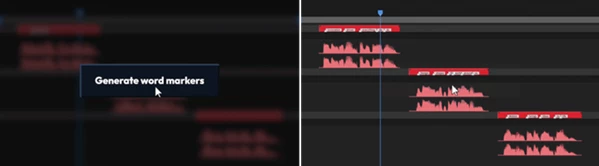
This tool changes the game by automatically detecting every word that is spoken in the voiceover and placing markers on the timeline that perfectly match the frames of the audio. Designers can save hours of searching for the perfect spot for each word and focus on creating their masterpiece.
What Is Cadence and Why Is It Useful?
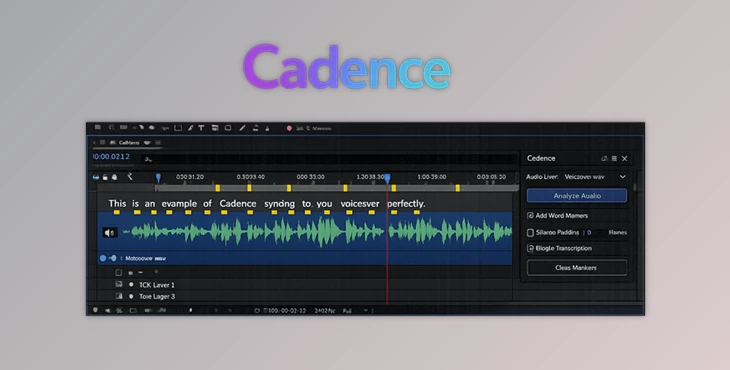
Cadence is an After Effects tool that uses advanced WhisperX AI technology to analyze voice recordings and generate timeline markers for every spoken word automatically.
In traditional workflows, motion designers often listen to audio repeatedly just to identify important moments. This process is time-consuming and often lacks true frame accuracy. Cadence eliminates this problem by creating markers at the exact moment each word begins.
This improves production quality in several ways:
- Animations hit precisely on spoken words.
- Typography appears at the perfect moment.
- Lip-sync animations become more believable.
- Visual elements stay synchronized with narration.
- Editing time is dramatically reduced.
For example, when creating an explainer video, important keywords can appear exactly when the narrator says them. In character animation projects, dialogue timing becomes significantly easier to manage. Even complex kinetic typography sequences can be built much faster because every word is already mapped on the timeline.
Meet Cadence: AI-Powered Audio Marker Generation
This product was specifically created for motion designers, animators, and video creators who work with voiceovers or dialogue in their projects.
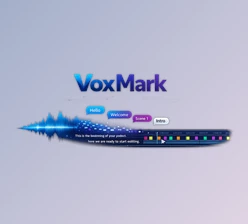
This panel integrates directly into After Effects. When the audio file is selected in the project window, the software can automatically convert the spoken audio to markers on the timeline that represent each word that is spoken.
Cadence makes this process extremely simple for designers. All that must be done is for the designer to select the audio file that they wish to add markers to and then click a button to initiate Cadence.
Features
AI-Powered Word Detection
This tool uses WhisperX AI to identify every spoken word and place a marker exactly where that word begins. This level of precision allows motion graphics, typography, and animation timing to feel more polished and professional.
Smart Marker Labels
Every generated marker contains the actual spoken word. Instead of seeing generic markers, your timeline becomes a readable script that is easy to navigate and reference while animating.
Multi-Layer Audio Processing
Projects often contain multiple voice tracks or dialogue layers. Cadence can process multiple audio layers simultaneously, saving considerable time during larger productions.
Flexible Marker Synchronization
Generated markers can be copied to:
- The current timeline
- Parent layers
- Parent compositions
This makes it easier to organize complex animation projects without rebuilding timing information.
Non-Destructive Workflow
Markers are placed directly on audio layers rather than cluttering the main composition. Your project remains clean, organized, and easy to manage even when working with long-form content.
WhisperX Precision Technology
One of Cadence’s biggest advantages is its use of WhisperX forced alignment technology. Unlike traditional speech-to-text systems that can drift over time, WhisperX offers:
- Millisecond-level accuracy
- Word-level alignment
- Near-zero timing drift
- Phoneme-based precision
- Support for more than 90 languages
Because markers stay accurate from beginning to end, even lengthy voiceovers maintain perfect synchronization throughout the entire timeline.
Real-World Project Examples
Kinetic Typography
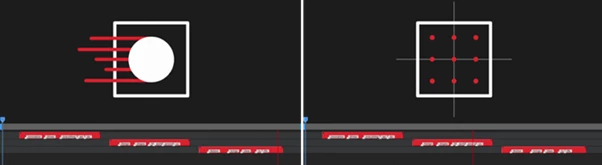
Every word already has a marker. Animators can quickly trigger text animations, scaling effects, and transitions at the exact moment words are spoken.
Character Lip Sync
Dialogue timing becomes significantly easier because every spoken word is mapped automatically. This allows animators to focus more on facial expressions and performance rather than timing corrections.
Educational Videos
Tutorial creators can reveal diagrams, charts, and key concepts precisely when they are discussed in the narration. This creates a smoother and more engaging learning experience for viewers.
Infographics and Data Visualizations
Statistics, numbers, and visual callouts can appear exactly when referenced by the narrator, improving clarity and audience comprehension.
Professional Tips for Better Results
Use clean voice recordings.
Cadence works best with clean voice recordings. Additionally, removing background noise before generating markers can significantly improve the results.
Organize your long narrations.
For projects with lengthy voiceovers, it is a benefit for the narrator to organize the narration into sections before adding markers using Cadence to make it easier to navigate the project later.
Combine markers with animation presets.
Cadence markers can be combined with animation presets to significantly speed up the process of adding animation to elements in your projects.
Use marker labels.
Since each marker displays the words that are spoken in the audio files, use these markers to navigate your projects and add edits to specific words when needed.
Build audio-driven workflows.
Markers that are generated with Cadence can be triggers for various animations, effects, and adjustments to the project's timeline.
Final Thoughts
Cadence brings AI technology to a tedious task in the motion design and animation industry. It can automatically generate markers for each word that is spoken in a voiceover, which allows designers to significantly increase their productivity.
Cadence is suitable for projects that feature voiceovers like kinetic typography, explainer videos, character animation, and audio-reactive motion graphics.
By using Cadence, designers can focus on creating compelling animations for their projects instead of spending hours searching for the perfect spot for each word in the voiceover.

Files Password : gfxplugin.com OR 123456