Downloadable Files
You can download Looping Lines for free from the end of this page.
Bring Your Animations to Life Instantly
Creating captivating motion graphics takes a lot of work. What if you could generate unique animated line patterns in just a few clicks? Looping Lines was created with the intention of allowing users to generate these types of line animations in just a few clicks.
The script can be used for creating endless designs for projects such as abstract animations, futuristic user interfaces, music visualizers, social media content, and more. All of these can be generated in just a few seconds with the script while maintaining complete control and customization options for users.
What Is Looping Lines and Why Is It Useful?
Looping Lines is a script that was created for automatically generating animated line motion graphics. Instead of manually animating various elements of a motion graphic project, Looping Lines automates this process.
This tool saves users both time and encourages creativity. By automating the process, users can generate dozens of unique animations in rapid succession without having to touch their computers between projects.
Some of the uses for the script include:
- Creating animated backgrounds for presentations
- Creating abstract visual effects for music videos
- Creating modern motion graphics for social media content
- Creating animated motion graphics for promotional videos
- Creating futuristic user interfaces for technology projects
Why These Features Improve Results
Looping Lines includes a variety of features that were created to improve the results of animations that are generated by the script.
These features include:
- Faster workflows
- Infinite possibilities for designing unique animations
- Consistent, seamlessly-looping animations
- Customization options for all aspects of the animations
- Creative freedom to create any type of motion graphics projects of their choosing
Meet Looping Lines
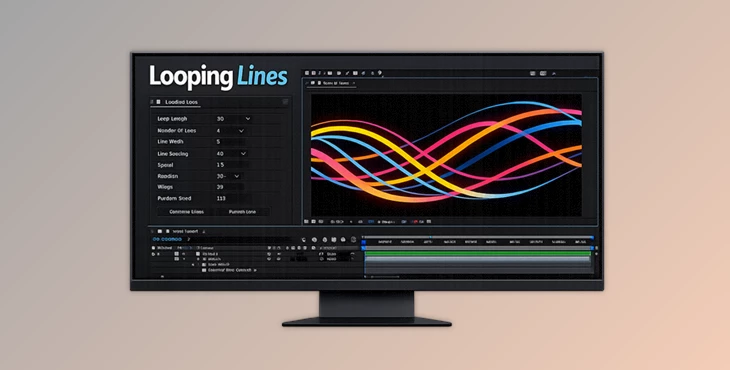
Looping Lines is a script for After Effects that allows users to generate infinite looping line animations with a few clicks.
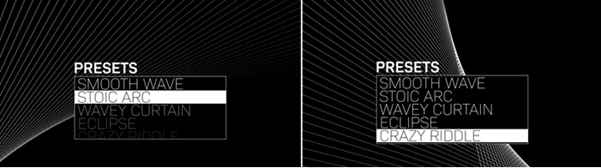
To use Looping Lines, users simply apply the script to a new or existing composition within After Effects. After applying the script, users are presented with a variety of different line animation presets. From these presets, users can begin to customize the animations to their specifications. Each of the animations generated by the script is also completely editable, which allows users to continue to create unique animations with ease.
Features
Instant Animation Generation
Generate unique looping line animations with a single click. This dramatically speeds up the design process and helps overcome creative blocks when searching for new visual ideas.
Preset-Based Workflow
Built-in presets provide excellent starting points for beginners and professionals alike. Instead of starting from a blank composition, users can quickly customize existing styles.
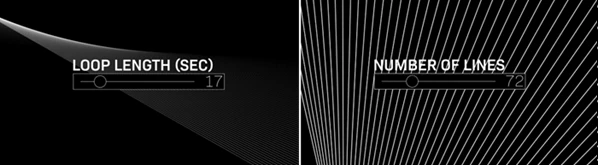
Adjustable Loop Length
Control the duration of your animation loop independently of your composition length. This flexibility makes the tool suitable for short social clips as well as longer motion graphics projects.
Complete Line Customization
Customize nearly every aspect of the generated lines, including:
- Number of lines
- Stroke width
- Line spacing
- Line color
- Start opacity
- End opacity
- Individual line rotation
These controls make it easy to match animations with branding requirements or project aesthetics.
Global Position and Rotation Controls
Offset the entire animation system globally to create different compositions and visual balances without rebuilding the animation.
Procedural Wiggle Effects
Add natural movement using:
- Rotation Wiggle Amount
- Position Wiggle Amount
These controls introduce organic motion that feels dynamic and less mechanical.
Animation Speed Control
Quickly adjust how fast or slow the loop evolves. This allows the same setup to work for energetic advertisements, relaxing backgrounds, or cinematic visuals.
Random Seed Generator
One of the most powerful features is the Random Seed control. Changing a single value instantly creates an entirely new animation pattern while preserving the overall structure of the design.
Fully Editable Structure
The setup is built using:
- Shape Layers
- Expressions
- Expression Controls
Everything remains open and editable. Users can modify paths, animate parameters, add effects, and integrate Looping Lines into larger motion graphics systems.
Real-World Project Examples
This tool can be used in many professional scenarios:
- Animated podcast backgrounds
- Music visualizers
- Event screens and stage graphics
- YouTube intros and transitions
- Corporate presentations
- Technology product advertisements
- Motion graphic title sequences
- Social media reels and stories
Its procedural nature makes it especially useful for projects that require multiple visual variations in a short amount of time.
Professional Tips for Better Results
Start with a Preset
Use presets as a creative foundation before making detailed adjustments. This helps you discover interesting directions much faster.
Experiment with Random Seeds
Try several random seed values before finalizing a design. Small changes often produce surprisingly unique animation styles.
Combine Wiggle and Rotation
Using both position and rotation wiggle together creates more natural and organic movement than relying on a single parameter.
Animate Control Values
Because all expression controls remain editable, you can keyframe parameters over time to create evolving and highly customized animations.
Add Additional Effects
Enhance your Looping Lines setup with glow, blur, color grading, distortion, or particle effects to create a more polished and cinematic look.
Final Thoughts
Looping Lines changes an intensive design process into a fast and creative process. With the abilities of Looping Lines, users can generate endless designs for their projects in just a few seconds.
Whether a user is looking to create motion graphics for abstract projects or for their promotional videos, this product provides them with a valuable tool for their creative process. The ability to edit the animations and the number of possible variations on each design ensures that users will find Looping Lines to be a valuable addition to their design workflows.