Downloadable Files
You can download Turbulence Effect for Final Cut Pro for free at the end of this page.
Bring Your Visuals to Life with Dynamic Distortion
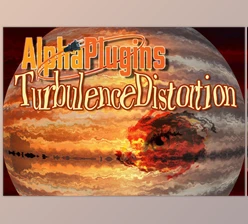
Do you want to give your logos, text, or video footage a dramatic transformation? With Turbulence Effect for Final Cut Pro, you can do just that with a few clicks of your mouse. This powerful plugin adds distorted effects to your projects to give your videos a dynamic and professional look.
Perfect for those creating intros for YouTube videos, promotional videos, music visualizers, or cinematic titles, Turbulence Effect for Final Cut Pro allows you to create stunning motion graphics with minimal effort.
What Is a Turbulence Effect and Why Use It?
A turbulence effect allows your static images and videos to gain life and movement on screen. The movement gives it an energetic look and a unique visual style that can be recognized as your brand or project.
Some of the many ways to use a turbulence effect include:
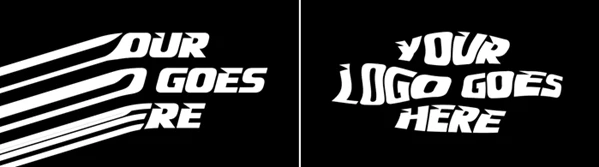
- Using it to give your brand’s logos a special melting and pulsing effect.
- Using it to create animated title sequences.
- Using it to add abstract elements to transitions between video edits.
- Using it to enhance music videos with moving visuals.
- Using it to give promotional videos a futuristic look.
Using turbulence effects can increase the engagement that your videos receive from viewers. These visuals will automatically draw the eye to the content on screen.
Meet the Plugin: Turbulence Effect for Final Cut Pro
Turbulence Effect for Final Cut Pro is a versatile plugin built for video editors who want to add professional distortion effects to their projects.
The plugin offers both ready-made animations as well as customizable settings for users of all experience levels within video editing software.
Features
- 7 Fully Customizable Effects: Turbulence Effect for Final Cut Pro comes with seven customizable effects that can be tailored to the look and feel of your project.
- 6 Pre-Animated Effects: These presets will automatically generate the animations for your video without any additional effort on your part.
- Ideal for Logos and Text: This effect will work best with your brand’s transparent PNG logos and text. They will look incredible with any intros or brand animations for your projects.
- Works on Images and Video Footage: Another benefit of this plugin is that it can work with any static image or video footage within your project.
- Drag-and-Drop Plugin: Simply drag and drop this effect into your project to get started with creating animated videos.
- Compatible with all aspect ratios: Your videos can be in any aspect ratio with this plugin, whether it is YouTube videos or social media videos in vertical ratios.
Real-World Project Ideas
Here are some situations where the plugin can shine:
- Animated logo reveals for businesses and brands.
- Creative YouTube channel intros.
- Dynamic title animations for documentaries.
- Abstract motion graphics for advertisements.
- Music video visual effects.
- Social media promotional content.
- Gaming and esports video intros.

Pro Tips for Better Results
Use transparent logos for best results.
Add motion blur to your clips to increase the feeling of movement from the distortions.
Use moderate distortion settings at first.
Another tip is to try layering this effect with others in your project to gain even more creative control over the outcome.
Match the turbulence settings to your videos’ content and mood to create the best visual experience for your audience.
Final Thoughts
Overall, Turbulence Effect for Final Cut Pro is an excellent solution for editors looking to add some movement and energy to their projects in an easy way. It provides editors with full control and flexibility to create the perfect visuals for their projects.
From animating brand logos to enhancing video titles and footage, Turbulence Effect for Final Cut Pro offers an easy way to create dynamic, professional videos that will engage your audience.

Files Password : gfxplugin.com OR 123456