Downloadable Files
You can download Lightpainter for free at the end of this page.
✨ Paint Light, Don’t Fight It
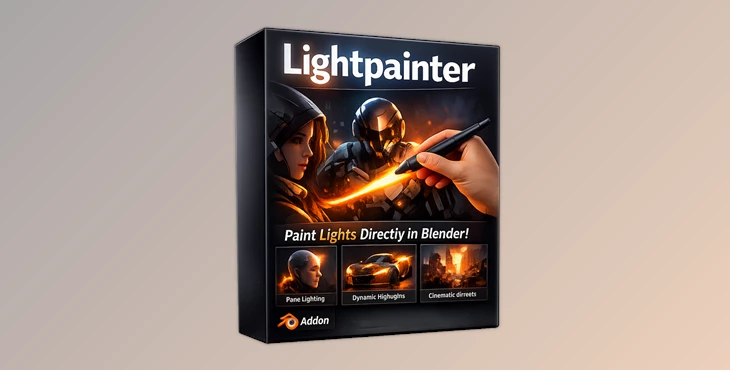
Imagine a lighting solution for Blender that feels as natural as painting in Photoshop. That’s exactly what Lightpainter offers. Instead of fiddling with the positioning and power of your lights in Blender, just paint light into your scene.
🎯 What Is Light Painting in 3D?
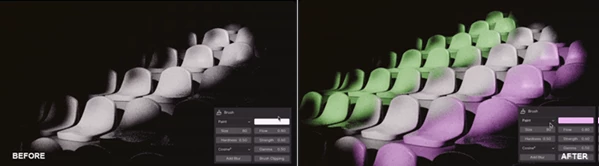
Lightpainter allows you to paint light into your Blender scene directly. You can paint highlights, gradients, and mask areas to include or exclude light.
🎯Why This Matters
When you work in Blender with traditional lighting nodes, you have to move from node to node to adjust your lighting. You have to render often. You can lose your place in the scene when making adjustments.
Lightpainter allows you to:
- See the results of your lighting changes immediately (no need to render)
- Work with precise control over your lighting
- Make changes without breaking your current lighting setup
Real-World Example
- Portraits: Paint light onto the subject’s face to enhance their features.
- Product Photography: Highlight specific areas of the product that need attention.
- Environment Lighting: Use gradients to simulate natural light falling onto the subject or area of focus in your scene.
🧰 Meet the Tool: Lightpainter
Lightpainter is a Blender add-on that turns lighting into a layered, non-destructive painting system directly inside the viewport. It removes complexity and replaces it with an intuitive, artist-friendly workflow — making lighting feel as expressive as digital painting.
🚀 Features
🖌️ Brush-Based Lighting
- Paint directly in the viewport
- Control size, hardness, strength, flow, and falloff
- Includes erase mode for quick corrections
💡 Result: You shape light exactly where you want it — no guessing.
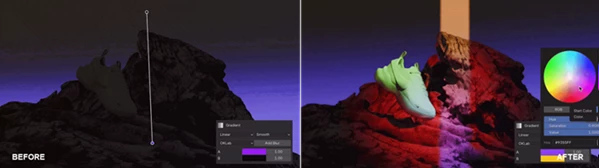
🌈 Gradient Lighting System
- Linear and radial gradients
- Smooth falloffs and cinematic transitions
- Stack multiple gradients with blend modes
💡 Result: Complex lighting setups become simple, fast, and visually rich.
🔲 Smart Selection Tools
- Rectangle, lasso, polyline, and brush selection
- Paint or erase only within defined areas
💡 Result: Pixel-level precision without tedious masking workflows.
🧱 Layer-Based Workflow
- Unlimited layers for light control
- Blend modes, visibility toggle, and reordering
- Non-destructive editing
💡 Result: Work like Photoshop — experiment freely without losing progress.
🖼️ Gobo & Texture Support
- Import PNG, JPG, or EXR textures
- Edit, mask, and blend them as layers
💡 Result: Static textures become dynamic, editable lighting elements.
🎬 Animation Ready
- Keyframe individual layers
- Animate movement, intensity, and blending
💡 Result: Complex animated lighting using minimal setup.
🔮 Upcoming Features
- EEVEE support
- Textured brushes
- Blur & smear tools
- Advanced gradient controls
- Radial focal shift
- Improved selection with feathering
🎨 Pro Tips for Better Results
- Start with broad lighting selections to establish the mood of your scene, then gradually add details as needed.
- Use the layer system to organize different types of lighting (e.g. highlight, shadow, accent).
- Combine the use of gradients and brushes to give your scenes more dimension.
- Experiment with the different blend modes to achieve unique lighting effects.
- Use keyframes to add subtle animation to specific lighting elements in your scene.
🌟 Final Thoughts
Lightpainter is definitely a new way of thinking about lighting within Blender. The frustration with complex lighting adjustments in Blender has finally been replaced with the creative freedom that comes with being able to paint light in your scenes. It’s a free add-on that can significantly improve your control over lighting and will benefit everyone working in Blender on cinematic or product shoots. For those struggling with the lighting tools already in Blender, this tool is worth exploring.
 LightPainter (v1.2.0) by Superhivemarket.rar (Size: 345.6 KB - Date: 8/15/2026 1:36:49 PM)
- LightPainter (v1.0.9) by Superhivemarket.rar (Size: 129.9 KB - Date: 5/9/2026 12:39:05 PM)
- LightPainter (v1.0.7) by Superhivemarket.rar (Size: 129.0 KB - Date: 5/4/2026 12:27:37 PM)
- Blender - LightPainter v1.0.6.rar (Size: 127.5 KB - Date: 4/21/2026 1:18:28 PM)
Files Password : gfxplugin.com OR 123456