Downloadable Files
You can download Grid Composer for free at the end of this page.
🎯 A Fresh Way to Design Layouts in After Effects
If you’ve ever struggled to arrange elements neatly inside After Effects, you’re not alone. Creating clean grids, balanced compositions, or dynamic layouts can quickly turn into a time-consuming task. That’s where Grid Composer comes in — a tool designed to make layout creation not only faster but also far more intuitive and enjoyable.
Imagine being able to visually build your layout, drag elements around, and instantly see the result — no complex setup, no guesswork. Sounds easier already, right?
🧩 What Is It and Why It Matters?
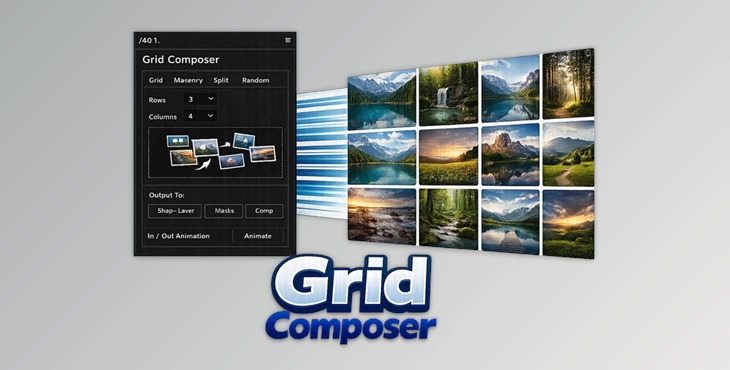
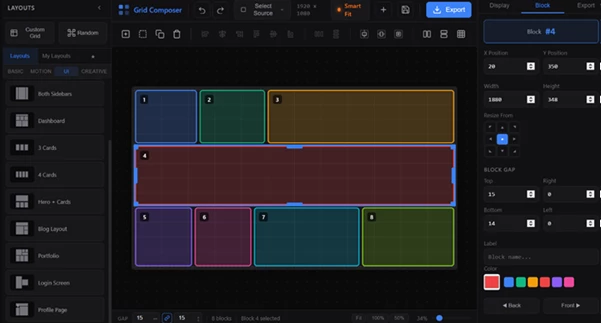
Grid Composer is a visual layout designer that allows you to create structured and creative compositions within After Effects. You get to design your compositions visually.
Real-World Uses
- Designing portfolio grids for motion reels
- Creating social media layouts with multiple frames
- Building UI mockups with clean alignment
- Arranging photo galleries or slideshows
These features improve your workflow because they remove repetitive manual work. You spend less time fixing alignment and more time focusing on creativity and storytelling.
🚀 Meet Grid Composer – Your Layout Assistant
Grid Composer allows you to design layouts and automation tools that will make your layout creation within After Effects faster and easier.
⚙️ Features
- Visual layout designer with real-time preview
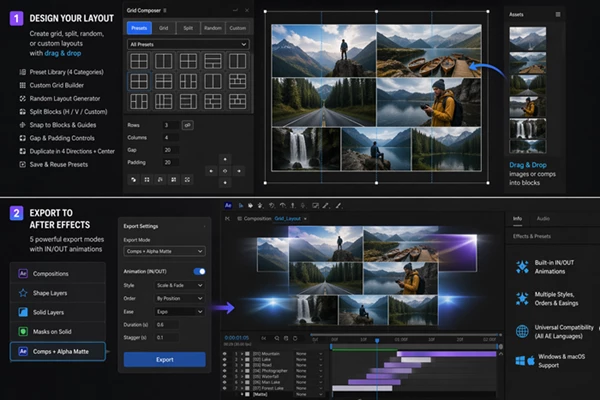
- Preset library organized into 4 categories for quick starts
- Custom grid builder with adjustable rows, columns, and cell sizes
- Random layout generator for creative and unexpected designs
- Flexible split options (horizontal, vertical, or custom sub-grids)
- Smart drag-and-drop system with snapping and alignment guides
- Gap and padding controls for precise spacing
- Block duplication tools in multiple directions
- Custom preset saving for reusability
5 export modes:
- Compositions
- Shape Layers
- Solid Layers
- Masks on Solid
- Comps with Alpha Matte
- Built-in IN/OUT animations with customizable styles and easing
- Works on all After Effects languages
- Compatible with Windows & macOS
🎬 Practical Impact
For example, instead of manually building a 12-image grid for a social post, you can generate it instantly, tweak spacing visually, and export it as animated compositions — all within minutes. This dramatically speeds up production while maintaining professional quality.
💡 Pro Tips for Better Results
- Start with a preset, then customize it to save time
- Use the random layout generator to spark new creative ideas
- Adjust padding and gaps carefully — small changes make layouts look more polished
- Combine split blocks with animation presets for dynamic motion graphics
- Save your best layouts as custom presets for future projects
These small techniques can make your work look more refined and help you build consistent design styles.
✨ Final Thoughts
Grid Composer for After Effects removes the tedious process of manually creating layouts. It gives you better creative control over every aspect of your composition.
Use Grid Composer for any project, no matter how complex. Whether you’re making a professional motion graphics showreel or a simple social media ad, this tool will make layout creation for After Effects faster and with less effort. Give it a try and find out how it can save you time on every project.
 Grid Composer (v1.8.15).rar (Size: 1.4 MB - Date: 10/5/2026 2:02:33 PM)
- Grid Composer - Visual grid layout designer for Ae by Aescripts (v1.4.05).rar (Size: 1.2 MB - Date: 8/29/2026 11:22:50 AM)
- Grid Composer - Visual grid layout designer for Ae by Aescripts (v1.4.04).rar (Size: 1.4 MB - Date: 8/17/2026 11:55:41 AM)
- Grid Composer - Visual grid layout designer for Ae by Aescripts (v1.2.2).rar (Size: 1.1 MB - Date: 5/13/2026 3:40:33 PM)
- Aescripts - Grid Composer v1.1.3.rar (Size: 26.5 MB - Date: 4/21/2026 11:38:12 AM)
Files Password : gfxplugin.com OR 123456