Downloadable Files
You can download BaseLUTs for Panasonic GH6 for free at the end of this page.
🎬 A Better Starting Point for Your Color Grading
If you work with Panasonic GH6 cameras a lot, you know V-Log can be very powerful but also tricky to work with. The monitor on the camera displays the footage in a flat format, but there is an incredible dynamic range to work with. Converting the footage from V-Log to a standard color space can be challenging and time-consuming.
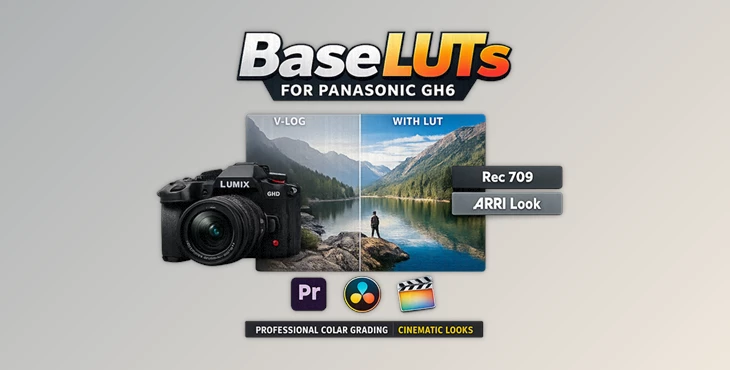
BaseLUTs for Panasonic GH6 come in handy when doing this color space conversion. Instantly, your Panasonic GH6 footage will look natural and ready for more color grading.
🎨 What Are BaseLUTs and Why Do They Matter?
A BaseLUT, or look-up table, is a color translation tool that takes your footage in log format, like V-Log, and converts it to standard formats like Rec709 or DaVinci Wide Gamut.
Why this matters:
- Accurate color foundation → Your footage starts from a correct baseline
- Consistent exposure mapping → Skin tones, highlights, and shadows fall into place
- Faster workflow → Less time fixing, more time creating
Real-world example:
Imagine shooting a sunset scene in V-Log. Without a proper LUT, highlights may feel dull or washed out. With a precise BaseLUT:
- Highlights retain detail (especially with DR Boost ON)
- Midtones (like skin at 42% IRE) look natural
- Blacks stay clean without crushing (12% IRE baseline)
This precision directly improves your final image quality.
🎥 Meet the Tool: BaseLUTs for Panasonic GH6
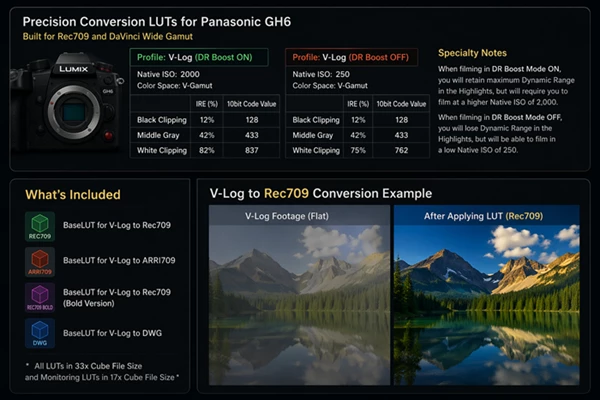
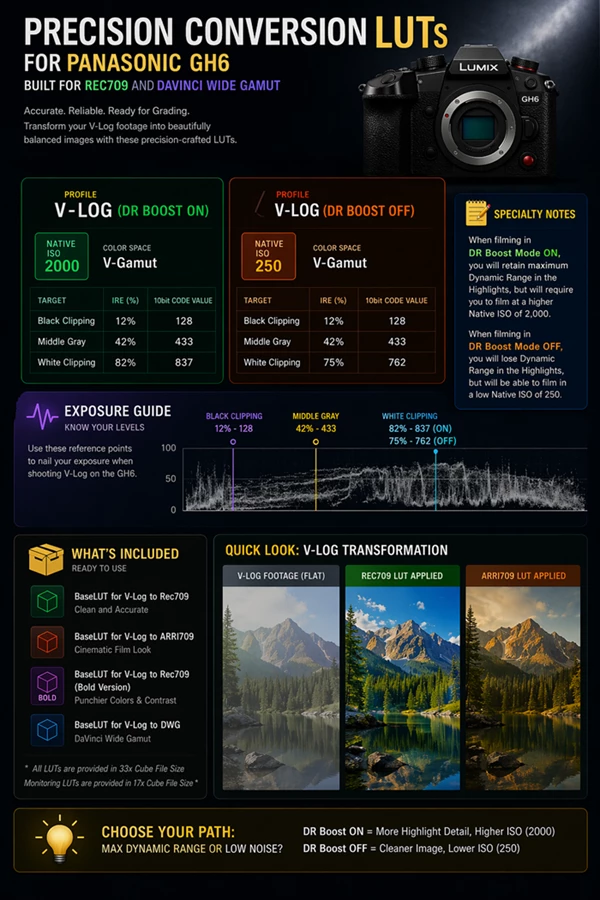
These BaseLUTs for Panasonic GH6 were specifically made for the Panasonic GH6. They are made with V-Log settings and V-Gamut color settings. They are calibrated to the exact values set by the GH6 cameras, such as the IRE levels and 10-bit code values for your colors. These LUTs will simplify your color grading experience, whether you choose to work in Rec709 or DaVinci Wide Gamut.
⚙️ Features
📊 Precision Calibration
- Built using GH6 V-Log specifications
Accurate mapping:
- Black: 12% (Code Value 128)
- Middle Gray: 42% (Code Value 433)
White Clipping:
- 82% (DR Boost ON)
- 75% (DR Boost OFF)
🌈 Multiple Output Looks
- V-Log to Rec709 (Standard)
- V-Log to Rec709 (Bold version for punchier contrast)
- V-Log to ARRI709 (cinematic tone)
- V-Log to DaVinci Wide Gamut (for advanced workflows)
🎛️ Optimized for DR Boost Modes
- DR Boost ON (ISO 2000) → Maximum highlight retention
- DR Boost OFF (ISO 250) → Cleaner low-light performance
📦 Professional File Formats
- 33x Cube LUTs → For grading
- 17x Cube LUTs → For monitoring on set
🎬 Real-World Impact
- Wedding filmmakers → Faster turnaround with consistent skin tones
- YouTubers → Clean Rec709 look straight out of the gate
- Commercial shooters → Reliable base for high-end grading workflows
These LUTs remove guesswork and give you confidence in every shot.
💡 Pro Tips for Best Results
🎯 Expose for Middle Gray (42%)
Expose your footage for 42% IRE for even skin tones and a balanced look. Avoid overexposing your highlights, as they will clip in the monitors.
🔆 Use DR Boost ON and OFF
Set your camera to DR Boost ON for bright scenes. Set your camera to DR Boost OFF for low-light scenes to avoid noise and color errors.
🎨 Use the BaseLUTs for Panasonic GH6 as a Base Only
Use the BaseLUTs for Panasonic GH6 as a starting point for your color grading. Then, adjust contrast, saturation, skin tones, and other aspects of your color grading to achieve your desired outcome.
🖥️ Use the LUTs for Different Purposes
Use the Rec709 LUTs for quick projects. Use DaVinci Wide Gamut LUTs for more complex color grading work.
🚀 Final Thoughts
These BaseLUTs for Panasonic GH6 are not just a color grading tool but an enhancement to the editing process. They make it easier and quicker to get better-looking footage without struggling with the challenges of V-Log. Whether you are a beginner or a professional in the editing world, these BaseLUTs will give you a solid starting point.

Files Password : gfxplugin.com OR 123456