Downloadable Files
You can download CineDream for free at the end of this page.
🎬 A Fresh Start for Cinematic Color
If you’ve ever spent hours tweaking colors and still felt like your footage looks “off,” you’re definitely not alone. Getting that clean, cinematic look isn’t just about adding a LUT or pushing sliders — it’s about having the right foundation.
That’s exactly where CineDream comes in. It doesn’t just edit your colors — it guides you toward a professional, film-like result in a way that feels natural and surprisingly simple.
🎨 What Is CineDream & Why It Matters
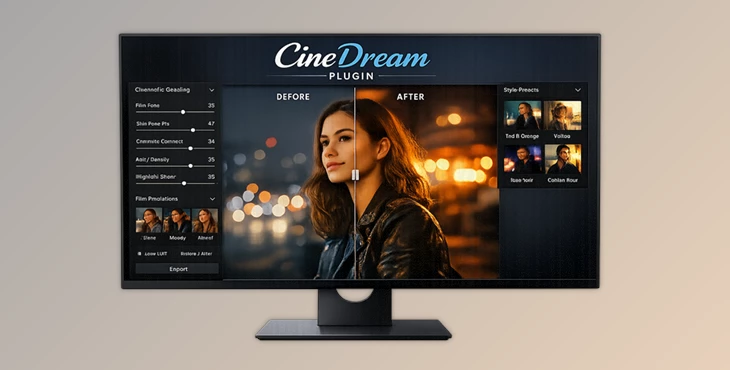
CineDream Plugin is a color grading plugin for Adobe Premiere, DaVinci Resolve. It works by automatically creating a cinematic color base for your footage using professional color science.
💡 Why creators struggle (and how this helps):
- Skin tones look unnatural → CineDream balances them automatically for a natural, film-like feel
- Too much tweaking → It simplifies grading with visual, intuitive controls
- Inconsistent shots → It ensures consistency across your entire project
🎥 Real-world example:
Imagine filming a vlog with mixed lighting. Normally, each clip would need separate correction. With CineDream Plugin, your footage starts with a unified cinematic base — making matching shots faster and far less frustrating.
🚀 Meet CineDream Plugin
This tool will drastically transform the way that you edit your footage. CineDream was designed to give editors a solid, cinematic starting point for their footage. From there, it will guide editors to their cinematic colors without the use of complex editing tools.
✨ Features
🎞 Hollywood-Level Color Foundation
- Built on ACES 2.0 color science used in film industry workflows
- Instantly prepares your footage for cinematic grading
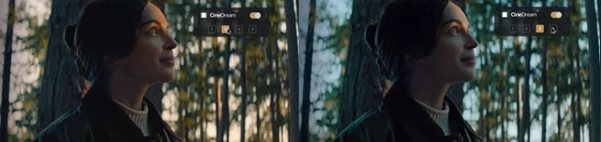
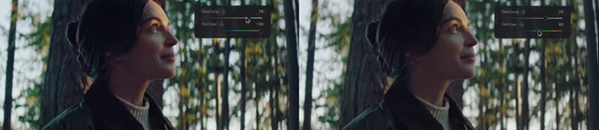
🖱 Click-and-Grade™ Controls
- Adjust colors directly on the image
- No technical guesswork — just intuitive visual interaction
🎨 Film-Inspired Looks
- Choose from multiple cinematic film emulations
- Works across different cameras and footage types
🌟 Film Texture Effects
- Add bloom, halation, and grain
- Creates depth, softness, and organic character
🔄 Consistency Across Clips
- Maintains uniform color across your entire timeline
- Eliminates time-consuming shot matching
🎬 Real Impact in Projects
- YouTube creators: Faster turnaround with consistent visuals
- Filmmakers: Achieve a film look without complex grading pipelines
- Editors: Save hours previously spent matching clips manually

🧠 Pro Tips for Better Results
- Start with the automatic cinematic color grading.
- Keep all color adjustments subtle - less is more in cinematic editing.
- Film grain and halation should be used sparingly.
- Always start with exposure adjusted to ensure color consistency.
- Do not overthink the color controls - just click to adjust.
🎯 Final Thoughts
CineDream Plugin is more than just a color grading tool. It was created to take the guesswork and complex editing tools out of the editing process to allow editors of all experience levels to produce cinematic, professional-quality videos without frustration.
As someone who struggles with color grading and LUTs, CineDream could very well be the editing tool that your project has been missing all along.
 CineDream (v1.1.14 Win).rar (Size: 188.6 MB - Date: 9/21/2026 12:53:38 PM)
- CineDream color grading Plugin for Pr, DVR (v1.1.12 Win).rar (Size: 221.7 MB - Date: 8/29/2026 11:22:35 AM)
- CineDream - color grading Plugin for Pr, DVR (v1.1.11 Win).rar (Size: 226.9 MB - Date: 8/5/2026 12:03:08 PM)
- CineDream color grading Plugin for Pr, DVR (v1.1.8×229 Win).rar (Size: 276.9 MB - Date: 5/11/2026 12:03:40 PM)
- CineDream Plugin for Premiere, DaVinci Resolve v1.1.3×178 (Win).rar (Size: 265.8 MB - Date: 4/7/2026 1:22:26 PM)
Files Password : gfxplugin.com OR 123456

.png)