Downloadable Files
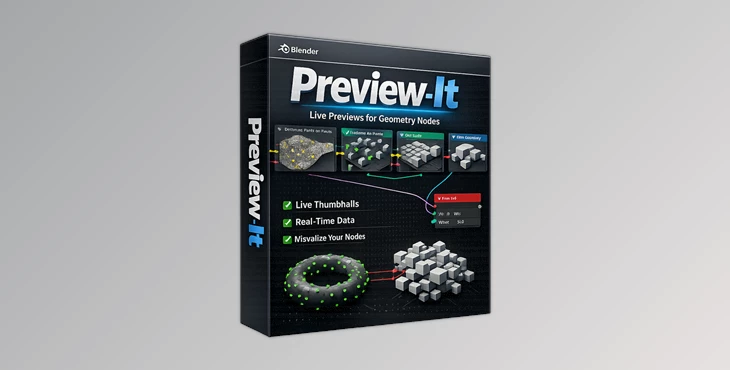
You can download Preview It for free from the end of this page.
✨ A Fresh Way to See Your Nodes
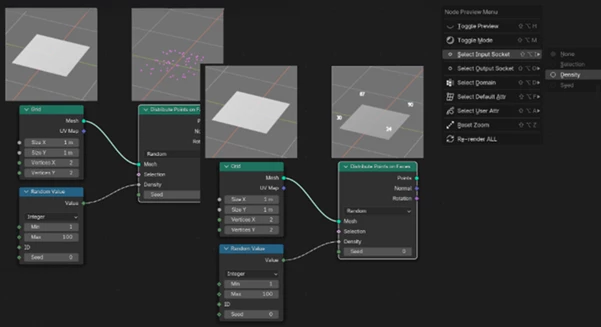
If you've ever worked with Geometry Nodes, you know how confusing things can quickly become. Enter: Preview It —a tool that allows you to see everything instantly. No more fiddling with adding nodes and changing views to see what is happening within your Node Editor.
🔍 What Is It & Why It Matters
Preview It is a real-time preview system for Geometry Nodes to show you what each node is doing within your nodes.
Why this is powerful:
- You can adjust a value and instantly see the results on each node.
- No more connecting the Viewer node over and over again.
- No more jumping between the viewport and the spreadsheet.
The result is a significant improvement in:
- Faster debugging – see the errors right away.
- Better understanding – learn how each node works faster.
- Cleaner workflows – no more fiddling with temporary nodes and setups to get the job done.
You can finally spend less time troubleshooting and more time creating.
🚀 Meet the Tool: Preview It
Preview It is designed specifically for artists working with complex Geometry Nodes setups. It transforms your node editor into a fully interactive visual workspace.
🧩 Features
Here’s what makes this tool stand out:
🔹 Live Node Previews
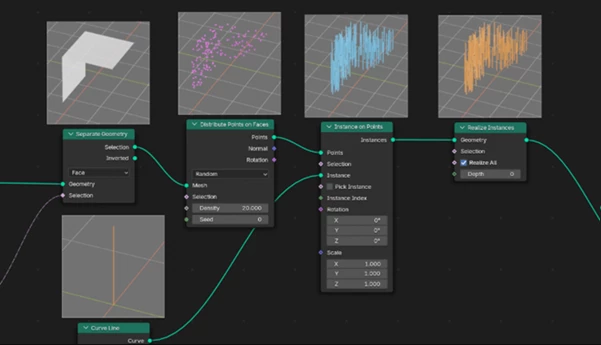
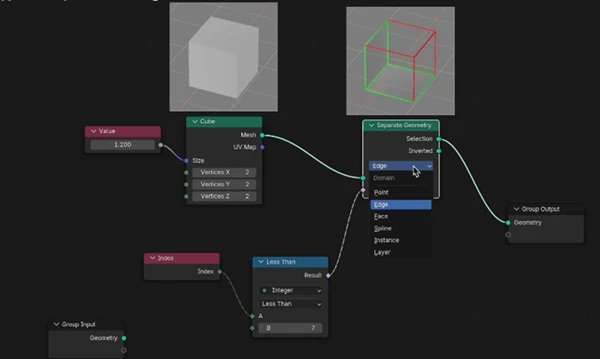
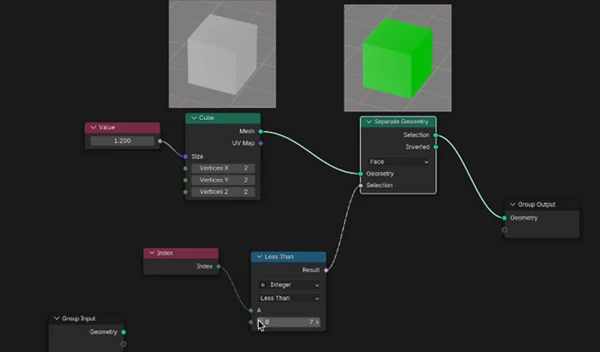
Every node shows a real-time thumbnail of its output — geometry, fields, and attributes included.
🔹 No Extra Setup
No Viewer nodes, no rerouting, no tricks. Everything works automatically.
🔹 Smart Data Visualization
- Color-coded geometry types (points, faces, curves, instances)
- Clear display of selections and masks
- Live visualization of values and vectors
🔹 Attribute Insight
See built-in attributes like index, ID, and position — plus named and captured attributes — directly in the preview.
🔹 Works with Complex Setups
Handles:
- Nested node groups
- Zones
- Named & captured attributes
- Large node trees
🔹 Independent Camera Controls
Each preview has its own:
- Orbit
- Pan
- Zoom
So you can inspect details without leaving the node editor.
🔹 Performance Optimized
- Runs in a separate background process
- Keeps Blender smooth and responsive
- Smart caching system prevents slowdowns
🔹 Adjustable Quality
Switch between:
- Fast low-res previews
- High-res detailed previews
Perfect for balancing speed and clarity.
🎯 Real-World Example
Let’s say you’re building a procedural city:
- You can instantly see how each node affects building placement.
- Selection masks become visually clear.
- Attribute changes (like height or density) update live.
Instead of guessing, you understand your system at every step.
💡 Pro Tips for Better Results
Want to get the most out of Preview It? Try these:
- Use low-res mode while building → switch to high-res only when needed.
- Zoom into problem areas → isolate issues faster.
- Watch attribute flow → helps you debug complex setups.
- Pause previews in heavy scenes → regain performance instantly.
- Leverage color coding → quickly identify geometry types.
These small habits can massively improve your workflow.
🔥 Final Thoughts
Preview It isn’t just a convenience — it’s a workflow upgrade.
It removes guesswork, speeds up debugging, and makes Geometry Nodes feel intuitive instead of overwhelming. If you’ve ever felt lost in a node graph, this tool will completely change how you work. Give it a try and see your nodes like never before.

Files Password : gfxplugin.com OR 123456