Downloadable Files
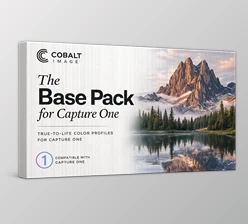
You can download The Base Pack for Adobe for free at the end of this very page.
Included Cameras
- Canon EOS R
- Sony ILCE-7CM2
- Sony ILCE-7M4
A New Starting Point for Your Colors
Have you ever felt that your photos look slightly different from what you actually saw? Maybe the skin tones feel off, sunsets look too artificial, or product colors don’t match reality. That’s where The Base Pack for Adobe changes everything. This powerful set of calibrated camera profiles is designed to give you accurate, controlled, and beautifully balanced colors right from the start. Instead of fighting with sliders for hours, you begin your editing journey with a precise color foundation — and that alone can completely transform your workflow. Curious what it can really do? Let’s dive in.
What Is The Base Pack for Adobe and Why Does It Matter?
At its core, The Base Pack for Adobe is a collection of professionally calibrated color profiles built for Adobe Camera RAW, Lightroom, and Lightroom CC. These profiles redefine how your camera interprets color inside Adobe software. Instead of relying on standard profiles, which often compromise color accuracy, this pack ensures:
- More realistic skin tones
- Accurate color reproduction
- Better dynamic range handling
- Greater editing flexibility
Real-World Examples
- Shooting portraits in natural light? Skin tones appear lifelike without heavy correction.
- Capturing a golden-hour landscape? Reds and yellows glow naturally without oversaturation.
- Photographing products in a studio? Colors remain faithful to reality — essential for e-commerce.
- Scanning film negatives? Linear data preserves every detail for precise post-production work.
These improvements directly enhance your results because you start with clean, calibrated color data. Less correction. More control. Better final images.
Meet the Professional Tool Behind It All
The Base Pack for Adobe is more than just a profile set — it’s the foundation of a modular editing system. Once installed, it activates compatibility with all supported cameras and seamlessly integrates with additional emulation packs. Whether you’re editing on a desktop or syncing through Adobe Creative Cloud to your mobile device, your profiles stay consistent and ready.
Features
1. Cobalt Standard – Natural & Emotionally Rich
- Optimized for natural light portraiture
- Superior skin tone chromatic accuracy
- Enhanced yellows and reds for sunset photography
- Maximized dynamic range balance
Perfect for photographers who want realism with emotional depth. Portraits look alive — not processed.
2. Cobalt Neutral – True-to-Life Precision
- Faithful, authentic color reproduction
- No artificial saturation or embellishment
- Ideal for nature photography
- Balanced tonal response in natural lighting
If your goal is color accuracy above all else, this is your go-to profile.
3. Cobalt Flat – Studio & Product Perfection
- Unmatched color accuracy for products
- Flat tone curve for smooth color transitions
- Reduced banding in gradients
- Natural contrast that minimizes editing time
Especially powerful for product photography where consumer trust depends on accurate colors.
4. Cobalt Repro – Maximum Editing Latitude
- Linear response for full dynamic range capture
- Ideal for high-contrast environments
- Essential for film digitization and archival work
- Extreme recovery and correction flexibility
This profile gives you the closest experience to working with untouched raw data — but optimized for Adobe’s ecosystem.
Technical Excellence That Sets It Apart
- 4-Star rating on FADGI Color SG target
SMI Score: 79 (ISO 17321 standard)
- Adobe D65 ISO 17321: 65
- Cobalt D65 ISO 17321: 79
- Tested with HR-1 Color Checker (1131 patches) using a Sony A7RII
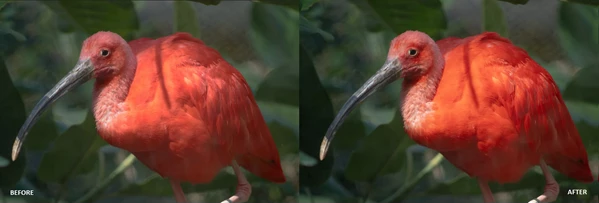
These numbers aren’t just technical bragging rights. They translate into measurable improvements in color fidelity and accuracy that you can see in every frame.

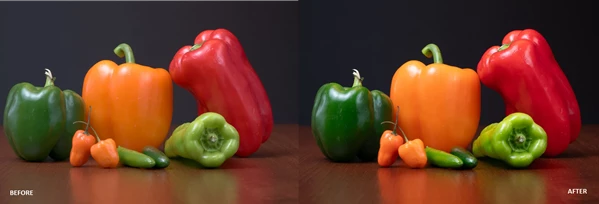
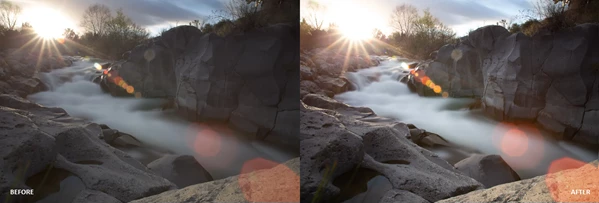
Pro Tips for Better Results
Start with the Right Profile
Choose your profile before touching any sliders. It defines your entire color workflow.
Use Cobalt Repro for Maximum Flexibility
If you’re planning heavy edits, start with Repro and build contrast manually.
Match Profile to Lighting
- Natural light → Cobalt Standard or Neutral
- Studio lighting → Cobalt Flat
- High contrast scenes → Cobalt Repro
Avoid Over-Editing
Since these profiles are already calibrated, you’ll need fewer drastic adjustments. Subtle tweaks often deliver the most professional results.
Why It Changes Your Editing Workflow
Instead of asking, “Which camera has better colors?”, you start asking, “Which color profile gives me better control?” That shift alone can revolutionize your photography. With The Base Pack for Adobe, you’re no longer correcting color problems — you’re building creative decisions on top of accurate data. It becomes faster. More consistent. More professional.
Final Thoughts
This pack isn’t about flashy filters or trendy looks. It’s about giving you a solid, calibrated starting point — one that you can expand upon to suit your own workflow and style. If you care about color — truly care about it — this is where your journey should begin.
 Cobalt Image Base Pack for Adobe - Sony A7 III Base Pack v2.1.rar (Size: 3.0 MB - Date: 8/5/2026 12:23:10 PM)
- Cobalt Image Base Pack for Adobe for Nikon D810.rar (Size: 2.9 MB - Date: 7/13/2026 1:03:13 PM)
- Cobalt Image Base Pack for Adobe and Sony A7 IV v3.0.rar (Size: 2.8 MB - Date: 6/11/2026 11:32:27 AM)
- Cobalt Image - Base Pack for Adobe for Sony A7C II.rar (Size: 2.8 MB - Date: 2/24/2026 2:05:33 PM)
- Cobalt Image - The Base Pack for Adobe v3 (for Canon EOS R).rar (Size: 2.8 MB - Date: 3/8/2025 1:54:43 PM)
Files Password : gfxplugin.com OR 123456