Downloadable Files
You can download Quick Font Pro for free at the bottom of this page.
Lost in the World of Fonts? Let’s Change That.
If you’ve ever worked on a 3D scene, animation, poster, or UI design, you know the feeling: you need the perfect font… and suddenly you’re drowning in hundreds—maybe thousands—of choices. Scrolling. Previewing. Switching windows. Installing. Testing. Repeating. What should be a quick creative decision turns into a time-consuming quest. That’s exactly where Quick Font Pro comes in. Instead of fighting through a chaotic maze of typography, you get a smart, powerful, and intuitive font management system directly inside Blender. It’s designed to keep your creativity flowing—without interruptions, without frustration.
What Is Quick Font Pro and Why Does It Matter?
Quick Font Pro is a professional font browser, manager, and downloader built directly into Blender, which lets you browse, search, preview, download, and use fonts on the fly – all without leaving your scene.
Practical Examples
Here’s what it means in practice for your creative projects:
- 3D Logo Design: Preview fonts in real time while working on logo designs until you find the perfect style.
- Animated Titles: Test out bold, stylish, or futuristic typography for animated titles with ease.
- Game User Interfaces: Access thousands of fonts to style your game’s UI however you like, whether retro or ultra-modern.
- Motion Graphics: Instantly compare the feel of different fonts in your design.
Why These Features Improve Your Results
- Faster decisions = stronger creativity. You stay in flow instead of breaking concentration.
- Real-time previews = better visual judgment. You see the font in context, not in a separate window.
- Massive font access = better design quality. More options mean more precise visual storytelling.
Instead of settling for “good enough,” you find the font that truly fits.
Meet the Hero: Quick Font Pro for Blender
Quick Font Pro will change the way you work with typography by offering many powerful features that will free you up to focus on your art and creativity. Quick Font Pro will integrate online fonts with your workflow, and here’s how it can help you:
- Web / Online Fonts (87,000+ Fonts)
With Quick Font Pro, you will have access to a massive online font library with 87,000+ fonts. As an artist, you will be able to download and apply these fonts without ever leaving your project.
2. Automatic Font Display Quick Font Pro automatically detects and displays all fonts installed on your computer.
- No manual importing.
- No complicated setup.
- Everything is visible at once.
It’s like opening a spellbook and seeing every typeface ready for use.
3. Custom Fonts Folder Setup Have a curated collection of premium or niche fonts? You can assign a custom fonts folder to keep everything organized exactly how you prefer. Perfect for studios and professionals who maintain structured font libraries.
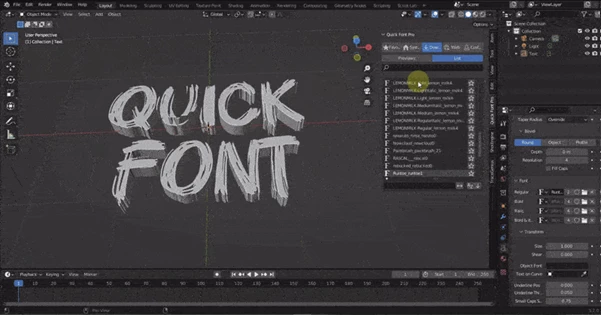
4. Interactive Search Bar Need something modern? Bold? Script-style? Just type a few letters. Quick Font Pro filters results in real-time, helping you find the right font in seconds instead of minutes.
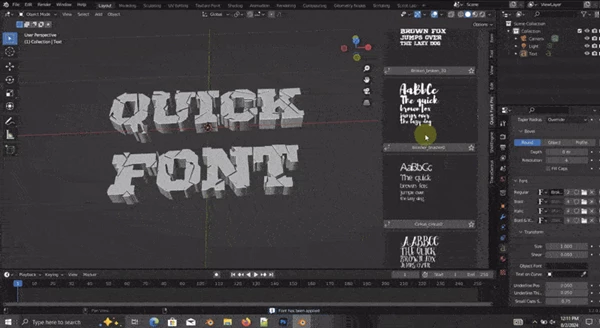
5. Real-Time Visualization in 3D View This is where the magic truly happens. Fonts are previewed directly inside the 3D view. You instantly see how your selected font looks on your text object—no guessing, no switching panels. For animators and 3D designers, this means:
- Better alignment with lighting and composition
- Faster iteration
- Stronger visual impact
6. Favorites System Found a font you love? Mark it as a favorite and access it instantly later. This is especially useful for:
- Brand consistency
- Recurring clients
- Personal signature styles
7. Flexible Viewing Options Choose between:
- List View
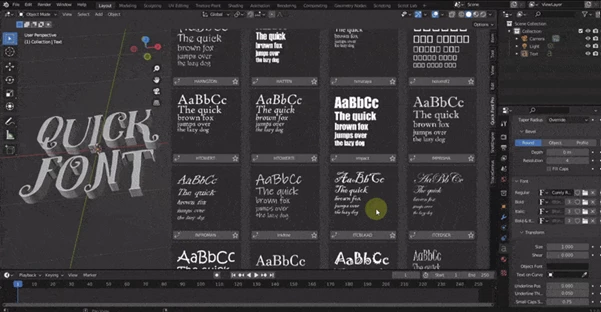
- Preview Mode with thumbnails
You can customize how fonts are displayed based on your workflow preference. Every artist works differently—Quick Font Pro adapts to you.
Pro Tips to Get the Most Out of Quick Font Pro
Want to work like a typography pro? Try these practical techniques:
1. Build a Favorites Strategy
Create categorized favorites:
- “Cinematic Titles”
- “UI Fonts”
- “Minimal Branding”
- “Playful & Cartoon”
This reduces decision fatigue in future projects.
2. Test Fonts in Context, Not Isolation
Always preview fonts with:
- Final lighting setup
- Intended camera angle
- Real materials applied
Typography behaves differently in 3D space. Real-time visualization helps you avoid unpleasant surprises later.
3. Combine Online Discovery with Custom Folders
Use the online library for exploration and your custom folder for curated, high-quality selections. This balances creativity and consistency.
4. Don’t Overcomplicate
Sometimes the most powerful design choice is clarity. Use the search bar wisely and focus on fonts that enhance readability and mood—not just complexity.
Final Thoughts: A Smarter Way to Handle Typography
With Quick Font Pro, you eliminate friction from one of the most important parts of visual design. You gain:
- Speed
- Organization
- Massive creative flexibility
- Seamless integration inside Blender
It doesn’t feel like a separate tool. It feels like a natural extension of your workflow. If you’re serious about 3D design, animation, motion graphics, or game development, exploring what Quick Font Pro can do might completely change how you approach typography.

Files Password : gfxplugin.com OR 123456