Downloadable Files
You can download PQ Type Boi for free at the end of this page.
Make Typography Move — Without the Usual After Effects Pain
Let’s be real: animated typography in After Effects can be slow, messy, and honestly kind of annoying. You either:
- Spend forever building type animations from scratch.
- Or download a template… and then waste time digging through layers like you’re exploring an ancient tomb 🗿
That’s exactly where PQ Type Boi comes in. It’s basically a ready-to-go library of pre-animated typography arrangements that lets you create stylish text motion in seconds — while keeping everything clean and customizable. And the best part?
You don’t need to “twirl open” a million layers just to change a color.
What Is PQ Type Boi — and What Can You Do With It?
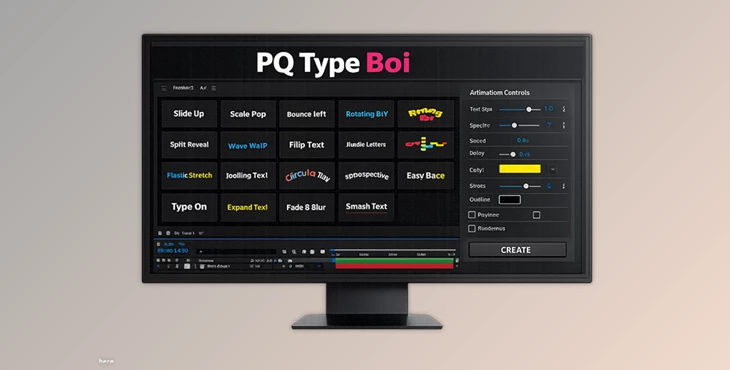
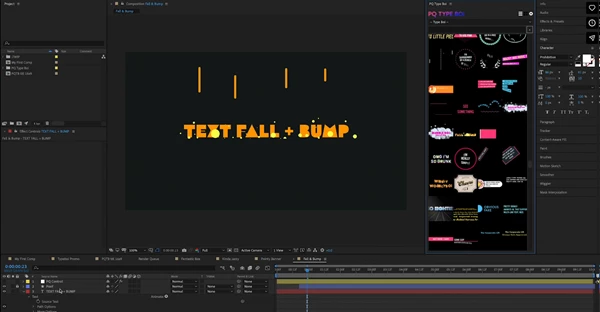
PQ Type Boi is a typography animation tool for After Effects that gives you over 120 pre-animated type setups and lets you generate them instantly inside AE. Instead of building motion typography manually, you simply:
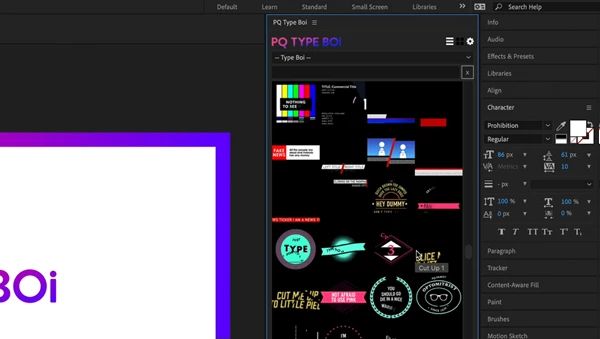
- Browse animated thumbnails in a UI panel.
- Click the one you like.
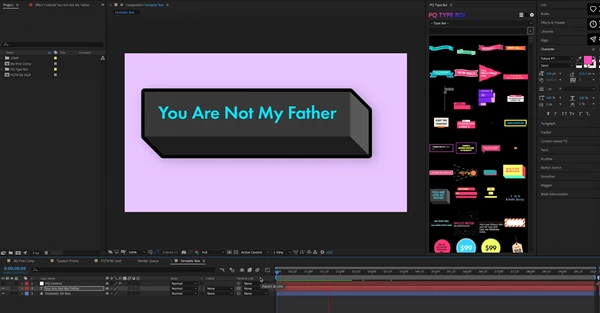
- Generate a ready comp with a control layer.
- Customize everything easily.
Real Use Cases (You Can Actually Picture)
PQ Type Boi is perfect for:
- YouTube titles and lower thirds
- Instagram Reels / TikTok motion captions
- Music videos with bold animated text
- Promo videos & product typography
- Logo intros with kinetic type
- Fast-paced social media edits
Why This Improves Your Work
This tool improves results because it removes the two biggest enemies of motion designers:
✅ Time waste
✅ Creative friction When you can test 10 typography styles in 2 minutes, you automatically make better decisions and end up with a stronger final video.
Meet the Tool: PQ Type Boi Inside After Effects
PQ Type Boi is built for one goal:
Work smarter, not harder.
And yes… that’s literally the vibe 😄 This is not just “another template pack.”
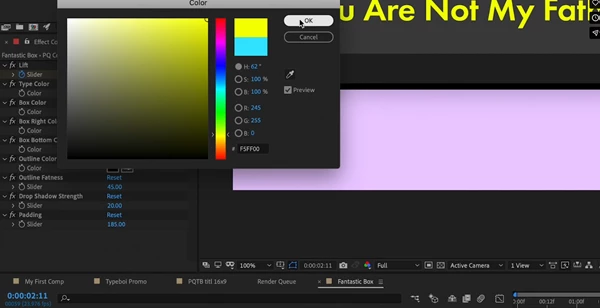
It’s a fast typography generation system that lives inside After Effects via a handy UI panel. You browse a huge library of animated thumbnails, click, and boom — you get a comp with a control layer where you can customize parameters like:
- color
- line width
- animation delay
- and more
Without digging through layers.
Features
✅ 120+ Pre-Animated Type Arrangements
PQ Type Boi comes with a big library of typography setups, ranging from:
- clean and modern
- bold and punchy
- fun and crazy
- experimental motion styles
Even if the library is huge, the real value is this:
Once you find your favorite go-to styles, you can reuse them constantly and speed up daily work.
✅ UI Panel With Animated Thumbnails
Instead of guessing what each preset does, you can actually browse animated previews right inside After Effects. That means:
- less trial and error
- faster selection
- smoother workflow
This is one of those “why doesn’t AE always work like this?” moments.
✅ One-Click Comp Generation
Click a thumbnail → it instantly generates a ready comp. No importing weird project structures.
No hunting for the right composition. You just pick and go.
✅ Control Layer Customization (No Layer Twirling)
This is where PQ Type Boi becomes addictive. You get a control layer where you can adjust key parameters like:
- Color
- Line width
- Animation delay
- Timing feel
- And other design controls
So instead of editing 20 different layers, you tweak a few controls, and you’re done.
✅ Works on AE CC2018+
If you’re on After Effects CC2018 or newer, you’re good to go.
Real Project Examples
PQ Type Boi fits naturally into:
- a fast client promo where you need 5 typography moments
- a YouTube video intro that needs punchy text hits
- a music video where type needs to feel alive
- social edits where captions must look professional without taking hours
Basically: anywhere text needs motion — fast.
Pro Tips to Make PQ Type Boi Look Even More Professional
PQ Type Boi is already designed to look good quickly, but a few small habits can make your results feel high-end.
🎯 Tip 1: Pick 2–3 Styles and Reuse Them
The library is huge, but don’t get lost. Choose a small set of favorites:
- one clean style
- one bold style
- one playful style
Reusing them across a project makes your work feel more consistent and intentional.
🎯 Tip 2: Use Animation Delay Like a Designer
Animation delay isn’t just timing — it’s rhythm. A small delay can make your typography feel:
- more musical
- more cinematic
- more “premium”
Try adjusting it slightly instead of sticking with default values.
🎯 Tip 3: Match Color With the Footage
Even a great type animation can look cheap if the color doesn’t fit. Use the control layer to:
- match accent colors from the scene
- follow brand colors
- stay within a simple palette
This alone makes your typography feel 10x more professional.
🎯 Tip 4: Don’t Overuse the Crazy Stuff
PQ Type Boi has some wild designs — which is fun. But if you use too many intense styles at once, the edit can feel chaotic. A good rule:
Use the crazy styles as highlights, not as the entire meal 😄
Final Thoughts — Why PQ Type Boi Is Worth Having
PQ Type Boi is one of those After Effects tools that makes you think: “Wait… why have I been doing this the hard way?” It gives you:
- speed
- variety
- clean customization
- and a workflow that actually feels modern
Even if you only end up using a handful of your favorite arrangements, it will still save you a ton of time and make everyday motion design smoother. If you’re working with typography regularly in After Effects, PQ Type Boi is the kind of tool that quickly becomes part of your normal workflow — without forcing you to change your style or process. And that’s what makes it genuinely useful.

Files Password : gfxplugin.com OR 123456
![Download Aidan Han starboy [electric guitar loop kit] WAV](https://dls3.gfxplugin.ir/Download_Files/18028/SearchSmall/banner.jpg)