Downloadable Files
You can download Pixel8r for free at the end of this page.
Turn Modern Textures into Retro Magic
Ever dreamt of converting a clean high-res texture into genuine pixel art with quality you can control? Well, now you can with Pixel8r! Unlike simple downscaling that leaves a lot to chance, Pixel8r offers precision tools for pixel-perfect results straight inside Substance. Whether you’re making game assets, UIs, or anything else that requires a stylized retro look, it’s never been so straightforward, controllable, and fun. Best of all, it works in the newest Substance builds as well as older pre-Adobe versions, so no worries there!
What Is Pixel8r and Why Does It Matter?
Pixel8r is a professional texture pixelizer for Substance that converts detailed textures into clean, stylized pixel art while giving you full control over dithering, color quantization, resampling, and pixel dimensions. In simple terms:
It helps you reduce resolution and colors intentionally—without destroying visual quality.
Practical Use Cases
Here’s where Pixel8r becomes powerful:
- 🎮 Creating retro-style game textures
- 🧱 Stylizing realistic materials into pixel-art environments
- 🖥 Designing low-resolution UI elements
- 🧩 Generating custom pixel-art assets directly inside Substance
- 🎨 Converting detailed materials into limited color palettes
Why These Features Improve Results
Most “pixel” effects simply downscale images. That causes blur, color banding, or uneven pixel shapes. Pixel8r improves results by:
- Preserving square pixel proportions automatically
- Offering controlled color reduction instead of destructive compression
- Providing advanced dithering to maintain visual depth
- Allowing custom palette generation based on the actual image
This means your final texture feels intentional, not broken.
Meet the Professional Tool
Pixel8r by Action Dawg is designed to make retro texture creation both powerful and intuitive. It simplifies complex pixel-art workflows and makes advanced color control accessible—even for non-experts. Below are its core capabilities:
Features
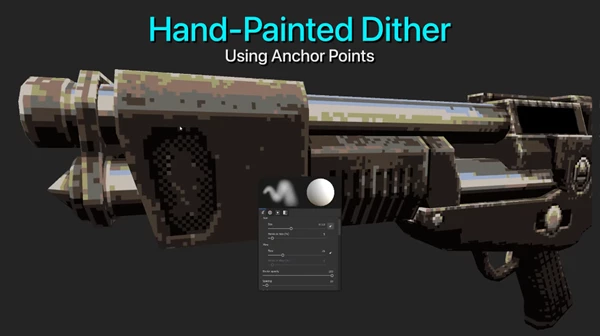
Robust Dither Blending Controls
Dithering helps simulate gradients and depth in limited color spaces.
Pixel8r gives you strong control over how dithering blends across your texture, allowing you to achieve:
- Subtle retro shading
- Classic 8-bit noise textures
- Stylized transitions without harsh banding
This gives your textures a more authentic retro feel.
Create Your Own Dither Styles
You can generate custom dither patterns using any resolution textures.
This means you’re not locked into preset styles—you can design your own signature retro look. For example:
- Use small grid patterns for Game Boy-style textures
- Use larger noise maps for experimental pixel aesthetics
3 Quantization Modes
Color control is one of Pixel8r’s strongest areas.
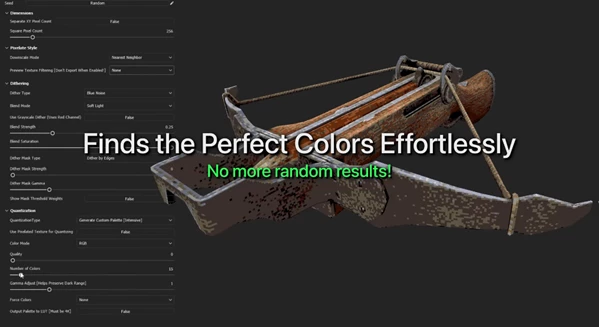
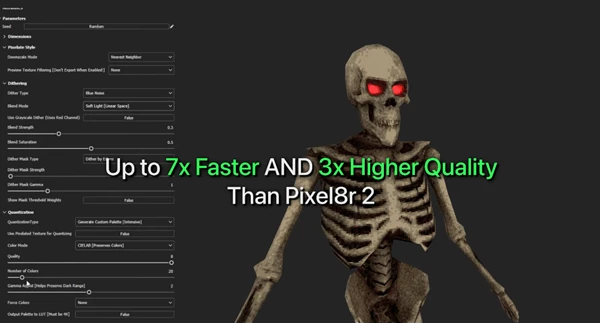
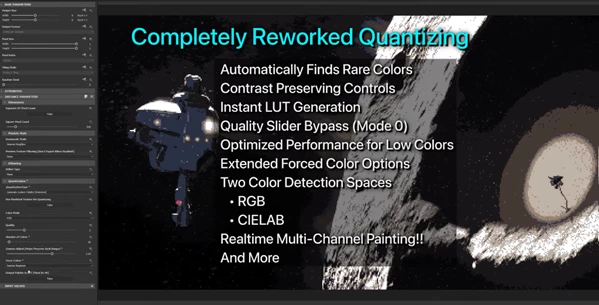
1) New! Generate Custom Color Palette Pixel8r analyzes your image and automatically generates the best possible palette based on its content.
- Supports up to 256 colors
- Infinite control options
- Smart color selection based on image data
This ensures your reduced palette still looks visually rich and intentional.
2) Per Channel Reduces bit depth per RGB channel. Perfect for:
- Creating classic console-style looks
- Simulating 16-bit or 8-bit color restrictions
- Stylized technical effects
3) Lookup Table (LUT) Use a custom color palette via LUT input.
- Includes 10 presets
- Allows complete artistic control
- Ideal for brand-based or theme-based palettes
This makes it easy to maintain visual consistency across an entire project.
Two Image Resample Modes
Pixel8r offers:
- Nearest Neighbor – Crisp, sharp pixel edges
- Nearest Softer – Slightly softened transitions
This allows you to decide how aggressive or smooth your pixelation feels.
Automatic Square Pixel Handling
If your image isn’t square, Pixel8r automatically keeps pixels square by default—so you don’t get stretched artifacts. This keeps your workflow simple and clean.
Unlock Pixel Dimensions
Want non-square pixels for a stylized CRT or retro console effect? You can unlock pixel dimensions and experiment freely.
Pro Tips for Better Results
🎯 Start with Dither Subtlety
Too much dithering can overwhelm a texture. Begin with low intensity and increase gradually.
- 🎨 Use Custom Palette Mode for Stylized Projects: The automatic palette generator is excellent for keeping important colors while removing noise. Use it when working with complex materials.
- 🧱 Test Pixel Size Early: Before finalizing your texture, experiment with different pixel resolutions to see what fits your project style.
- 🖥 Combine LUT + Per Channel: For advanced control, combine LUT presets with Per Channel reduction to create unique retro signatures.
- 📦 Keep Consistency Across Assets: If you’re working on a full game or asset pack, use the same palette mode and resample settings across textures to maintain visual harmony.
Final Thoughts: Why Pixel8r Is Worth Exploring
Pixel8r isn’t just a filter for pixelation. It’s a system of creative controls for retro aesthetics in Substance. It provides:
- Accurate color handling
- Flexible dithering processes
- Real pixel aspect ratios
- Intelligent palette generation
- Multi-version support
If you want to craft 8-bit retro vibes or even a contemporary scene with a stylistic twist, Pixel8r lets you do it in style, professionally, and with a clean approach. If you’re a fan of retro aesthetics and want to have complete control over your texture workflow, Pixel8r is something you’ll want to try out.

Files Password : gfxplugin.com OR 123456