Downloadable Files
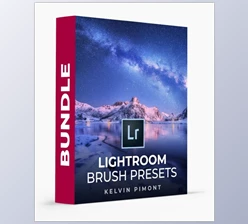
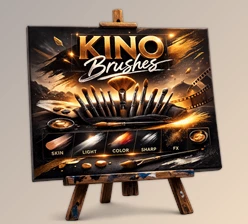
You can download the Brush System for free at the bottom of this page.
Edit Faster — Without Losing the Natural Look
Have you ever finished editing a photo and thought:
“Why did this take so long… and why does it still feel unfinished?”
That’s one of the most common problems photographers face — not because they don’t know Lightroom or Photoshop, but because professional-looking results usually take too many steps. That’s exactly what Brush System solves.
It gives you advanced brushes and gradients for Lightroom Classic and Photoshop (through Adobe Camera Raw), so you can create clean, polished edits in a fraction of the time — without making your photos look fake. And unlike most brush packs, this one also teaches you how and why to use each tool.
What Is the Brush System — and What Is It Used For?
Brush System is a professional collection of advanced brush presets and gradients designed for targeted editing. Instead of manually adjusting
exposure, contrast, texture, highlights, shadows, and masks every time… You simply select a brush preset, paint over the area you want to improve,
and instantly get a controlled, professional effect.
Real-world uses (easy to imagine)
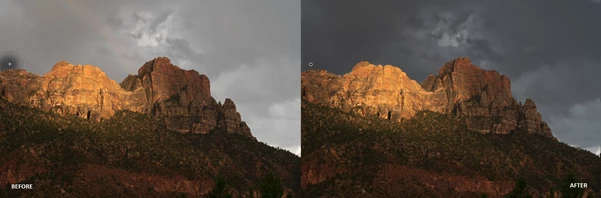
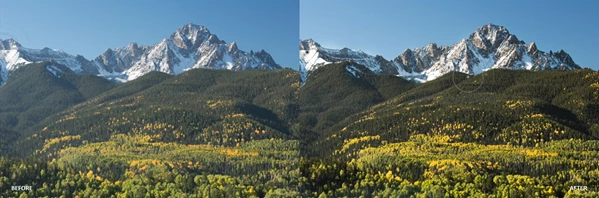
- Landscape photos: Make skies richer, add depth, enhance textures, and improve outdoor contrast.
- Portraits: Smooth skin, bright eyes, white teeth, and sharp details naturally.
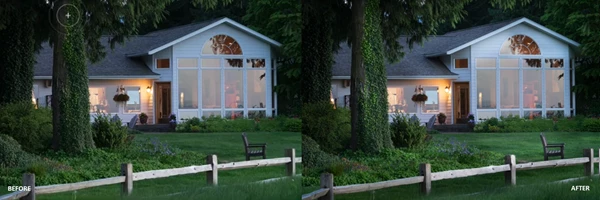
- Night photography: Enhance lights and glow without blowing out highlights.
- Everyday photography: Quick dodge & burn for better light shaping.
Why this improves your results
Because great edits are rarely “global.” The best photos are shaped with local adjustments:
- to guide the viewer’s eye
- to add depth and separation
- to improve light direction
- to enhance details without overprocessing
Brush System makes those adjustments faster and easier.
Introducing the Professional Tool: Brush System
Brush System is built for photographers who want speed, control, and high-end results. You get:
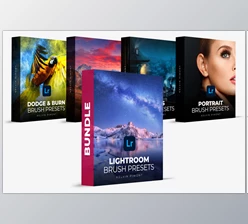
- 3 brush packs (over 50 brush presets)
- advanced gradients
- 90+ minutes of premium tutorials
- compatibility with Lightroom Classic and Photoshop via Adobe Camera Raw
Features
1) Landscape Pack (20+ Presets)
This pack includes over 20 brushes created specifically for:
- landscape photography
- wildlife
- outdoor images
These brushes help you enhance:
- skies and clouds
- natural textures (rocks, trees, grass, mountains)
- depth and contrast
- outdoor mood and atmosphere
Example:
You can add dramatic depth to a flat mountain photo by boosting texture and contrast only in the foreground — while keeping the sky soft and realistic.
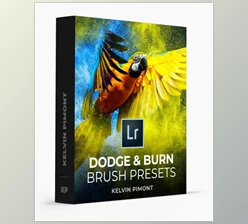
2) Dodge Burn and Lights Pack
This pack is designed for photographers who want more control over light. It includes brushes for:
- darkening areas (burn)
- brightening areas (dodge)
- turning on lights or enhancing existing lights
Example:
In a street photo at night, you can paint over lamps or shop lights to make them glow naturally — without increasing exposure everywhere.
3) Portrait Pack
This pack focuses on professional portrait retouching — without overdoing it. It includes brushes for:
- skin smoothing
- brightening eyes
- whitening teeth
- sharpening key details
Example:
You can soften skin texture gently while keeping pores natural, then brighten eyes in a way that still looks realistic.
4) Works in Adobe Camera Raw (Photoshop-Friendly)
Brush System is compatible with Adobe Camera Raw, meaning you can use it inside Photoshop, too.
Apply them as a Filter.
Using the Camera Raw Filter, you can apply these presets as a filter to any image opened in Photoshop.
Brushes, Gradients, and Layers
You can apply brushes and gradients to a layer through Camera Raw Filter and control:
- opacity
- blending
- layering
Example:
You can apply a dodge effect on a duplicate layer, then reduce opacity to keep everything subtle and professional.
5) Premium Education
Brush System includes over 90 minutes of training from one of the world’s top Lightroom instructors. The tutorials cover:
- installation for Lightroom Classic
- installation for Camera Raw
- Lightroom vs Photoshop Camera Raw differences
- brush basics
- gradient basics
- basic brush settings
- advanced brush settings
- advanced erase options
- auto masking and range masking
- 10 essential brush tips
- How to make your own presets
- renaming presets to organize them
- overview and customization of all brush packs
This turns the product into a complete learning system — not just a pack of presets.
Pro Tips and Techniques for Better Results
Here are a few simple techniques that will instantly improve your results with the Brush System:
Keep your brush work subtle
The most professional edits are the ones people don’t notice. Use light strokes and build effects gradually instead of making heavy adjustments.
Layer multiple brushes instead of overusing one
For example, in landscapes:
- Use one brush for sky depth.
- One brush for foreground texture.
- One brush for lighting.
Small changes stacked together look more natural than one strong effect.
Use gradients to shape mood
Gradients are perfect for:
- darkening edges
- guiding attention toward the subject
- creating cinematic light direction
- controlling highlights and shadows
Use masking tools for cleaner edges
Brush System works beautifully with:
- Auto Masking
- Range Masking
This makes your edits cleaner around hair, trees, buildings, and complex edges.
Photoshop workflow tip: use layers with Camera Raw Filter
A strong workflow is:
- Duplicate your layer.
- Apply Camera Raw Filter.
- Use Brush System presets.
- Adjust opacity and blending.
This gives you total control while keeping edits non-destructive.
Final Thoughts: A Real Upgrade for Lightroom and Photoshop Users
If you want faster edits, cleaner portraits, more cinematic landscapes, and better light control, the Brush System is a powerful tool to have. It improves your workflow, helps you edit with more confidence, and gives you professional results without complicated steps. And because it includes real training, it doesn’t just give you brushes — it teaches you mastery. If you enjoy editing and want your results to look more refined and intentional, the Brush System is absolutely worth exploring.

Files Password : gfxplugin.com OR 123456