Downloadable Files
You can download Creative LUTs for Apple Log for free at the bottom of this page.
Turn Flat Apple Log Footage Into a Cinematic Look
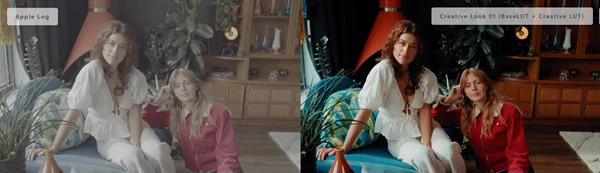
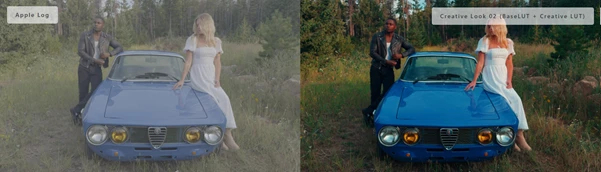
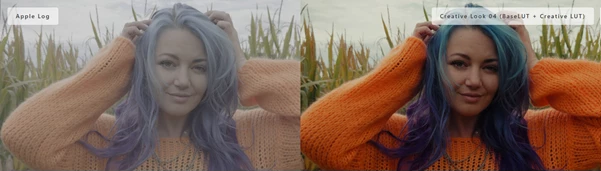
If you’ve ever filmed in Apple Log and thought, “Why does everything look so flat and lifeless?” — you’re not alone. Apple Log is designed to capture more dynamic range and preserve detail, which is great for professional grading. But the downside is that your footage often looks washed out until you apply the right color transformation. That’s where Creative LUTs for Apple Log comes in. Creative LUTs for Apple Log gives your Apple Log footage a bold, expressive look instantly—without complicated steps, technical confusion, or stacking multiple LUTs.
What Are Creative LUTs and Why Are They Useful?
A LUT (Look-Up Table) is a color preset that changes the tones, contrast, and colors of your footage in a specific style.
Simple definition
Creative LUTs are designed to give your footage a mood and visual identity—like cinematic contrast, richer colors, or a film-inspired tone.
Real-world uses (easy to imagine)
- YouTube videos and vlogs: faster professional color without heavy grading
- Short films: a consistent cinematic look across scenes
- Commercials: punchy contrast and clean modern tones
- Travel footage: richer skies, deeper shadows, more emotion
- On-set monitoring: preview a final look while filming
Why does this improve your final results?
When you use LUTs made specifically for Apple Log, your footage becomes:
- more consistent across different shots
- easier to color match
- cleaner in skin tones
- more cinematic with less effort
Instead of fighting with flat footage, you start from a strong base and build your style faster.
Professional Product Introduction: Creative LUTs for Apple Log
Creative LUTs for Apple Log is a professional LUT pack built specifically for:
- Apple Log
- Apple Log 2
The biggest advantage is that each LUT is designed as a complete solution. Instead of applying a technical Base LUT first and then stacking a creative LUT on top, Creative LUTs for Apple Log combine both into one file.
What’s Included
- 5 unique Creative LUTs
Each LUT comes in two versions:
- Apple Log
- Apple Log 2
- Total: 10 LUTs
Features
- No stacking required
- BaseLUT + Creative look is embedded inside each LUT.
- Designed specifically for Apple Log and Apple Log 2
- Better color accuracy and smoother contrast.
Compatible with major software
- Premiere Pro
- Final Cut Pro
- DaVinci Resolve
- and more
Works for editing and on-set monitoring
- Use it while editing or load it on a monitor during production.
Real examples of what you can achieve
Depending on which LUT you choose, you can get:
- Warm cinematic highlights for storytelling scenes
- deeper shadows for dramatic visuals
- clean modern tones for commercial work
- vibrant but controlled colors for social media content
The goal is simple: your footage stops looking like a flat log and starts looking like a finished film.
Pro Tips for Better Results (Techniques & Practical Notes)
Even though these LUTs are designed for speed, a few simple tips will help you get the best possible look.
Expose Apple Log correctly
- Apple Log works best when your footage is properly exposed.
- If it’s too dark, LUTs may increase noise and make the image look harsh.
Adjust LUT strength for natural results
- Most editing programs allow you to reduce LUT intensity.
For a more natural look, try:
- 60% to 85%
Make small corrections after applying the LUT
After applying the LUT, fine-tune:
- exposure
- white balance
- contrast
- saturation
This makes the look feel more realistic and professional.
Keep your project consistent
- Choose one LUT as your main “project look.”
- Apply it across all clips and then adjust per scene.
- This creates a clean, cohesive style that feels higher-end.
Use LUTs for on-set monitoring
- If you’re filming with a client or team, Apple Log footage looks very flat on a monitor.
- Using the LUT during monitoring helps everyone see the final vibe immediately.
Final Summary: A Bold Toolkit for Apple Log Creators
If you shoot in Apple Log, you’re already aiming for a high-quality image—but you shouldn’t have to spend hours just to make it look good. Creative LUTs for Apple Log gives you:
- 5 unique creative looks
- versions for both Apple Log and Apple Log 2
- BaseLUT + Creative look inside one file
- compatibility with all major editing tools
It’s a fast, expressive, and professional way to bring Apple Log footage to life—while keeping your workflow simple. If you want your footage to look cinematic in minutes instead of hours, this toolkit is worth trying.

Files Password : gfxplugin.com OR 123456