Downloadable Files
You can download Key Selected Objects for free from the end of this page.
🎬 Animate Smarter, Not Harder in Blender
If you’ve ever tried animating multiple objects in Blender, you know it can be a headache. Countless keyboard shortcuts, confusing Keying Sets, and the dreaded “did I keyframe everything important?” moment.
Key Selected Objects was designed to solve all that—and it does it in a way that feels natural, visual, and honestly, how Blender animation should work.
This handy add-on makes a horrible workflow into a pleasant, intuitive experience that will have you wanting to animate more, not less.
🔍 What Is Key Selected Objects & Why It Matters
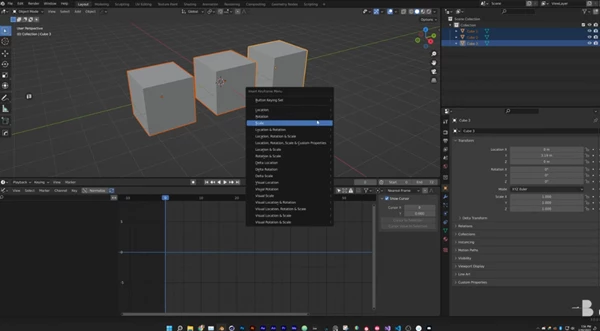
Key Selected Objects is a Blender add-on that allows you to keyframe properties for all selected objects at once—directly from the right-click menu.
Why this is a big deal:
Normally, Blender expects you to:
Use predefined Keying Sets
Manually keyframe each object
Or rely on shortcuts that aren’t always clear
With this add-on, you simply:
Select multiple objects (or bones, or materials)
Right-click on a property (Location, Rotation, Scale, etc.)
Choose “Keyframe All Selected Objects”
That’s it. Clean, fast, and very visual.
Real-world examples:
Animating a group of props moving together
Synchronizing rotations for mechanical parts
Keyframing scale or visibility for multiple assets in motion graphics
These features improve your workflow by reducing errors, saving time, and keeping animations consistent across complex scenes.
🚀 Meet the Tool: Key Selected Objects
Key Selected Objects is a professional yet beginner-friendly Blender add-on designed to make multi-object animation obvious and stress-free.
It removes guesswork and replaces it with clarity.
✨ Features
✔ One-Click Multi-Object Keyframing
Keyframe any property for all selected objects with a single right-click.
✔ Full Support for Multi-Dimensional Properties
Easily keyframe entire property groups like:
Location
Rotation
Scale
No need to expand channels or guess which axes are keyed.
✔ Delete Keyframes Just as Easily
Remove keyframes from all selected objects without hunting through timelines or editors.
✔ Works with Materials
If multiple materials use the same Surface Shader (like Principled BSDF), you can keyframe them together—perfect for animated color changes or shader effects.
Perfect for riggers, character animators, and motion designers.
🧠 Pro Tips & Practical Techniques
Group your selections smartly
Select only objects that truly need synchronized animation to keep curves clean.Use it with the Graph Editor
After fast keyframing, refine motion curves for smoother, more natural animation.Great for blocking animations
Quickly set main poses across many objects, then polish later.Combine with Auto Key (when needed)
For even faster workflows, especially in motion-heavy scenes.
All of these tips are easy to apply—even if you’re not an advanced Blender user.
🎯 Final Thoughts
Overall, the Key Selected Objects feature can be used to simplify the process of keyframing multiple objects and properties within Blender, making one of its most confusing workflow processes much easier. With this add-on, animators can focus on their creative goals instead of having to worry about the technical and tedious steps to keyframe objects, bones, materials, and even custom properties within Blender. While there are many benefits to this add-on that can improve almost all animation projects, the biggest benefit is the creation of consistent, quality keyframes. Such enhancements can significantly improve the quality of your animations.

Files Password : gfxplugin.com OR 123456
![Blender - Download Lazy Shapekeys [Shape Keys Folder & Utility] v1.9.0](https://dls4.gfxplugin.ir/Download_Files/27522/SearchSmall/banner02.png)