Downloadable Files
You can download AnimCopy for free at the bottom of this page.
A Smarter Way to Copy Animation in Blender
If you’ve ever animated in Blender, you know how easy it is to copy modifiers, constraints, or materials from one object to another—but animation has always been a different story. Copying keyframes curve by curve is slow, repetitive, and breaks creative flow.
That’s exactly where AnimCopy steps in. This powerful add-on removes friction from animation work and replaces tedious manual steps with fast, precise tools that feel native to Blender.
AnimCopy is designed to make you curious the first time you use it—and dependent on it after.
What Is AnimCopy and Why Does It Matter?
AnimCopy is an advanced tool that lets you copy animation from one object to one or more targets, all done selectively and accurately!
Stop manually recreating motion, timing, and easing.
Copy:
Keyframe values and timings
Interpolation and easing (even handle shapes!)
F-Curve Modifiers (Noise, Cycles, Envelopes)
Animation data for objects, bones, shape keys, and properties
Why does this improve your results
When you use battle-tested animation data to build your animations, Copying and pasting between rigs, scenes, and assets becomes error-free. Your animations maintain consistency, timing retains its purpose, and ‘robotic’ artifacts are avoided.
Imagine the possibilities! Copy the “feel” of the perfect walk cycle for multiple characters. Retarget mechanical motions across an impressive array of parts in seconds instead of minutes.
Meet AnimCopy: A Professional Animation Tool for Blender
AnimCopy revolutionizes how animators work inside Blender’s Graph Editor. Once installed, simply right-click in the Graph Editor to access its intuitive menu and powerful operators.
Features
Selective Copying
Copy all F-Curves, only transform curves, selected curves, or even just selected keyframes—nothing more, nothing less.Copy Animation to Selected Objects
Transfer full animations from an active object to multiple selected targets with options to replace or add keys, apply frame offsets, and remap axes (X, Y, Z).Shared Actions (Blender 4.4+)
Share a single Action across multiple objects using Action Slots—clean, efficient, and no duplicated data-blocks.Timing & Ease Transfer
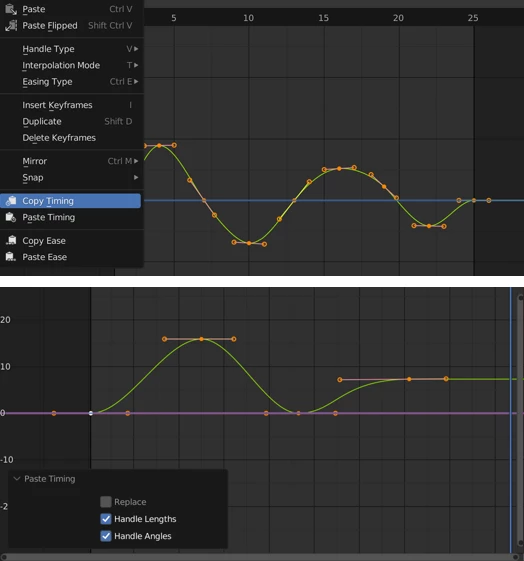
Copy only timing or only easing and paste it onto any curve, even if key counts don’t match.Modifier Preservation
Noise, Cycles, Envelope, and other F-Curve modifiers are copied perfectly, maintaining procedural motion.Move F-Curves to Action
Cleanly extract animation data into new or existing Actions, ideal for organizing clips for the NLA Editor.
Real-world examples
Share a walk or run cycle between characters without rebuilding animation.
Apply identical camera shake to multiple shots using Noise modifiers.
Retarget mechanical animations across rigs with different axis orientations.
Pro Techniques and Practical Tips
Use Copy Timing for Style Consistency
When animating multiple shots, copy timing from a “hero” animation to keep rhythm consistent.Paste Ease for Natural Motion
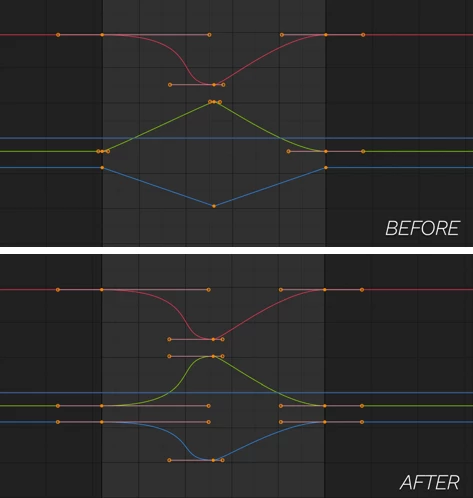
Transferring handle shapes instantly gives new animations the same smooth, professional feel.Leverage Frame Offsets
Offset copied animations slightly to avoid robotic synchronization in crowds or repeating elements.Organize with Move to Action
Break large animations into clean, reusable clips for the NLA Editor without losing data.
These techniques are easy to apply and make a noticeable difference—even for casual Blender users.
Why AnimCopy Is Worth Using
There’s nothing flashy about AnimCopy. But why would there be?
AnimCopy sublimely removes friction from a tedious and time-consuming workflow without stealing focus from animators’ creative impulses.
If you animate in Blender—character animations, motion graphics or complex scenarios—you deserve more time on creative pursuits than drudgery. Once you’ve copied animation with this level of precision, going back is not an option!
If you animate with Blender, download AnimCopy today—and take time to learn its features!

Files Password : gfxplugin.com OR 123456