Downloadable Files
You can download Blockbuster V2 for free from the bottom of this page.
When Colors Speak for Themselves
We all know that a photo or video without proper color grading feels somewhat lifeless and boring. Even the best animation or motion graphics lose half their excitement if the colors aren’t right, and the viewer won’t feel the emotion of the scene. A golden sunset with dull colors or a dramatic scene with cold, mismatched tones will feel empty, even if the scene itself is excellent. When colors are chosen and adjusted correctly, however, everything comes to life. A warm tone conveys intimacy, a cool tone evokes mystery and drama, and the right combination of light and colors can fully immerse the viewer in the story. Achieving this cinematic feel isn’t always easy; adjusting tones, lighting, contrast, and color harmony across scenes can take a lot of time and focus.
What Does Cinematic Color Grading Mean?
Cinematic color grading means adjusting colors and tones in a way that gives the scene a specific mood. For example, a video with golden lighting and warm tones, or a dramatic scene with cold, mysterious colors.
This approach allows viewers to connect with the scene and makes your project look more professional. For animation and motion graphics, it’s the same: proper color grading can convey the story and the mood of your project at a glance.
Old Methods and Their Limitations
Color grading can be done with default tools in software like Lightroom, Premiere, or DaVinci Resolve. In this method, everything is manual and step-by-step: you adjust tones and contrast, tweak color saturation, and correct lighting until you reach the desired result. For a single photo or short video, this might be tolerable, but for long or multi-scene projects, it’s time-consuming and requires a lot of focus. The main problem is that finding the right tone isn’t always easy and may take hours of trial and error to achieve a truly cinematic feel. Moreover, when projects and software differ, colors may not match, or they might look different on mobile and desktop. In short, without a professional tool, achieving that cinematic look is both difficult, tiring, and time-consuming.
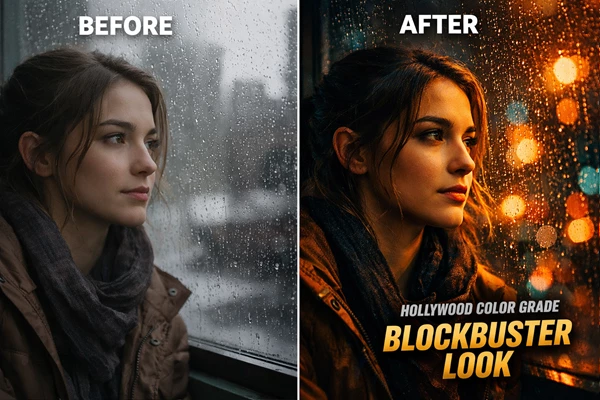
When a Professional Tool Comes In
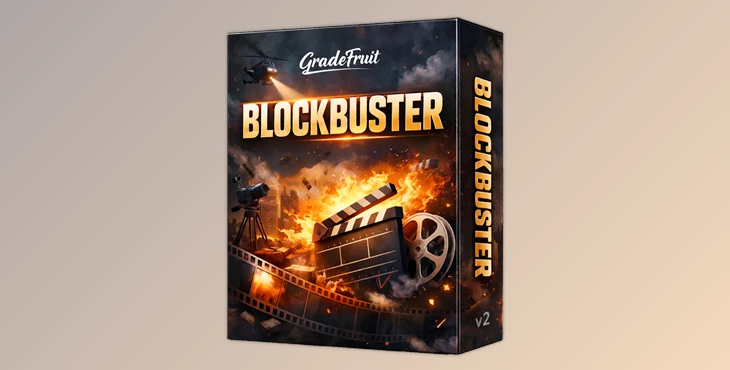
This is where Blockbuster V2 – Hollywood Style Cinematic Color comes in. This package includes ready-made LUTs and presets that bring cinematic color grading to your projects effortlessly and instantly. No more hunting for the right tones and contrast for hours or manually adjusting everything every time. Key Features and Benefits:
- 16 Ready-to-Use and Diverse Looks
- Includes dramatic, energetic, warm, cool, and mysterious tones.
- Suitable for photos, videos, animation, and motion graphics.
- Ensures your projects always feel professional and cinematic.
- Device Compatibility
- Works on Mac, Windows, iOS, and Android.
- Edit on a computer, laptop, or mobile device and get the same results.
- Support for Popular Software
- Lightroom (desktop & mobile), Adobe Premiere Pro, DaVinci Resolve, Final Cut Pro X, CapCut, Vegas Pro, Avid Media Composer, LumaFusion, and more.
- No software limitations—color grade any project you have.
- Professional Standard Formats
- .cube for LUTs, .drx for Lightroom, .dng for photos.
- Files are standard and usable in any professional environment without compatibility concerns.
- Simultaneous Use on Photos and Videos
- Suitable for motion graphics, videos, and photo editing.
- No need for separate tools—everything is accessible in one place.
- Quick and Easy Setup
- Simply select your desired look and apply it to the project.
- No need to manually adjust each tone and contrast.
- Simple enough for beginners and flexible enough for professionals.
- Consistent Color Across Devices and Software
- Results are always uniform across desktops, mobiles, different software, and projects.
- Blend and Customize
- Combine multiple looks, adjust opacity, or use masks for complex, professional effects.
- Fine-tune tones and color saturation to achieve precise results.
With this tool, color grading becomes not only fast and easy but also consistently professional, cinematic, and appealing. It’s like having a professional assistant bringing Hollywood-level vibes to your projects without consuming hours of your time.
Professional Yet Simple Tips
To make your project’s color grading professional and cinematic, a few simple tips can help greatly:
- Adjust Lighting and Contrast Before Applying a Look
Ensure colors appear natural and the project looks professional. Even the best preset won’t deliver the desired result without proper lighting and contrast. - Combine Multiple Looks
Use opacity or masks to create complex effects. For example, a warm tone over the whole scene and a cool tone in the shadows for more depth. - Choose Looks According to the Scene’s Mood
- Romantic scene = warm, soft tones
- Dramatic or scary scene = cool, dark tones
This multiplies the impact of the scene on the viewer.
- Test on Mobile and Desktop
Make sure colors and tones appear consistent across all devices, especially if the project is for social media or multiple platforms.
Following these simple tips ensures your color grading is professional, natural, and attractive, without consuming hours of your time.
🎬 Color Grading That Brings Projects to Life
Professional color grading can turn an ordinary project into a truly cinematic work. Even a short video or motion graphic can evoke a completely different mood and engage viewers more effectively with the right colors. Tools like Blockbuster V2 make this easy: they save your time, deliver professional results, and let you focus on creativity and storytelling without worrying about colors. With just a few clicks, your projects become more vibrant and engaging, gain a cinematic feel, and allow viewers to truly connect with the scene. Ultimately, when colors are chosen correctly, even the smallest details shine, taking your work one step above the ordinary.

Files Password : gfxplugin.com OR 123456