Downloadable Files
You can download the Ultimate Color Grading Color Wheel for Photoshop for free at the bottom of this page.
Ultimate Color Grading Color Wheel for Photoshop
A Smarter Way to Shape the Mood of Your Photos
Color Grading can make or break an image in this step, and yet, the Ultimate Color Grading Color Wheel for Photoshop makes it effortless, giving you clarity and creativity instead of guessing.
Forget messing around with layers and curves; you’ll see the colors working in harmony on-screen as you go. It’s visual, intuitive, and even fun to use.
Whether a photographer, digital artist, or passionate retoucher, this handy plug-in makes the theory surrounding color accessible to your daily edits.
What Is a Color Grading Color Wheel?
Color Wheel Color Grading Color wheels help control the relationship between colors in highlight, midtone, and shadow areas, instead of
The relationships between colors will give you all of the following benefits to your images:
- Balanced Colors: Cinematic, balanced colors keep images looking less edited than usual. Not all images need to be overly stylized.
- Consistent Palettes: Helps you keep a consistent palette across an entire series of images.
- Contrast Control: Contrasting warm and cool colors through placement will give you more depth and contrast, directing your viewer will become more straightforward.
A subtle touch of teal in the shadows and warming the highlights up will give you that effortless, cinematic feeling without overprocessed images.
Ultimate Color Grading Color Wheel for Photoshop:
This pro plug-in for Adobe Photoshop is easy to control through all the real-world use cases you use every day. Forget about overly complex color grading; this professional plug-in takes the theories of color harmony and gradient maps to help you get exactly where you need to be.
Features
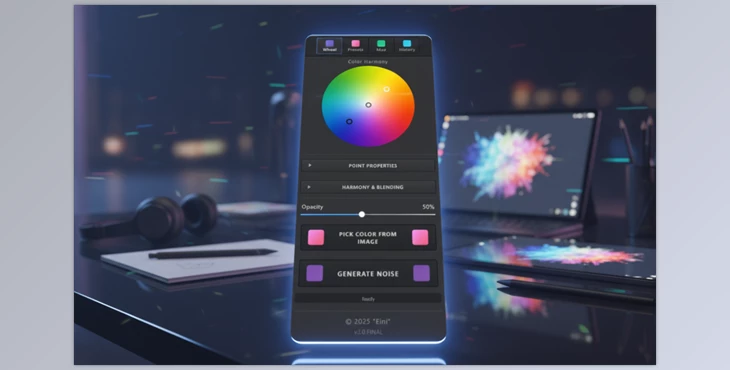
🎨 Advanced Color Harmony Tools
- 5 Harmony Modes to Choose From:
- Manual
- Analogous
- Triad
- Complementary
- Split-Complementary
These modes give you a useful relationship between colors to build strength and save time.
👁️ Live Preview
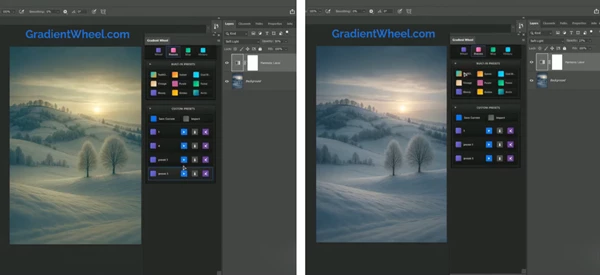
- Every change made in the color wheel gives you an instant preview of your gradient map on the image. It’s easier than guessing.
🎯 Smart Color Picker
Pick out colors from your image so that you use the existing tones to build a palette with harmony. Use this for all your:
- Series Photos
- Project Photos
- Fashion images can better emphasize the natural skin tones in your models, avoiding skewing them into unrecognizable territory.
⏮️ Unlimited Undo / Redo
The ultimate color grading color wheel for Photoshop also comes with unlimited undo and redo, giving you an entire history of every edit made. Non-destructive editing builds the courage to explore while being able to go back, building confidence without fear.
💾 Custom Presets & Workflow Sharing
Save your favorite gradient maps and color harmonies.
Import and export presets via JSON—ideal for teams or consistent brand looks.
⚡ Built-in Presets
- Get started instantly with 9 professional presets, including:
- Teal & Orange
- Sunset
- Vintage
- Moody
- Arctic
…and more carefully crafted styles.
Pro Techniques for Better, More Natural Results
Here are some practical tips to get the most out of the tool:
- Start subtle: Small color shifts often look more professional than extreme grades.
- Anchor with sampled colors: Use the color picker to ground your harmony in the original photo.
- Use presets as a base: Apply a preset, then fine-tune instead of starting from scratch.
- Check skin tones: When working with portraits, keep midtones neutral and push creative colors into shadows and highlights.
- Compare often: Toggle before/after views to ensure your grade enhances the image rather than overpowering it.
These small habits make a big difference in achieving clean, cinematic results.
Final Thoughts: Why This Tool Deserves a Spot in Your Workflow
Ultimate Color Grading Color Wheel for Photoshop bridges the gap between color theory and practical editing. It gives you confidence in your choices, speeds up your workflow, and helps you create consistent, high-quality color grades without technical overload.
Instead of fighting with adjustments, you focus on storytelling, mood, and emotion—the things that truly make an image memorable. If color grading is an important part of your creative process, this tool is absolutely worth exploring.

Files Password : gfxplugin.com OR 123456