Downloadable Files
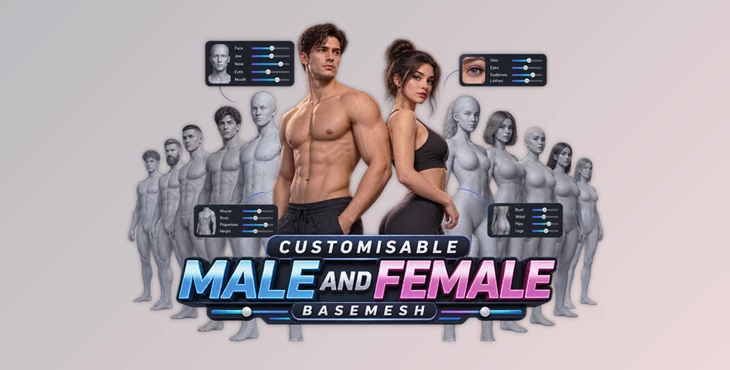
You can download Customisable Male and Female Basemesh for free from the end of this page.
Build Your Own 3D Characters Without Starting From Scratch
Creating a convincing 3D character can involve a surprising amount of preparation. Before you even reach posing, animation, or rendering, you may need to model the body, refine facial proportions, clean up topology, unwrap UVs, prepare materials, and build a usable rig.
Customisable Male and Female Basemesh is designed to simplify that process by giving Blender artists a ready-made foundation for character creation. Instead of building every new person from zero, you can approach character design much like a video game character creator: adjust sliders, experiment with proportions, change facial features, customise materials, and quickly explore different looks.
Both the male and female basemeshes are designed around the same flexible system, making them particularly useful when you need to create several different characters while maintaining a fast and consistent workflow.
What Is a Customisable Basemesh?
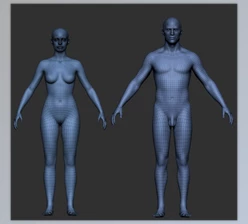
A basemesh is essentially a starting model that provides the underlying geometry for a character. Rather than sculpting or modelling the entire human body every time, you begin with an established mesh and modify it to match the character you want to create.
The advantage here is speed, but consistency is just as important.
The Customisable Male and Female Basemesh models already include clean topology and UV mapping, removing two major preparation stages from the character workflow. They also come fully rigged using Blender’s Rigify system, so characters can move from design to posing and animation much faster.
Imagine creating background characters for an animated scene. One character might be tall with a narrow face, another short with broader proportions, while another could have a completely different skin tone, eye design, clothing, and facial details. Instead of modelling each person separately, the same underlying system can be customised into a variety of characters.
That makes the basemesh useful not only as a modelling shortcut, but also as an experimentation tool.
Meet Customisable Male and Female Basemesh
Version 2.1 expands the character-creator approach considerably. The system now provides more than 80 body and facial customisation options, allowing you to control both large-scale proportions and smaller character-defining details.
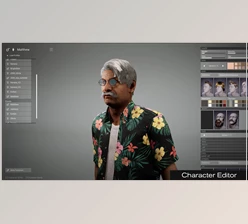
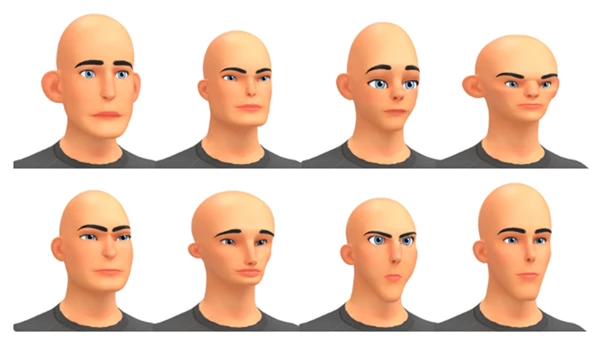
You can modify height, head scale, facial features, body proportions, silhouette, materials, eyes, skin, overlays, and other visual characteristics through the included custom addon.
Better still, the male and female versions are designed to work together. Materials, presets, textures, and settings are cross-compatible, making it easier to maintain a unified character-design workflow across both models.
Features
80+ Face and Body Controls
With more than 80 customisation options, you can create a much wider variety of characters from the supplied basemeshes.
Instead of only making small cosmetic changes, you can adjust important elements such as body proportions, facial structure, overall silhouette, height, and head scale.
This is especially useful during the concept stage. You can quickly test whether a character looks better with exaggerated proportions, a stronger silhouette, or subtler facial characteristics without rebuilding the model.
Fully Rigged With Rigify
Both characters come rigged using Blender’s Rigify system.
Once you have created a design you like, you already have a foundation for posing and animation. This makes the basemesh particularly practical for artists who want to move quickly from character development into actual scenes, renders, or animation tests.
No Retopology Required
The basemeshes already feature prepared topology, so you don’t have to perform a complete retopology pass before beginning character work.
That removes one of the more technical and time-consuming stages of character creation and lets you concentrate more directly on design.
Already UV Unwrapped
UV preparation is also handled in advance.
You can use the supplied textures or create your own custom materials and textures without having to unwrap the entire character first. For artists creating multiple characters, this can save considerable repetitive work.
Fast Customisation Through a Dedicated Addon
Version 2.1 includes a custom Blender addon with menus specifically designed for character customisation.
Rather than manually searching through modifiers, materials, and other settings, you can access the relevant controls through a more convenient character-building interface.
This helps make the workflow feel closer to a traditional character creator than ordinary manual mesh editing.
Presets and Randomisation
Sometimes the hardest part of character design is deciding where to begin.
Built-in presets can provide an immediate starting point, while randomisation lets you rapidly explore different possibilities. Individual sections can be randomised, allowing you to experiment without necessarily changing everything about the character.
A useful workflow is to randomise until you discover interesting proportions, keep the characteristics you like, and then manually refine specific areas.
Male and Female Cross-Compatibility
One of the important improvements in version 2.1 is compatibility between the male and female basemesh systems.
Materials, presets, and settings can work across both versions. The female version also includes new textures designed around this shared system.
For projects containing many characters, this provides a more consistent workflow instead of requiring completely separate setups for male and female models.
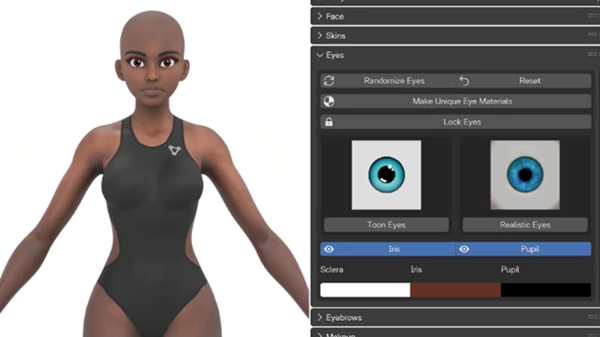
Customisable Eyes
Eyes can have a major influence on a character’s personality, and the system gives you control over individual eye components.
The sclera, iris, and pupil can be customised separately. Different parts can also be enabled or disabled to create less conventional eye designs.
The male basemesh additionally supports two completely separate eye designs, providing more freedom when creating asymmetric or stylised characters.
Flexible Skin Customisation
The skin system provides several starting options, including Caucasian and Black skin textures as well as more realistic variations.
There is also a coloured skin option, allowing you to move beyond natural human tones. This can be useful for fantasy, sci-fi, stylised, or experimental characters where traditional skin colours are not appropriate.
Overlay Textures for Extra Character
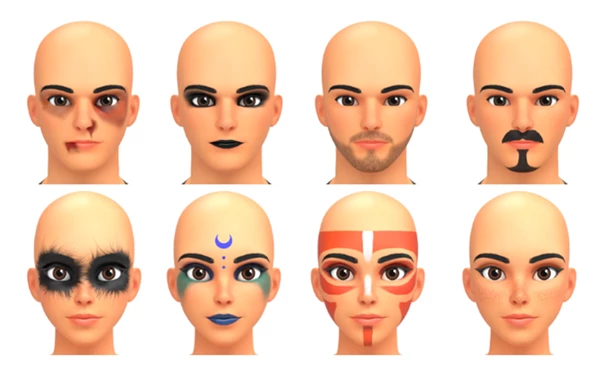
Overlays make it easier to add smaller details that help distinguish one character from another.
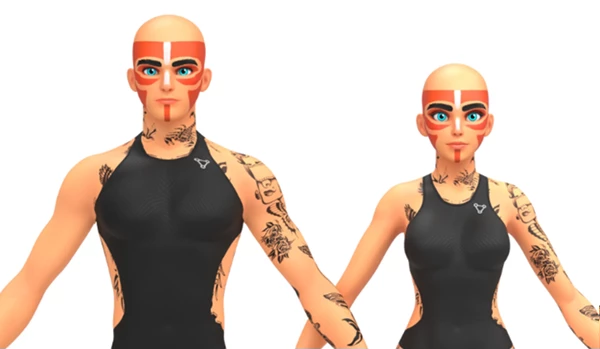
Version 2.1 supports details such as freckles, scars, tattoos, makeup, and facial hair. You can also create custom overlay textures for more personalised designs.
These details can be especially effective when several characters share the same underlying basemesh. Small surface variations help each one feel more individual.
Improved Higher-Resolution Textures
The female version includes improved, higher-resolution textures, with the textures divided into separate face and body maps.
Giving the face its own texture space is particularly useful because facial details are often viewed much closer than the rest of the body and therefore benefit from additional resolution.
Clothing Options
The female basemesh provides five clothing options.
Besides being useful for presentation, clothing can influence how you perceive a character during the design process. Trying a different outfit may suggest an entirely different personality, occupation, setting, or visual direction.
Multiple Characters in One Scene
The addon isn’t restricted to working with only one character at a time.
Multiple characters can exist within the same Blender scene, and the addon identifies which character you are currently editing. Proportions, facial features, and materials can therefore be changed independently.
This becomes especially valuable for scenes involving groups, crowds, teams, or several main characters.
Where Can These Basemeshes Be Useful?
The system can fit into many different character-based Blender workflows.
For example, an animator could quickly create several characters, adjust their silhouettes so they remain visually distinct, and immediately start testing poses thanks to the Rigify setup.
A concept artist could use randomisation and presets to generate starting points, then refine the most interesting results into more deliberate designs.
For a game prototype, the basemeshes can provide quick placeholder or early-stage characters without requiring every model to be built from scratch.
They can also work as starting points for stylised characters. By combining unusual body proportions, coloured skin, custom eyes, overlays, and exaggerated facial characteristics, you are not limited to creating only realistic humans.
Tips for Better Character Designs
Start With the Silhouette
Before spending too much time on skin, eyes, makeup, or small facial details, establish the character’s overall proportions.
Height, head size, body shape, and facial proportions determine how recognizable the character will be from a distance. Once the silhouette works, smaller details become much easier to judge.
Use Randomisation for Ideas, Not Just Finished Characters
Randomisation is most useful as an exploration tool.
Generate different combinations until something interesting appears, then keep the features that work and manually refine the rest. This can lead to designs you might not have considered when adjusting every slider deliberately.
Avoid Making Every Character Too Similar
When building multiple people for one scene, vary more than just textures
. Change height, body proportions, head scale, facial structure, eyes, clothing, and surface details. Strong differences in silhouette will usually make a group of characters feel more varied than simply giving the same model different skin or clothing.
Add Overlays Near the End
Freckles, scars, tattoos, makeup, and facial hair can add personality, but they work best after the underlying character has already been established.
Think of overlays as the final layer of identity rather than the foundation of the design.
Test Characters in Poses
Because the models are already rigged, take advantage of the Rigify setup while designing.
A character that looks good in a neutral position should also work from different angles and in expressive poses. Testing the model early can reveal proportion choices that may need further adjustment.
Take Advantage of Male and Female Compatibility
If you use both basemeshes in one project, shared materials, presets, and settings can help you work faster and maintain visual consistency.
You can establish a general material direction first and then create variations for individual characters rather than developing every character independently.
Blender Compatibility
Version 2.1 of the Customisable Male and Female Basemesh was developed primarily for Blender 5.0, making that the intended and most compatible version.
The creator has also tested the basemeshes with additional Blender versions. If you are working outside Blender 5.0, checking the supplied compatibility information and documentation before beginning an important project is recommended.
A Faster Starting Point for Character Creation
Character creation doesn’t always need to begin with an empty scene and a completely new mesh.
Customisable Male and Female Basemesh provides a flexible starting point where modelling preparation, topology, UV mapping, rigging, and basic material options are already in place. With more than 80 face and body controls, presets, randomisation, custom eyes, skin options, overlays, clothing, and cross-compatible male and female systems, version 2.1 gives artists plenty of room to develop distinct characters.
Its biggest advantage is the freedom to spend more time designing and less time repeating technical setup. Whether you’re exploring character concepts, preparing models for animation, creating several people for a scene, or simply experimenting with different appearances, the system makes it easier to move from an idea to a usable Blender character.
 Gumroad - Customisable Female Basemesh + Customisable Male v2.1 for Blender 5.0+.rar (Size: 774.7 MB - Date: 8/27/2026 10:20:32 AM)
- Gumroad - Customisable Female Basemesh v2.0.rar (Size: 276.3 MB - Date: 2/10/2026 12:27:37 PM)
- Gumroad - Customisable Female Basemesh v1.0.rar (Size: 122.2 MB - Date: 7/12/2025 12:20:08 PM)
Files Password : gfxplugin.com OR 123456