Add Camera Rigs:
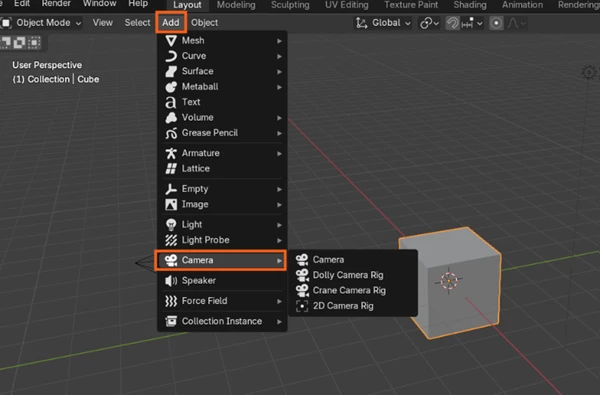
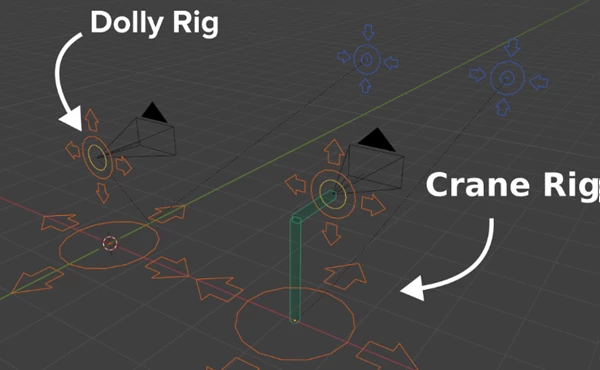
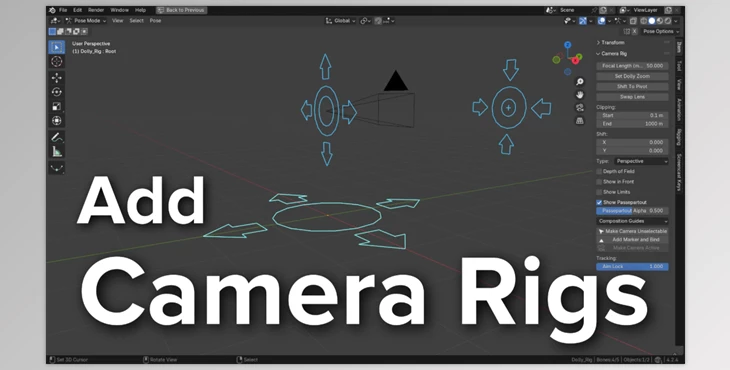
The Add Camera Rigs add-on for Blender improves the use of camera tools beyond their basic functions by allowing users to access arm controls with easy-to-use widgets as well as a separate panel that provides instant access to camera controls from the 3D Viewport. Users can now find three additional camera rig options under the Add ‣ Camera menu: The Dolly and Crane Rig, and 2D Camera Rig. Both the Dolly and Crane Rigs emulate real physical camera equipment. For instance, the Crane Rig comes with extra functionality for controlling arm height and length, which allows it to perform cinematic crane shots. The 2D Camera Rig is best suited for static poses and performs optimally when used in contexts similar to stage plays where the action occurs in front of a still or slowly panning camera.
Some great features of Add Camera Rigs:
- Root Control: Functions as the parent of the whole rig, so full range movement of all axes in 3d space is possible.
- Camera and Camera_Offset: These controls translate the camera position while providing some rotational control independent of the main control rotation.
- Aim Control: Ensures lock on focus within the frame while having tilt control rotating about its Y axis.
- Crane Specific Controls: CraneHeight vertically positions the rig above a point while CraneArm lengthens its elbow, giving it the ability to move like a crane, which more strongly enhances these functions too.
"Add Camera Rigs" Samples: