Downloadable Files
You can download MAD PAINTER for free from the bottom of this page.
Paint Your Footage Like an Artist
Have you ever thought about how your video would appear if each frame were painted with expressive brush strokes? With MAD PAINTER, you can bring this artistic style into After Effects and turn your footage into something that looks closer to a painting that moves across the screen.
Rather than having to create hundreds of individual brush strokes by hand, MAD PAINTER automatically applies brush strokes to your video. It is GPU accelerated so it will take advantage of compatible hardware as you experiment with various styles.
You can tweak brush size and paint style to achieve subtle painterly effects or more stylized and expressive results.
What Is MAD PAINTER?
MAD PAINTER is an Adobe After Effects GPU-accelerated plugin that paints brush strokes onto video.
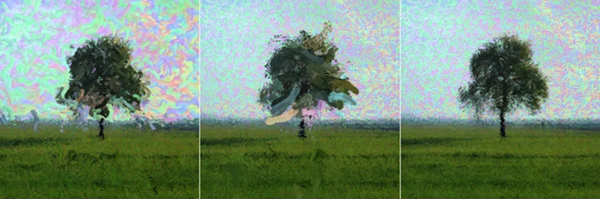
MAD PAINTER applies the technique of digital painting to video. With MAD PAINTER, your source footage serves as the base image, and the plugin will attempt to recreate that image using brush strokes.
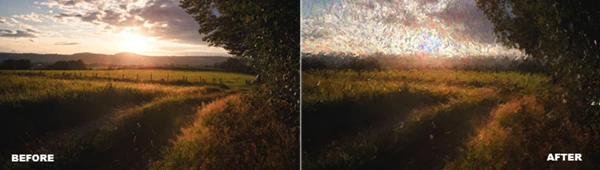
For instance, a simple landscape shot could be transformed into a video where brush strokes are clearly visible throughout the image. A portrait could be given a more handmade and artistic quality. A regular video could be given an artistic quality similar to a painted image.
The option to vary brush size also makes an impact. Larger brushes provide a more abstract and bolder look, while smaller brushes can help maintain more identifiable details from the source image.
MAD PAINTER for After Effects
The main advantage of MAD PAINTER is that it makes painterly video effects much easier to explore directly inside After Effects. You can work with your existing footage and experiment with different brush characteristics without having to manually paint individual frames.
Its GPU-accelerated processing is particularly useful for an effect that needs to generate large numbers of visual strokes across footage.
Features
- GPU-accelerated processing: Uses compatible GPU hardware to process the painterly effect.
- Brush stroke painting: Paints generated brush strokes directly over your footage.
- Different brush sizes: Experiment with smaller or larger strokes to dramatically change the visual character.
- Paint style controls: Provides control over how the painted result looks.
- After Effects integration: Designed specifically for use with Adobe After Effects.
- Windows GPU support: Compatible with Windows systems using CUDA or OpenCL GPUs.
- Mac support: Works with Intel and Apple Silicon Macs running macOS 12.0 or later.
These controls allow the same footage to take on very different personalities. A cinematic landscape might benefit from larger, expressive strokes, while a close-up portrait may look better with finer brushwork that retains more facial structure.
Where Can You Use the Painterly Effect?
The effect can work particularly well whenever a conventional video look feels too clean or ordinary.
You could use MAD PAINTER to stylize a music video, transform landscape footage into an animated painting, give an experimental short film a distinctive visual identity, or create artistic sections for motion graphics projects.
It can also be useful for transitions between realistic and painterly scenes. For example, a normal video shot could gradually move toward a heavily painted appearance, helping create a more imaginative visual moment.
Tips for Better Painted Results
Try playing with brush size before trying to overextreme every parameter. The size of the brush can have a large impact on how much of the source video remains visible.
Smaller brushes may help preserve details in objects, faces, and architecture. Larger brushes may be effective at achieving a greater amount of painterly style in backgrounds and landscapes, or in intentionally abstracted footage.
Try experimenting with multiple paint styles on a short piece of video before trying the effect on a longer clip. This can help you find a style that works well with the content, instead of one that just covers the content.
Finally, there's the source video. Good shape, strong subjects, and interesting contrasts can provide a stronger basis for the output brush strokes.
System Requirements
To use MAD PAINTER, your system should meet the following requirements:
- Adobe After Effects
- Windows with a CUDA or OpenCL-compatible GPU
- Mac with Intel or Apple Silicon
- macOS 12.0 or later for Mac systems
Because the plugin relies on GPU acceleration, compatible graphics hardware is an important part of the workflow.
Turn Video into a Moving Canvas
MAD PAINTER offers a creative way to move beyond the conventional video look and explore footage through digital brushwork. With adjustable brush sizes, paint-style controls, and GPU-accelerated processing, you can experiment with anything from relatively detailed painted footage to bold and expressive visuals.
If you enjoy combining video editing with traditional art-inspired aesthetics, this plugin gives you an interesting playground inside After Effects. Try different brush scales and painting styles—the same piece of footage can produce surprisingly different results with only a few adjustments.
 MAD PAINTER for Adobe & Davinci Resolve by Aescripts (v1.4.11 for Win).rar (Size: 23.9 MB - Date: 9/12/2026 9:47:40 AM)
- Aescripts - MAD PAINTER v1.4.7 for Adobe & Davinci Resolve (Win).rar (Size: 6.8 MB - Date: 9/3/2026 12:26:14 PM)
- Aescripts - MAD PAINTER v1.2.11 (Win, Mac).rar (Size: 16.2 MB - Date: 7/22/2026 11:31:24 AM)
- Aescripts - MAD PAINTER v1.2.6.rar (Size: 3.5 MB - Date: 7/4/2026 3:47:33 PM)
- Aescripts - MAD PAINTER v1.1.0.rar (Size: 707.3 KB - Date: 2/19/2025 11:43:12 AM)
Files Password : gfxplugin.com OR 123456