Downloadable Files
You can download ON1 Effects for free from the end of this page.
Give Your Photos the Finishing Touch They Deserve
Sometimes a photo already looks good, but it still needs that final touch to make it truly stand out. Maybe a portrait needs a softer glow, a landscape could benefit from stronger contrast, or an ordinary image needs a cinematic atmosphere. Instead of building complicated effects manually, ON1 Effects gives photographers a faster and more creative way to transform their images.
With hundreds of professional filters, presets, LUTs, textures, and borders, you can experiment with different styles in just a few clicks. From subtle enhancements to dramatic creative transformations, the software gives you plenty of room to develop a look that fits each photo.
What Is ON1 Effects?
ON1 Effects is photo effects software designed to help photographers quickly style, enhance, and finish their images. It combines ready-made creative looks with customizable filters and AI-powered masking tools, making it possible to achieve professional-looking results without relying on complicated editing workflows.
For example, you can turn a landscape into a moody cinematic scene, add a film-inspired character to a portrait, create a dramatic black-and-white image, introduce glow or lens blur, or use textures and borders to give an image a completely different personality.
The important advantage is control. Presets can provide a quick starting point, while individual filters can be stacked, blended, masked, and adjusted to create a more personalized result. This helps prevent every photo from looking like it simply received the same preset.
Fast Creative Editing with More Control
ON1 Effects 2026 is built around the idea of combining speed with creative flexibility. Instead of spending time constructing complex effects from scratch, photographers can begin with curated presets or individual filters and then fine-tune the result.
The software can be used as a standalone application, as a plugin for Photoshop, Lightroom, and other compatible workflows, or as an integrated part of ON1 Photo RAW 2026.5.
This flexibility makes it useful both as a dedicated effects editor and as a finishing tool within an existing photography workflow.
Features
Hundreds of Presets, Filters, LUTs, Textures, and Borders
One of the main strengths of ON1 Effects is the large collection of creative tools available in one place. You can explore different visual styles without having to manually recreate every adjustment.
Popular looks include:
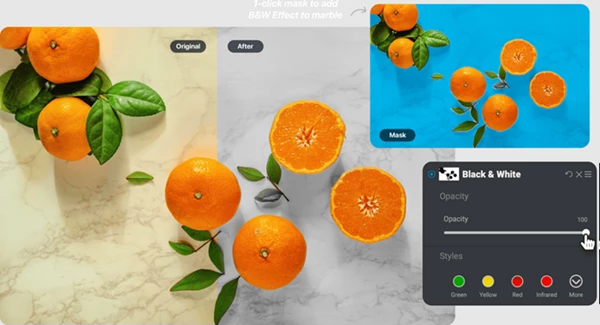
Black and white and HDR-style effects
Dynamic Contrast and Lens Blur
Glows and film-inspired looks
Split Tone effects
Textures and decorative borders
These tools can be customized rather than simply applied as fixed effects. You can stack multiple filters, change their settings, blend them together, and build your own custom looks.
This is especially useful when you want consistency across a photo series while still having enough flexibility to adapt the effect to individual images.
Smarter AI Masking
Creative effects often work best when they are applied selectively rather than across the entire image. ON1 Effects 2026 includes AI-powered masking tools designed to make precise selections easier.
One-click subject and background selections can help isolate important areas of a photograph so that an effect influences only the parts you want.
For example, you might enhance the background while leaving a portrait subject untouched, or apply a stronger creative treatment to the subject without changing the surrounding scene. Selective editing can make effects feel much more natural and intentional.
Depth Lighting
The Depth Lighting filter allows you to adjust the lighting of the foreground or background independently.
This can be particularly helpful when the subject does not stand out enough from the surrounding environment. By balancing the light between different areas of the scene, you can guide the viewer's attention toward the most important part of the image.
Instead of relying only on global brightness adjustments, Depth Lighting gives you a more targeted approach to shaping the visual depth of a photograph.
Double Exposure
Double Exposure makes it easy to blend two photographs into a single layered composition.
This effect can be used for artistic portraits, conceptual photography, abstract compositions, or experimental visual storytelling. Rather than manually constructing the entire effect through a complicated workflow, you can quickly combine images and explore different creative possibilities.
Motion Filter
Still photographs do not always have to feel completely static. The Motion filter can introduce panning, zooming, or twisting movement into an image.
Used carefully, these effects can add energy and direction to an otherwise still composition. They can work particularly well for action-oriented photographs, experimental artwork, or images where you want to create a stronger sense of movement.
Split Field
The Split Field filter provides another interesting way to change the visual relationship between the foreground and background.
It can bring distant backgrounds closer while maintaining the wide-angle appearance of the foreground. This gives photographers additional control over perspective after the photograph has already been captured.
Layering and Non-Destructive Compositing
ON1 Effects also allows you to combine multiple photos non-destructively. Together with its masking tools, this opens the door to more advanced image editing and compositing.
You can use these capabilities for tasks such as replacing skies, swapping heads, combining photographs, or applying creative effects only to selected areas.
Because the workflow is non-destructive, you have greater freedom to experiment and refine your composition without permanently committing to every change.
Create Your Own Signature Looks
Ready-made presets are useful for speed, but some of the most interesting results come from combining several effects.
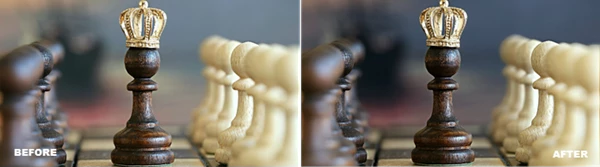
For example, you could begin with a film-inspired look, add Dynamic Contrast to strengthen details, introduce a subtle glow, and finish with a texture or border. By adjusting the strength and blending of each filter, the final result can feel much more personal.
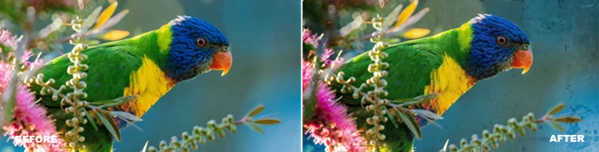
The same approach works for cinematic grading, vintage photography, bold pop-art treatments, black-and-white images, and many other styles.
Instead of searching for one perfect preset, think of each filter as one ingredient in the final image.
Practical Tips for Better Results
Start with subtle adjustments before pushing an effect to its maximum strength. Creative filters are often more convincing when they complement the original photograph instead of completely overpowering it.
AI masking can also make a significant difference. If an effect looks too strong across the entire frame, try limiting it to the subject, foreground, or background. This can create more visual separation and keep important details looking natural.
When stacking filters, consider what each one contributes. For example, use one filter for overall color and mood, another for contrast or detail, and a final effect for atmosphere. This usually gives you more control than applying several strong effects that all change the same characteristics of the image.
For a series of photographs, creating a custom look can also help maintain a consistent visual identity. Build a combination you like, then adapt its intensity and masking to each individual image rather than starting from zero every time.
A Faster Way to Explore Creative Photo Effects
ON1 Effects combines professional filters, LUTs, textures, borders, AI masking, layering, creative effects, presets and more into one flexible photo editing solution. ON1 Effects can be used for everything from subtle finishing touches to more creatively styled photo transformations.
Advanced effects like Depth Lighting, Double Exposure, Motion and Split Field open up new possibilities beyond traditional filters. AI assisted masking also gives you more control over where effects are applied.
ON1 Effects can be used for a variety of applications including portraiture, cinematic photo styles, artistic composites and overall photo styling. It gives you a way to quickly explore different photo styles while still maintaining control over the end result.
 ON1 Effects 2026.5.2 (v20.5.2.19304 for Win).rar (Size: 427.5 MB - Date: 9/30/2026 12:35:39 PM)
- ON1 Effects 2026.5.2 (v20.5.2.19304 for Mac).rar (Size: 712.2 MB - Date: 9/30/2026 12:35:24 PM)
- ON1 Effects 2026.5.1 v20.5.1.19148 (Win).rar (Size: 427.3 MB - Date: 9/2/2026 1:00:45 PM)
- ON1 Effects 2026.5.1 v20.5.1.19148 (Mac).rar (Size: 712.0 MB - Date: 9/1/2026 12:37:36 PM)
- ON1 Effects 2026.5 v20.5.0.19062 (Mac).rar (Size: 711.7 MB - Date: 8/15/2026 1:35:09 PM)
- ON1 Effects 2026.5 v20.5.0.19062 (Win).rar (Size: 358.2 MB - Date: 8/15/2026 1:34:42 PM)
- ON1 Effects 2026.5 v20.5.0.19010 (Mac).rar (Size: 711.7 MB - Date: 7/29/2026 11:21:22 AM)
- ON1 Effects 2026.5 v20.5.0.19010 (Win).rar (Size: 358.2 MB - Date: 7/28/2026 10:36:17 AM)
- ON1 Effects 2026.4 v20.4.1.18862 (Mac).rar (Size: 721.1 MB - Date: 6/27/2026 11:51:37 AM)
- ON1 Effects 2026.4 v20.4.1.18862 (Win).rar (Size: 351.3 MB - Date: 6/27/2026 11:51:11 AM)
- ON1 Effects 2026.3 v20.3.1.18535 (Win, Mac).rar (Size: 704.6 MB - Date: 3/28/2026 1:02:14 PM)
- ON1 Effects 2026.3 v20.3.1.18535 (Win).rar (Size: 342.7 MB - Date: 3/28/2026 1:01:49 PM)
- ON1 Effects 2026.3 v20.3.0.18187 (Mac).rar (Size: 704.7 MB - Date: 2/26/2026 10:25:26 AM)
- ON1 Effects 2026.3 v20.3.0.18187 (Win).rar (Size: 342.7 MB - Date: 2/26/2026 10:25:01 AM)
- ON1 Effects 2026.2 v20.2.1.17958 (Mac).rar (Size: 705.7 MB - Date: 1/27/2026 8:02:04 AM)
- ON1 Effects 2026.2 v20.2.1.17958 (Win).rar (Size: 342.9 MB - Date: 1/27/2026 8:01:33 AM)
- ON1 Effects 2025.2 v19.2.1.16909 (Mac).rar (Size: 681.5 MB - Date: 6/17/2025 1:25:43 PM)
- ON1 Effects v2025.2 v19.2.1.16909 (Win).rar (Size: 373.2 MB - Date: 6/16/2025 1:03:38 PM)
- ON1 Effects 2025.1 v19.1.0.16592 (Mac).rar (Size: 679.5 MB - Date: 3/6/2025 12:59:54 PM)
- ON1 Effects 2025.1 v19.1.0.16592 (Win).rar (Size: 372.4 MB - Date: 3/6/2025 12:59:28 PM)
- ON1 Effects 2024.5 v18.5.1.15726 (Win).rar (Size: 370.6 MB - Date: 10/17/2024 6:30:23 PM)
Files Password : gfxplugin.com OR 123456