Downloadable Files
You can download Stylized Hair PRO for free from the end of this page.
Create Stylized Hair Without Building Everything by Hand
Creating stylized hair in Blender can quickly become a detailed process. You need to control the overall silhouette, individual strands, profiles, thickness, curls, braids, materials, and sometimes even animation. Stylized Hair PRO brings these controls together in a procedural workflow designed to make the process faster and easier to manage.
Built around Geometry Nodes, the add-on focuses primarily on Blender’s Hair Curves system while also supporting traditional curves such as Bézier curves and paths. This means you can create anything from simple stylized strands to more complex hairstyles with braids, split tips, ornaments, custom profiles, and dynamic movement.
The latest version has also been reworked and optimized specifically for Blender 4.5 and above, bringing improved controls, better performance, additional gizmos, and refined procedural hair-generation tools.
How Procedural Stylized Hair Works
Instead of treating every hair strand as geometry that must be modeled manually, a procedural workflow lets you build and modify hair through curves and adjustable parameters. The curves establish the direction and general shape of the hairstyle, while Geometry Nodes generate and control the final appearance.
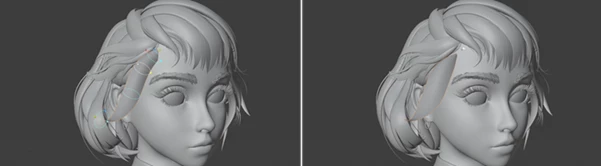
For example, you can create the main flow of a character’s hairstyle with curves and then adjust its profile, thickness, split tips, bumps, curls, or braids without rebuilding the hairstyle from scratch.
This becomes especially useful when experimenting with character designs. If a strand looks too thick, a braid needs a different shape, or the tips need more separation, you can modify the relevant settings instead of manually remodeling the geometry.
Stylized Hair PRO also works with traditional Bézier curves and paths, giving artists another familiar approach to creating stylized hairstyles.
Meet Stylized Hair PRO
Stylized Hair PRO is a Geometry Nodes based Blender add-on designed specifically for procedural stylized hair creation. It provides tools for controlling not only the basic shape of hair curves but also their geometry, profiles, materials, ornaments, and animation.
This makes the add-on useful for character artists who want to create hairstyles with strong, readable shapes while keeping enough flexibility to refine the design later.
You could, for example, build large flowing strands for a stylized character, create individually adjustable braids, add ornaments along selected curves, or animate the finished hairstyle using the included Hair Dynamics system.
Features
Hair Curves and Traditional Curves
The tool is centered around Blender’s Hair Curves system but can also work with other curve types, including Bézier curves and paths. This gives you flexibility in choosing how you construct and control your hairstyle.
Improved Split Tips
The Split Tip system now works with all profile types, including custom profiles. You can specify the exact number of splits instead of relying on split density, making the final result easier to control.
Bend and Curl controls have also been improved for more consistent results. Their Limit option allows these effects to become stronger toward the tips while remaining reduced near the base.
The Limit Central Splits Bend setting can further reduce unwanted overlap in central split strands.
For custom profiles, the profile curve needs to contain a single spline for Split Tip to work.
Better Bumps
Regular Bumps can now taper in both directions, offering more flexibility when shaping individual hair sections.
Resolution generation around gaps has also been improved, helping bumps maintain cleaner forms even at relatively low resolutions. Profiles preserve their sharp points during resolution changes, which helps stylized shapes remain closer to their intended design.
More Flexible Braids
Braids receive several useful controls in this version. The Thickness and Flatten values of braid strands can be adjusted individually, giving you more precise control over their appearance.
A new Braid Roots Size Factor also lets you determine where the braid root visually connects to the rest of the braid weave. This can help create smoother and more intentional transitions.
Expanded Profile Controls
Smart Profile functions now work across all profile types. A new Almond profile has also been added, based on what was previously the default Smart Profile shape.
Custom profile curves preserve sharp points as their resolution changes, allowing low-resolution profiles to remain more faithful to the original form.
Entire Custom Profile Collections can also be instanced, opening the door to more complex multi-curve profile designs.
Custom Ornaments
Stylized hairstyles often include decorative elements, and Stylized Hair PRO includes controls for working with ornaments directly on curves.
The new Center Ornaments Position option makes positioning custom ornaments relative to the curve easier and more predictable.
Improved Hair Shading
The Combined UV Map is now the default UV map when working with shader nodes that use a UV output. This makes the system more convenient when incorporating pre-made hair shaders.
The SHP Shades node also introduces new shading information, including:
- Root Pinch Map
- Tip Pinch Map
Existing materials using the SHP Shades node need to be updated for the new add-on version.
Hair Root Controls
Two new settings expand the Auto-Squish Hair Root functionality.
Squish Strength controls the amount of angle-based squishing, while Limit Squish determines how much of the root length receives the effect.
These controls can help refine how hair strands transition into their roots.
Hair Dynamics
Stylized Hair PRO goes beyond static modeling by providing a Hair Dynamics system for animation.
Once the hairstyle has been designed, dynamics can be used to introduce movement into the strands. This is particularly valuable for animated characters where hair should respond visually rather than remain completely rigid.
Performance Optimization
Complex procedural hair can become demanding, particularly during animation. The Optimization utility includes two important features designed to improve performance.
Optimize Modifier dynamically selects, deselects, and collapses the SHP modifier according to context, helping improve workflow performance in Blender 4.5.
Bake Hair Geometry converts the generated result into baked hair geometry. This can improve animation playback with dynamics because Blender no longer needs to regenerate the hair geometry on every frame.
Some procedural functionality is temporarily unavailable while the hair is baked, including adjustments to hair shape and resolution. You can delete the bake, make your changes, and bake the hair again. Grooming and dynamics can still be used while the hair is baked.
More Interactive Gizmos
The Thickness and Pinch gizmos have been updated for greater shape control, while several new gizmos have been introduced for:
- Curls
- Braid Shape
- Braid Strands
- Braid Roots
- Split Tip
- Resolution
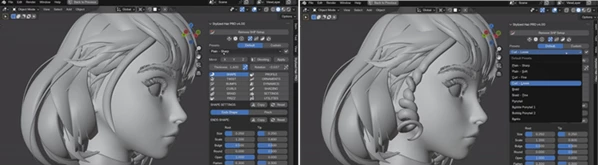
You can also choose which curve displays the gizmos using Gizmos Curve Index. A new drop-down menu next to the gizmo toggle provides access to all gizmo controls.
Where Stylized Hair PRO Can Be Useful
The add-on can fit naturally into many stylized character workflows. A character artist could use it to create thick graphic hair strands for a cartoon character, design elaborate braided hairstyles, experiment with custom strand profiles, or add ornaments to fantasy-inspired hair designs.
Because the workflow remains procedural, it is also useful during design exploration. You can experiment with the silhouette and details of a hairstyle while retaining access to the underlying parameters.
For animated characters, the Hair Dynamics system and Bake Hair Geometry option provide an additional workflow for moving from hair creation toward animation.
Tips for Better Stylized Hair
Start with the overall silhouette before focusing on smaller details. Large curves should establish the direction, volume, and visual rhythm of the hairstyle. Once those forms work well, smaller elements such as split tips, bumps, curls, and ornaments can add character.
Use profile resolution according to what the project actually needs. The improved preservation of sharp profile points can help maintain stylized forms at lower resolutions, so unnecessarily dense geometry may not always be required.
When working with braids, experiment with Thickness, Flatten, and Braid Roots Size Factor together. These controls affect different aspects of the braid and can help you find a better balance between readable stylization and believable structure.
For animation-heavy scenes, consider using Bake Hair Geometry after you are satisfied with the main procedural design. This can reduce the amount of geometry generation Blender needs to perform during playback. If further changes are required, remove the bake, edit the hairstyle, and bake it again.
Finally, use the new gizmos when refining curls, braids, split tips, thickness, and resolution. Interactive controls can make visual adjustments easier than relying only on numerical values.
Blender Compatibility
This version of Stylized Hair PRO requires Blender 4.5.0 or newer.
The node group has been specifically reworked and optimized for Blender 4.5. Using this version of the add-on with older Blender releases can cause errors or malfunction. For older Blender versions, a previous release of the add-on should be used instead.
For the best experience, using the latest available Blender version is recommended.
It is also worth noting that older custom Stylized Hair PRO presets may not work correctly with the latest version because the default presets and underlying settings have been updated.
Final Thoughts
Stylized Hair PRO has done a great job in turning many of the repetitive tasks involved in creating stylized hair into a flexible procedural pipeline. In addition to basic hair creation, it offers controls over root, shading, dynamics, optimization, curls, bumps, split tips, ornaments, braids, profiles, and curls.
Due to its use of Hair Curves, Geometry Nodes, interactive gizmos, and procedural functionality, Stylized Hair PRO is well suited for character artists looking to experiment with hairstyles while still maintaining the ability to edit the created hair.
The recent updates to Blender 4.5 offer several notable enhancements to both functionality and performance. Whether creating a basic cartoon style hairstyle or a more complex hairstyle featuring braids, custom profiles, and animated strands, there is a clear workflow for creating and editing the final result.
 Stylized Hair PRO (v4.3.1).rar (Size: 3.5 MB - Date: 9/22/2026 12:11:58 PM)
- Gumroad - Stylized Hair PRO v4.3.1 for Blender.rar (Size: 3.5 MB - Date: 9/3/2026 12:26:30 PM)
- Gumroad - Stylized Hair PRO v4.2.1 for Blender.rar (Size: 3.5 MB - Date: 8/5/2026 12:03:11 PM)
- Gumroad - Stylized Hair PRO v4.0.1 for Blender.rar (Size: 3.7 MB - Date: 1/27/2026 7:48:09 AM)
- Stylized Hair PRO v3.14 for Blender.rar (Size: 1.4 MB - Date: 10/17/2024 6:10:23 PM)
Files Password : gfxplugin.com OR 123456