Downloadable Files
You can download ViewPoint for free from the bottom of this page.
Introduction: Take Full Control Over Your Image Geometry
Have you ever taken a photo that seemed perfect at first, only to later realize that some portion of the image appeared distorted, unbalanced, or out of place? Perhaps a building appeared tilted, an object at the edge of the image appeared stretched, or a specific feature was not placed where you wanted it.
These small problems can have a large effect on the final image. Rather than retaking the shot or spending hours trying to correct complicated perspective problems, ViewPoint allows photographers and artists the ability to accurately tweak, reshape, and correct their images.
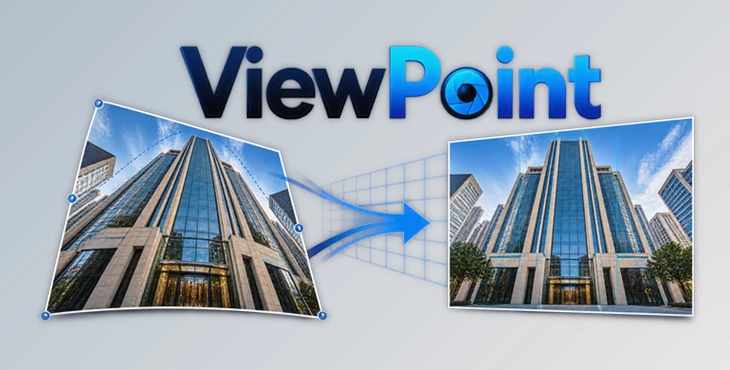
ViewPoint is designed for professional image correction. It can correct perspective distortion, lens distortion, distortions in proportions, and can also move objects within an image. Using powerful yet easy to use tools, ViewPoint can take an ordinary image and give it professional, balanced results.
ViewPoint is ideal for architectural, landscape, portrait, interior, and creative photography. Whatever type of photography you do, ViewPoint gives you the ability to correct the geometry in your images to get them to the desired result.
What Is ViewPoint and How Does It Improve Your Photos?
ViewPoint is a professional image correction tool created to solve common photography problems caused by camera angles, lens limitations, and perspective distortion.
Unlike traditional editing methods that affect the entire image, ViewPoint allows you to make selective adjustments to specific areas while keeping the rest of the photo unchanged.
For example, if a person standing near the edge of a wide-angle photo appears stretched, or if a building loses its natural proportions because of perspective, you can correct only that area and maintain a realistic appearance.
With ViewPoint, you can:
- Move and reposition important image details.
- Resize or rotate specific elements.
- Correct stretched subjects caused by wide-angle lenses.
- Adjust perspective and horizon alignment.
- Restore realistic proportions.
- Create creative miniature effects with shallow depth of field.
These features help photographers achieve cleaner compositions, more natural results, and greater creative freedom without needing to reshoot their images.
Professional Image Correction With ViewPoint
ViewPoint brings advanced geometry and perspective editing tools into a simple and efficient workflow. It is designed for photographers who need accurate control over the structure of their images while maintaining a natural look.
Instead of applying broad corrections that may affect the whole composition, you can work locally and fine-tune only the areas that require adjustment.
Features
ReShape Fusion: Transform Any Area of Your Image
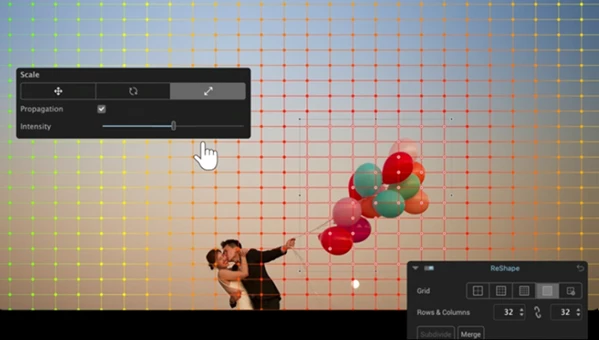
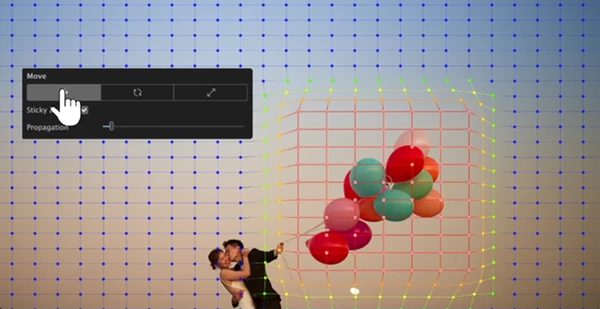
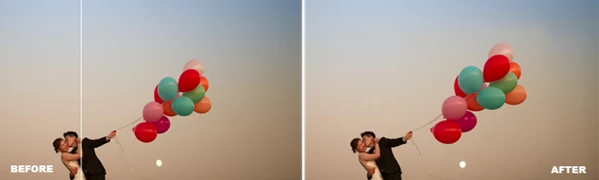
The powerful ReShape Fusion tool introduces a completely new way to edit photos. It allows you to move, scale, and rotate individual elements directly inside your image.
This is especially useful when a small detail affects the overall balance of your composition. You can reposition objects, adjust proportions, or improve the placement of important elements without having to capture a new photo.
The new Spread slider provides additional control by blending your adjustments smoothly with surrounding areas, creating more realistic and professional results.
Local Volume Deformation Correction
Wide-angle lenses often create unwanted stretching effects, especially when subjects are placed close to the edge of the frame. This problem is common in architectural photography, group photos, and interior shots.
ViewPoint includes a volume deformation correction tool that helps restore natural proportions instantly.
With local correction capabilities, you can fix distorted areas without changing the appearance of the rest of the image. This allows subjects, faces, and objects to maintain a more realistic shape.
Advanced Perspective Adjustments
Perspective errors can make images feel unbalanced or unnatural. A simple global correction is not always enough, especially when only certain parts of an image need adjustment.
With ViewPoint, you can selectively refine perspective and geometry by:
- Correcting specific areas of an image.
- Adjusting horizons.
- Aligning vertical and horizontal lines.
- Restoring realistic perspective using advanced control points.
This level of precision is ideal for architectural photographers, real estate creators, and anyone working with complex scenes.
Automatic Lens Distortion Correction
Camera lenses do not always capture the world exactly as our eyes see it. Optical issues such as barrel distortion and pincushion distortion can change the appearance of objects.
ViewPoint automatically corrects these distortions and helps recover the maximum possible image area from your camera sensor.
This feature is extremely useful for:
- Architecture photography.
- Interior design images.
- Landscape photography.
- Wide-angle shots.
- Professional commercial projects.
Create Miniature Worlds Without a Tilt-Shift Lens
Creative effects do not always require expensive equipment. ViewPoint allows you to transform regular photos into miniature-style scenes by applying a shallow depth of field and soft bokeh effects.
This technique helps guide the viewer’s attention toward specific areas of the image and creates a unique artistic appearance similar to tilt-shift photography.
Professional Tips for Better Results
To get the most natural and professional results with ViewPoint, follow these simple techniques:
Make Subtle Adjustments
Small corrections usually create the most realistic results. Avoid extreme changes and gradually adjust elements until the image feels balanced.
Use Local Corrections Instead of Global Changes
Whenever possible, focus on the specific area that needs improvement. Local adjustments help preserve the original composition and prevent unwanted changes elsewhere.
Pay Attention to Natural Proportions
When fixing volume deformation, always compare the edited result with real-world proportions. Over-correcting can make subjects look unnatural.
Combine Geometry Corrections With Creative Editing
After improving perspective and structure, continue enhancing your image with color adjustments, lighting improvements, and creative effects for a complete professional finish.
Review Your Image From Different Perspectives
Small perspective changes can have a large visual impact. Zoom in and check important details before finalizing your edit.
Final Thoughts
If you are a photographer or image editor wanting full control over image perspective, distortion, and image geometry, then ViewPoint is the tool for you.
With ViewPoint, complex photo editing can be simplified, made faster and more accessible. Whether it is fixing lens issues or distorting specific areas of an image, ViewPoint enables more advanced image editing. Intelligent distortion correction, local perspective correction, and ReShape Fusion enable the creation of natural and well balanced images with less complexity.
Whether you are working with portrait, landscape, architecture, or creative images, ViewPoint enables you to edit your images to a professional standard.
Check out the capabilities of ViewPoint and find a smarter way to balance, perspective, and shape your images.
 DxO - ViewPoint v5.17.0.41 (Win).rar (Size: 474.0 MB - Date: 9/8/2026 4:49:22 PM)
- DxO ViewPoint v5.15.0 (Mac).rar (Size: 668.4 MB - Date: 7/30/2026 11:55:55 AM)
- DxO ViewPoint v5.13.0 Build 16 (Mac).rar (Size: 681.4 MB - Date: 6/16/2026 3:19:23 PM)
- DxO ViewPoint v5.5.0.1 (Win).rar (Size: 575.3 MB - Date: 6/11/2025 12:12:37 PM)
- DxO ViewPoint v5.4.0.506 (Win).rar (Size: 569.9 MB - Date: 5/8/2025 1:04:47 PM)
- DxO ViewPoint v5.3.0.496 (Win).rar (Size: 569.4 MB - Date: 4/16/2025 12:32:02 PM)
- DxO ViewPoint v5.2.1.1 (Win).rar (Size: 569.0 MB - Date: 2/16/2025 11:17:41 AM)
- DxO ViewPoint v5.2.0.474 + Portable (Win).rar (Size: 587.0 MB - Date: 2/5/2025 3:01:51 PM)
- DxO ViewPoint v5.2.0.474 (Win).rar (Size: 569.0 MB - Date: 2/5/2025 3:01:23 PM)
- DxO ViewPoint v4.15.0.294 (Mac).rar (Size: 1.0 GB - Date: 1/23/2025 12:41:11 PM)
- DxO ViewPoint v5.1.0.454 (Win).rar (Size: 567.1 MB - Date: 1/23/2025 12:40:35 PM)
- DxO ViewPoint 4.16.0.302 Multilingual.rar (Size: 736.4 MB - Date: 10/17/2024 4:57:56 PM)
Files Password : gfxplugin.com OR 123456