Downloadable Files
You can download Blender Launch Control for free at the end of this page.
Start Your Engines – Make Vehicle Animation Effortless
Car animation in Blender can quickly turn into a technical maze. Suspension systems, steering mechanics, wheel rotations, physics simulations — everything needs to work together perfectly to look believable. And if even one detail feels off, the whole animation looks fake.
That’s precisely where the Launch Control addon comes into play. Designed to automate the rigging and animation process for vehicles, it streamlines these complexities, enabling car commercial creators, animators, and automotive visualizers to produce high-quality outputs with less stress and time investment.
What Is Launch Control and Why Does It Matter?
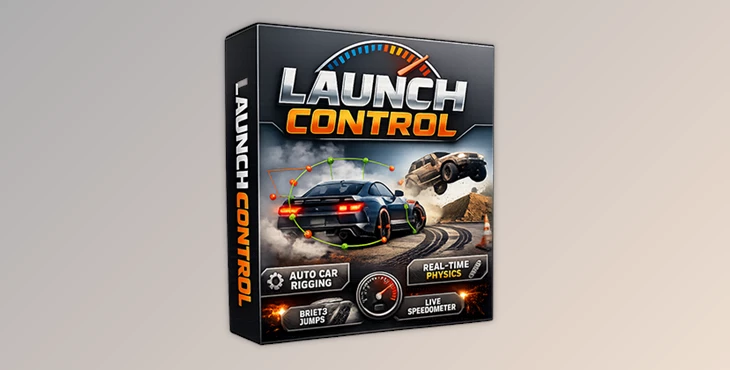
At its core,Launch Control is a vehicle rigging and animation addon designed to automatically create realistic car rigs inside Blender. Using a smart tagging system, it detects wheels, body, and brakes, then generates a fully adjustable rig in just a few clicks.
But this tool isn’t just about speed — it’s about accuracy.
Vehicle animation becomes convincing when small mechanical details behave correctly. For example, in real life:
- Front wheels turn at different angles during curves (Ackermann steering).
- Wheels tilt slightly due to camber and caster.
- Suspension compresses under braking and acceleration.
- Speed variations affect weight distribution.
Launch Control integrates these principles directly into your workflow. The result? Animations that feel grounded, mechanical, and physically believable without requiring you to manually engineer every detail.
Launch Control – A Professional Workflow Simplified
Launch Control is built for individual creators who want professional-level results without studio-level complexity. The workflow is structured and intuitive:
Select → Tune → Animate → Physics → Add FX → Export
From rig creation to final export, everything is organized logically so you always know what step comes next. Helpful pop-ups guide you through the tagging process, making even first-time setups surprisingly smooth.

Features
One-Click Rigging That Actually Works
After tagging the wheels and body, Launch Control automatically builds an adjustable rig. No manual bone hierarchies, no driver setups, no complex constraint chains. Within minutes, your vehicle is ready for animation.
For CAD datasets, there’s even a dedicated CAD Data Setup tool, ensuring professional automotive visualization workflows stay efficient.
Procedural Animation & Custom Driving Paths
If you want instant motion, built-in animation presets give you a strong starting point. You can quickly generate:
- Drifts
- Jumps
- Donuts
- Off-road motion
- Looping sequences
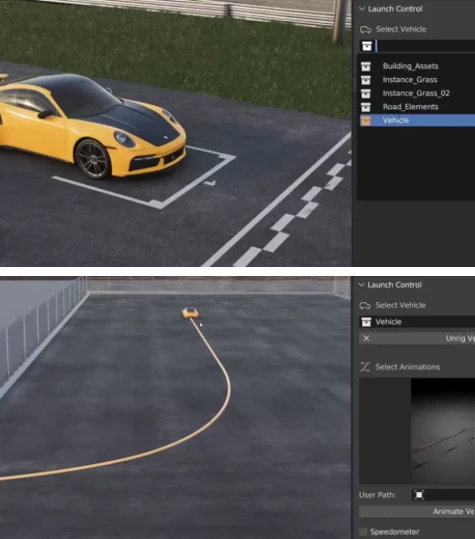
And if presets aren’t enough, simply draw your own driving path and animate the vehicle along it. This balance between automation and creative control is what makes the addon powerful rather than restrictive.
Real-Time Physics With Artistic Control
Launch Control doesn’t just move objects — it simulates behavior. You can use physics presets or manually dial in suspension response, gravity effects, and motion intensity.
Need realistic gravity for a jump scene? Done.
Want to exaggerate movement for a stylized commercial? You can do that too.
The built-in Speedometer and G-Force meter help maintain believable motion throughout the scene, giving you constant feedback inside the 3D View.
Realistic Steering & Suspension Details
Car animation often looks convincing — until the vehicle enters a curve. That’s where technical realism becomes essential.
Launch Control includes:
- Real-world Ackermann steering geometry
- Automatic camber and caster calculations
- Advanced suspension types including live axles
- Simulated suspension lengths
- Airborne mode for jump sequences
These features ensure your vehicle reacts naturally to movement, dramatically improving realism in dynamic shots.
Multi-Car Workflow & Scene Management
For racing scenes or traffic simulations, you can rig and animate multiple vehicles simultaneously. Color-coded paths and Multi-Edit mode allow batch editing across vehicles, saving enormous amounts of time in complex scenes.
The Automated Ground Detection system also simplifies interaction with surfaces. Just place geometry into the “Ground Detection” collection — high poly, low poly, messy topology — it doesn’t matter. The addon adapts automatically.
Built-In Extras That Elevate Visual Quality
Launch Control includes thoughtful additions that add cinematic polish:
- Automatic Skidmark Generator with intensity control
- Volumetric HDR Headlight presets
- Steering wheel rigging
- Jump trajectory generator
- Quick camera setup
- 3 high-quality vehicle models (Indie plan)
These aren’t just bonus features — they help tell a story. Skidmarks show aggression. Headlight beams add atmosphere. Subtle wheel shake adds realism. Small details create big impact.
Pro Tips for More Cinematic Results
Even with automation, a few creative decisions can push your animation further.
First, avoid perfectly straight motion paths. Real drivers make subtle micro-adjustments, so slight variations in curves and timing will instantly improve realism.
Second, combine physics simulation with manual refinement. Let the system calculate suspension and gravity, then fine-tune with PostFX controls for artistic direction.
Finally, pay attention to speed progression. Gradual acceleration and believable braking feel more cinematic than constant velocity. The built-in speed feedback makes this easier than ever.
Think of Launch Control as your technical assistant — but you’re still the director.
Why It Changes the Game
Vehicle animation is widely recognized as one of the most technically demanding areas of 3D production. With its comprehensive features that tackle real-world vehicle behaviors—from steering geometries to suspension dynamics—Blender Launch Control removes much of that complexity while maintaining creative control for users.
For individual artists, especially, the Indie version offers an impressive balance of power and accessibility. You get professional-level rigging behavior without needing a dedicated technical director or custom setup workflow.
If you work with automotive scenes in Blender — whether for commercials, visualization, or cinematic projects — Blender Launch Control is not just a convenience. It’s a serious upgrade to your workflow.
 Blende - Launch Control Auto Car Rig v1.9.71 Indie.rar (Size: 270.2 MB - Date: 2/7/2026 12:52:31 PM)
- Blender Market - Launch Control Auto Car Rig v1.9.1.rar (Size: 262.6 MB - Date: 4/13/2025 11:24:00 AM)
- Blender Market - Launch Control Auto Car Rig v1.8.1.rar (Size: 262.3 MB - Date: 4/5/2025 4:16:52 PM)
- Blender Market - Launch Control Auto Car Rig v1.8.rar (Size: 262.3 MB - Date: 2/3/2025 4:27:21 PM)
- Blender Market - Launch Control Auto Car Rig v1.7.0.rar (Size: 188.6 MB - Date: 10/29/2024 12:14:55 PM)
- BM - Launch Control Auto Car Rig v1.5.1.rar (Size: 167.9 MB - Date: 10/17/2024 3:17:36 PM)
Files Password : gfxplugin.com OR 123456