Downloadable Files
You can download Extreme Pbr Nexus for free from the end of this page.
Take the Complexity Out of Blender Materials
Creating realistic materials in Blender can quickly become one of the most time-consuming parts of a 3D project. Building node networks, managing multiple texture maps, adjusting displacement, fixing visible texture repetition, and adding realistic imperfections can require a surprising amount of work.
Extreme Pbr Nexus is designed to simplify this entire process. Instead of spending most of your time dealing with complex Blender nodes, you can work through an intuitive interface and access a large ready-to-use material library.
With more than 1,800 materials and approximately 9,000 textures, the addon gives 3D artists a practical way to build detailed surfaces, blend materials, create realistic wear, control texture mapping, and prepare assets for different types of projects.
What Is Extreme Pbr Nexus?
Extreme Pbr Nexus is a professional Blender addon focused on PBR material creation and management. It has been developed and continuously improved over several years with the goal of making advanced material workflows easier to handle.
At its core, the addon provides an organized library containing more than 1,800 materials divided into categories, complete with tags and a search system. Instead of manually constructing every shader from scratch, you can start with an existing material and customize it for your scene.
This approach can be useful for architecture, interior visualization, product rendering, environmental scenes, vehicles, game assets, and many other 3D projects.
For example, you could apply a brick material to a building and use displacement to introduce actual surface depth. A painted metal object could receive procedural worn edges and scratches, while a vehicle could use realistic metallic car paint with visible flakes. These details help surfaces feel less artificial and give renders additional depth and visual credibility.
Features That Make Material Creation Easier
1,800+ Ready-to-Use Materials
One of the biggest advantages of Extreme Pbr Nexus is its extensive material library. More than 1,800 materials are included and organized into libraries and categories.
Tags and search tools make it easier to locate the material you need without manually browsing through a huge collection.
The materials can also be combined and blended, giving you considerably more creative freedom than simply applying a single texture to an object.
Paint Directly Between Materials
The Texture Paint workflow allows you to blend different materials directly on your 3D objects.
With only a few steps, you can paint between materials from the included library and build customized surfaces. This is especially useful when creating weathered objects, layered materials, damaged surfaces, or environments where perfectly clean textures would look unrealistic.
For example, you could combine clean metal with rusted or worn areas rather than covering the entire object with one uniform material.
Realistic Car Paint
Extreme Pbr Nexus includes an improved Car Paint Material designed for realistic vehicle surfaces.
You can create everything from relatively simple automotive paint to metallic finishes containing metallic flakes. This gives vehicle artists more flexibility when trying to reproduce the layered appearance of real automotive paint.
Realtime Animated Water
Creating animated water doesn’t have to mean building a complicated shader from the beginning.
Extreme Pbr Nexus provides an automatically animated water material that can also be edited according to the needs of your scene. This makes it useful when you need moving water quickly while still retaining control over its appearance.
Procedural Worn Edges
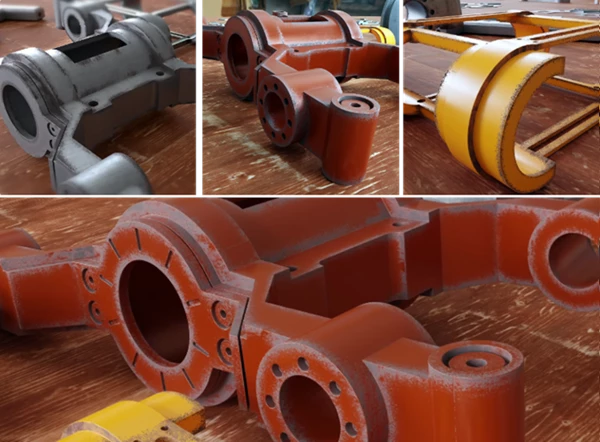
The FX Layer system makes it possible to generate procedural worn edges in both Cycles and Eevee.
You can introduce effects such as peeling paint, scratches, and exposed metal without permanently modifying the underlying material. Because the workflow is non-destructive and works in real time, you can experiment with different amounts of wear until the surface fits the object.
This is particularly valuable for props, machinery, industrial environments, vehicles, and other assets that should show signs of use.
Surface Imperfections
Real-world surfaces are rarely completely clean.
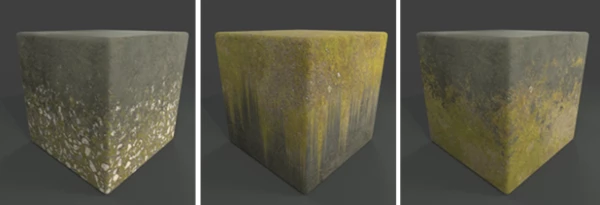
Using FX Layers, you can introduce imperfections such as scratches and fingerprints with only a few adjustments. Small details like these can make a major difference in close-up product renders or photorealistic scenes because they break up surfaces that would otherwise appear unnaturally perfect.
Displacement and Microdisplacement
Texture-based materials are prepared for displacement, allowing you to activate or deactivate it whenever necessary.
The system relies on Blender’s native non-destructive modifier workflow. This gives materials additional geometric depth while keeping the setup flexible.
Brick walls are a good example. Instead of relying only on color and normal information, displacement can make individual bricks and surface details physically stand out, producing a much more convincing result.
Anti-Tile System
Repeated texture patterns are one of the easiest ways to reveal that a surface is computer-generated.
The Anti-Tile system helps eliminate visible texture repetition across larger surfaces. It can also be used with your own textures, making it useful beyond the included Extreme PBR library.
This is especially helpful for walls, floors, terrain, concrete, stone, and other large areas where repeating patterns can become obvious.
Visual Mapping Control
Instead of constantly switching to the UV Editor for basic mapping adjustments, Extreme Pbr Nexus provides visual controls directly from the 3D Viewport.
You can manipulate texture scale, rotation, and position while viewing the result.
This can significantly speed up architectural and interior workflows. When adjusting wooden flooring, for example, you can quickly orient the grain in the correct direction. Tile patterns can similarly be positioned and scaled until they properly match the room.
Shader Overlay for Scene-Wide Effects
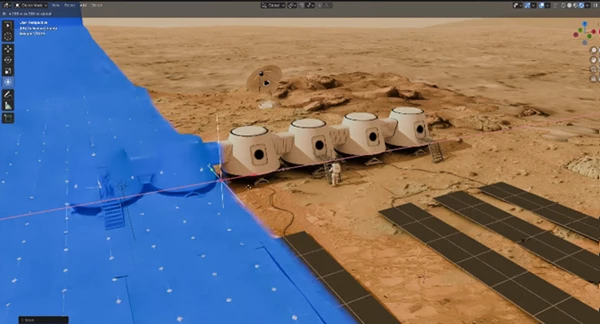
The Shader Overlay system allows you to mix materials throughout a scene simultaneously.
It can be used to create effects such as animated gradients or combined with the Invisible material to produce professional Cut Plane animations.
Because these effects can operate across the scene, they open up interesting possibilities for architectural presentations, technical animations, and stylized visualizations.
Flexible Material Override
Material Override works with both Cycles and Eevee and gives you control over which objects should receive an overridden material.
You can select the objects you want to change while leaving other materials untouched. The override can come from an existing material in your scene or directly from the Extreme PBR library.
This can be particularly convenient when testing different visual styles or creating alternative versions of a render.
Asset Browser Integration
Extreme Pbr Nexus can create an Asset Browser directly from its material library.
This gives you another convenient way to access materials through Blender’s native Asset Browser workflow, especially when you frequently reuse materials across different scenes.
Powerful Texture Manager
The Texture Manager provides access to approximately 9,000 textures, including maps such as diffuse, normal, and roughness textures at different resolutions.
From here, you can modify properties such as color, saturation, and exposure or bring in your own textures.
A dedicated Texture Browser also makes it easier to search through the textures associated with materials in the library.
Export Materials for Unreal Engine and Unity 3D
Material creation doesn’t necessarily have to end inside Blender.
After painting an object, you can bake its materials and export the resulting textures for use in Unreal Engine, Unity 3D, or other 3D engines.
This makes the painting and material workflow useful for artists who create assets in Blender but ultimately need them inside a real-time engine.
Practical Ways to Use Extreme Pbr Nexus
The addon can adapt to many different types of projects. An architectural visualization artist could use its material library for walls, floors, bricks, wood, tiles, and other building surfaces while relying on visual mapping controls to quickly correct their alignment.
For product visualization, surface imperfections such as fingerprints and scratches can prevent perfectly polished materials from looking overly synthetic.
Environment artists can combine multiple materials and paint transitions between them to create more varied surfaces. Anti-Tile can then help prevent large areas from exposing obvious repeating patterns.
Vehicle artists can take advantage of the dedicated Car Paint Material, while game artists can paint and bake materials before exporting their textures to Unreal Engine or Unity 3D.
The important benefit is not simply having more materials. It is having several material-related workflows available from one organized system.
Tips for More Natural Results
A large material library can speed up your workflow, but realistic results still depend on how materials are used. Try to avoid making every object perfectly clean. Subtle scratches, fingerprints, edge wear, or variations can make a surface feel much more believable.
Use displacement where actual depth contributes to the scene, such as bricks or strongly textured surfaces, but avoid exaggerating it. Small adjustments often produce more convincing results than extremely strong displacement.
For large surfaces, pay attention to texture repetition and use the Anti-Tile system when patterns become noticeable.
When blending materials, think about how objects naturally age. Wear usually appears more strongly around exposed edges and frequently touched areas rather than being distributed uniformly across an object.
Architecture and interior artists should also make use of the visual mapping controls. Correct grain direction on wood or proper alignment of tile patterns can have a surprisingly large impact on the realism of a finished visualization.
Finally, experiment with FX Layers non-destructively. Because you can adjust your effects without permanently damaging the original material, it is easier to compare different amounts of wear and surface variation before settling on the final look.
A More Efficient Material Workflow
Extreme Pbr Nexus brings a large collection of materials together with tools for painting, displacement, mapping, imperfections, material overrides, texture management, and scene-wide effects.
Its biggest strength is the way these features can simplify tasks that would otherwise require more manual work with Blender’s shader nodes and texture systems.
Whether you’re creating architecture, environments, products, vehicles, animations, or assets for game engines, the combination of more than 1,800 materials, thousands of textures, non-destructive FX Layers, Anti-Tile technology, visual mapping controls, and export-oriented workflows gives you plenty of room to experiment.
Instead of treating materials as the final repetitive step of a project, Extreme Pbr Nexus can make them a faster and more creative part of the overall 3D workflow.
 Blender - Extreme Pbr Nexus v4.2.106.rar (Size: 58.9 MB - Date: 9/2/2026 1:01:02 PM)
- Blender - Extreme Pbr Nexus v4.2.101.rar (Size: 59.3 MB - Date: 5/9/2026 12:38:58 PM)
- Blender - Extreme Pbr Nexus v4.1.141.rar (Size: 59.1 MB - Date: 12/20/2025 12:53:53 PM)
- Blender - Extreme Pbr Nexus v4.1.134.rar (Size: 58.2 MB - Date: 8/5/2025 10:54:47 AM)
- Blender Market – Extreme Pbr Nexus v4.1.131.rar (Size: 58.2 MB - Date: 2/19/2025 12:00:15 PM)
- Blender Market – Extreme Pbr Nexus v4.1.129.rar (Size: 58.2 MB - Date: 11/28/2024 11:04:40 AM)
- Blender Market – Extreme Pbr Nexus v4.1.113.part1.rar (Size: 5.0 GB - Date: 10/18/2024 2:11:52 AM)
- Blender Market – Extreme Pbr Nexus v4.1.115.rar (Size: 58.0 MB - Date: 10/18/2024 2:11:04 AM)
- Blender Market – Extreme Pbr Nexus v4.1.113.part2.rar (Size: 223.5 MB - Date: 10/18/2024 2:11:02 AM)
Files Password : gfxplugin.com OR 123456