Downloadable Files
You can download Pixelmash for free from the end of this product page.
A Smarter Way to Create Pixel Art
Pixel art may look simple at first glance, but creating clean sprites, smooth animations, and consistent assets can quickly become time-consuming. Working pixel by pixel gives you precise control, but editing shapes, changing proportions, or animating characters often requires a lot of manual work.
Pixelmash approaches this process differently. It combines traditional per-pixel painting with high-resolution artwork, vectors, dynamic layers, animation tools, and non-destructive effects. This means you can keep the distinctive look of pixel art while using a much more flexible workflow behind the scenes.
Instead of committing every detail directly to a low-resolution canvas, you can build parts of your artwork at higher resolutions or with vectors and let Pixelmash pixelate them in real time.
How Does Pixelmash Work?
The main idea behind Pixelmash is to combine different methods of creating artwork inside a single project. You can work with traditional pixel-perfect layers when you need precise control, while also using vector and dynamic-resolution layers for elements that need more flexibility.
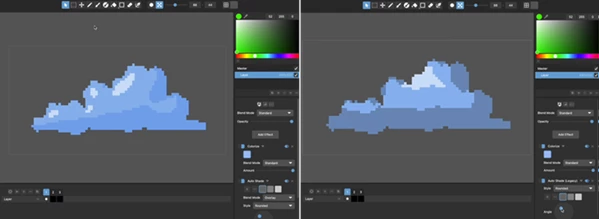
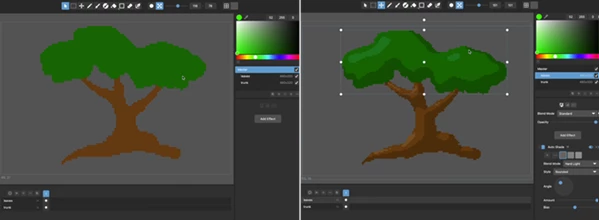
High-resolution and vector-based layers can be non-destructively pixelated into a lower resolution in real time. Because the original layer remains editable, you can transform, animate, or modify it without permanently destroying its source quality.
For example, imagine creating a character using vector or high-resolution body parts. Instead of redrawing the character whenever you need to adjust its size or position, you can transform those layers while Pixelmash continuously produces the pixelated result.
This workflow can make experimentation faster while keeping the final artwork consistent with a pixel-art aesthetic.
Meet Pixelmash: Pixel Art Meets Vectors
Pixelmash is a pixel art and animated sprite editor designed to make some of the more difficult and repetitive parts of pixel-art production easier.
One of its biggest advantages is that you don’t have to choose between traditional pixel painting and modern graphics workflows. You can mix per-pixel artwork, vector graphics, and dynamically pixelated high-resolution layers in the same project.
You can even import existing high-resolution artwork or SVG files, animate them with transforms, and then use layer effects to create outlines and other pixel-style treatments.
This makes Pixelmash useful not only for creating individual pixel illustrations, but also for building reusable assets and animated characters.
Features
Vector and High-Resolution Pixel Art
Pixelmash allows high-resolution and vector artwork to exist alongside traditional low-resolution pixel layers. These layers can be pixelated dynamically, giving you more freedom to edit shapes and proportions before settling on the final appearance.
Traditional Per-Pixel Painting
When individual pixels matter, you can still use traditional pixel-perfect painting. This makes it possible to combine flexible construction techniques with detailed manual refinement.
Non-Destructive Pixelation
Vector and high-resolution layers are converted visually into low-resolution pixel art in real time without permanently destroying the original artwork.
You can therefore continue changing the source layer while seeing how those changes affect the pixelated result.
Rigged Character Animation
Characters can be constructed from parented layers, creating a simple rig-like structure for animation.
For example, separate layers could represent different parts of a character. Parenting these layers makes it easier to control their relationships and animate the character using keyframes instead of manually recreating every frame.
Transforms and Tweening
Pixelmash supports transforms and tweening, giving you another way to create movement without relying exclusively on traditional frame-by-frame pixel animation.
This can be particularly useful when experimenting with character movements or animated objects.
Advanced Layer Effects
Layer effects can be combined in many different ways to create editable pixel-art treatments. Since the workflow is non-destructive, effects can remain adjustable instead of becoming permanently baked into the artwork.
Outlines are one practical example of how these effects can be used.
SVG and High-Resolution Artwork Import
Existing high-resolution artwork and SVG files can be imported into Pixelmash. You can then animate them using transforms and apply pixelation and layer effects to integrate them into your pixel-art project.
Multiple Asset Resolutions
Vector and high-resolution source artwork makes it easier to produce assets at different resolutions.
Rather than manually recreating the same design whenever another resolution is required, you can work from flexible source artwork and adapt the resulting pixel art.
Reusable Templates
Pixelmash also supports the creation of template files that have layers and effects already set up. Templates are useful if you often create content that shares the same appearance or structure. With templates, you can reduce the amount of repeated configuration necessary and help ensure consistency across your art.
What Can You Create with Pixelmash?
Pixelmash can fit naturally into projects involving pixel-art characters, animated sprites, game assets, reusable graphic elements, and pixel-style illustrations.
For example, you could import an SVG character, separate or organize its components into layers, apply pixelation and outline effects, and animate those elements using transforms.
Another useful workflow is asset production. If you need similar artwork at several resolutions, working from high-resolution or vector source layers gives you a more flexible starting point than manually rebuilding every asset pixel by pixel.
For character animation, parented layers and keyframes can also simplify movements that would otherwise require considerable manual editing.
Tips for Getting Better Results
Pixelmash offers a large amount of flexibility. By thoughtfully combining the workflows described above, you can create projects that are easier to work with.
Employ vector and dynamic-resolution layers for objects that are likely to be transformed, resized, or animated often. Use regular per-pixel layers for details where pixel precision is desired.
Break any significant moving parts of an animated character into separate layers and try to create beneficial connections between them using parenting. This will help simplify any animation changes made later.
Try experimenting with combinations of layer effects instead of always painting every visual element of the artwork. Non-destructive effects will enable you to experiment with various looks and then polish them later.
For frequently created artwork, create template files with the layers and effects you most often use already set up. This can save on setup time and can help ensure that all artwork shares a consistent style.
Avoid treating vector artwork and traditional pixel artwork as mutually exclusive. One of the benefits of using Pixelmash is the ability to combine both workflows. Use the technique that allows for the most efficient and effective results for each situation.
Pixel Art Without the Usual Limitations
Pixelmash strikes a nice balance between traditional pixel-perfect art and more liberal modern art practices. As needed, you can still paint pixel by pixel, but you also have the benefits of vectors, high-res layers, transforms, tweening, parenting, keyframe animation, and non-destructive editing.
These features can help out pixel artists who are creating characters, sprites, game art, or other forms of pixel art by allowing for greater experimentation and iteration.
What makes Pixelmash so unique is the ability to combine traditional pixel art with dynamically pixelated vector and high resolution art. Rather than trying to alter pixel art, Pixelmash allows for new methods of creation and animation.
 NeverCenter Pixelmash v2026.2 (Win).rar (Size: 20.4 MB - Date: 9/3/2026 12:26:34 PM)
- NeverCenter Pixelmash v2026.0 (Win).rar (Size: 18.0 MB - Date: 1/3/2026 12:08:08 PM)
- NeverCenter Pixelmash v2025.2 (Win).rar (Size: 18.0 MB - Date: 9/10/2025 12:22:48 PM)
- NeverCenter - Pixelmash v2025.1 (Win).rar (Size: 18.0 MB - Date: 5/4/2025 1:41:10 PM)
- NeverCenter Pixelmash v2025.0.1 (Win).rar (Size: 18.0 MB - Date: 2/25/2025 3:18:23 PM)
- NeverCenter Pixelmash v2024.1.0 (WIN) X64.rar (Size: 16.0 MB - Date: 10/17/2024 11:42:49 AM)
- NeverCenter Pixelmash v2024.0.0 (WIN) X64.rar (Size: 19.1 MB - Date: 10/17/2024 11:42:49 AM)
- NeverCenter Pixelmash 2023.5.0 (WIN) X64.rar (Size: 19.1 MB - Date: 10/17/2024 11:42:49 AM)
- Nevercenter Pixelmash 2024.3 (Win).rar (Size: 19.3 MB - Date: 10/17/2024 11:42:48 AM)
Files Password : gfxplugin.com OR 123456