Downloadable Files
You can download the Reach Pro product for free at the end of this page.
🚀 Work Faster, Create Smarter
If you’ve ever felt slowed down by the number of menus or the number of tasks to complete within After Effects, then Reach Pro is the tool for you.
It’s designed to remove the friction from your editing process and allow you to work faster. All of your essential tools are located within Reach Pro - just one search away!
🎯 What is Reach Pro and Why It Matters
Reach Pro is an all-in-one extension that offers After Effects users a range of features to make editing projects easier.
Practical Use Cases
- Instantly apply effects using the search bar instead of browsing menus
- Save and reuse color palettes across multiple projects
- Manage and apply expressions without rewriting them each time
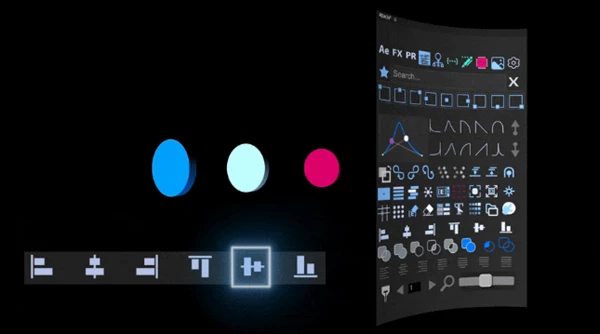
- Align, animate, and organize layers with fewer steps
Why It Improves Your Results
By simplifying complex workflows, Reach Pro helps you:
- Save time on repetitive tasks
- Reduce errors in your projects
- Maintain consistency in design and animation
- Focus more on creativity instead of technical processes
🧰 Introducing Reach Pro
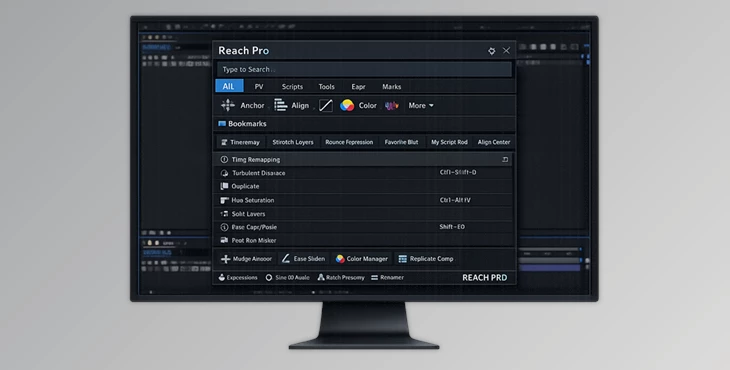
Reach Pro enhances After Effects by making it faster, more intuitive, and more flexible. It acts like a smart control center that gives you instant access to everything you need.
⭐ Features
🔍 Smart Search & Instant Access
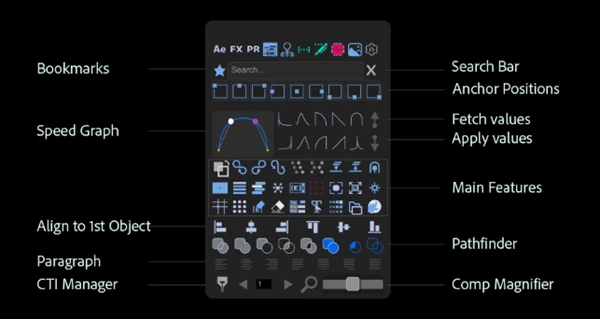
- Launch commands, effects, scripts, and presets instantly
- Bookmark frequently used tools
- Clear cache or capture snapshots with one click
🎨 Color Palettes Manager
- Pick colors directly from your layers
- Save palettes for reuse across projects
- Organize and toggle palettes easily
🧠 Expression Editor
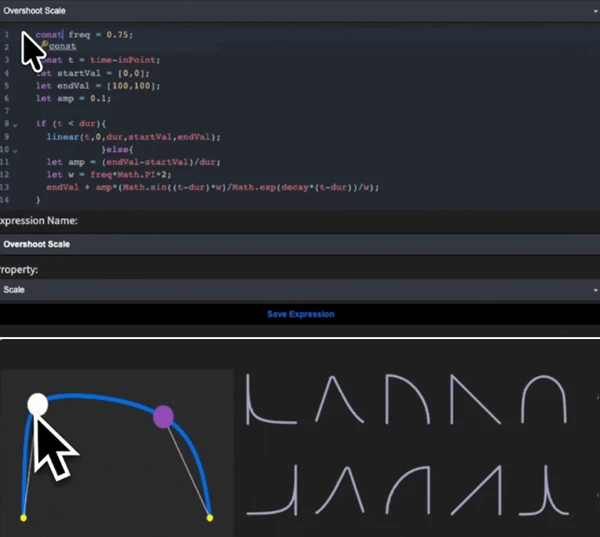
- Store and manage all expressions in one place
- Edit expressions with a modern JavaScript formatter
- Apply expressions instantly with predefined settings
📈 Speed Graph & Keyframe Tools
- Visual easing editor with built-in presets
- Duplicate, mirror, and loop keyframes
- Convert markers and keyframes efficiently
🦴 BONES Rigging Toolkit
- Create rigs from paths quickly
- Bind shapes to bones easily
- Control animation with adjustable constraints
🧩 Shape & Layer Tools
- Swap fill and stroke colors
- Merge or split shapes
- Align layers relative to the first selected object
🧾 Text & Content Tools
- Split text into words, lines, or characters
- Automatically create text backgrounds
- Search and replace text across projects
🎥 Animation & Effects Tools
- Apply universal effect setups
- Toggle or remove expressions
- Reset layers instantly
🎧 Audio & Timing Tools
- Create audio-driven animations
- Generate BPM-based markers
- Sync animations precisely with sound
🧹 Cleanup & Project Management
- Remove unused or disabled effects
- Automatically organize project structure
- Export compositions as standalone files
🎬 Real Workflow Example
Imagine working on a motion design project:
- You apply effects instantly using search
- Maintain consistent colors using saved palettes
- Animate smoothly with custom easing tools
- Sync everything perfectly with audio markers
What used to take hours can now be done in minutes.
💡 Pro Tips for Better Results
- ⭐ Bookmark your most-used tools so they can be accessed quickly.
- 🎨 Use the color palettes manager to save colors for your projects.
- 🧠 Save expressions to your project so they can be applied instantly to project elements.
- ⚡ Use the keyframe tools to create various animations.
- 🔊 Use the audio tools to plan your project animations to sync with audio.
These tips may take a little while to learn, but they will significantly improve your editing process.
🔥 Final Thoughts
Reach Pro is more than just a plugin for After Effects. It’s a tool that will significantly improve your editing process by simplifying complex tasks and allowing you to focus on your projects’ creative processes. Whether you are just starting with After Effects or are a professional in the industry, integrating Reach Pro into your editing process will dramatically improve your experience with the software.
 Reach Pro (v3.0.20 for Win, Mac).rar (Size: 50.2 MB - Date: 9/24/2026 11:37:38 AM)
- Reach Pro by Aescripts (v3.0.18 for Win, Mac).rar (Size: 50.2 MB - Date: 9/7/2026 2:59:50 PM)
- Reach Pro by Aescripts (v3.0.17 for Win, Mac).rar (Size: 50.5 MB - Date: 6/29/2026 11:42:25 AM)
- Reach Pro by Aescripts (v3.0.16 for Win, Mac).rar (Size: 50.2 MB - Date: 6/6/2026 11:12:47 AM)
- Reach Pro by Aescripts (v3.0.15 for Win, Mac).rar (Size: 50.2 MB - Date: 4/30/2026 11:45:25 AM)
- Reach Pro by Aescripts (v3.0.12 for Win, Mac).rar (Size: 50.2 MB - Date: 4/29/2026 2:22:45 PM)
- Reach Pro - Powerful search bar to access and bookmark in Ae by Aescripts (v3.0.011 for Win, Mac).rar (Size: 50.3 MB - Date: 4/25/2026 1:47:57 PM)
- Aescripts - REACH Pro v3.0.09 (Win, Mac).rar (Size: 51.5 MB - Date: 4/15/2026 11:36:34 AM)
- Aescripts - REACH Pro v3.0.08 (Win, Mac).rar (Size: 94.6 MB - Date: 1/25/2026 4:25:28 PM)
- Aescripts - REACH Pro v3.0.05 (Win, Mac).rar (Size: 1.7 MB - Date: 1/8/2026 12:42:58 PM)
- Aescripts - REACH Pro v3.0.04 (Win, Mac).rar (Size: 1.7 MB - Date: 1/6/2026 1:33:08 PM)
- Aescripts - REACH Pro v3.0.02 (Win, Mac).rar (Size: 1.5 MB - Date: 12/31/2025 12:40:43 PM)
- Aescripts - REACH Pro v3.0.01 (Win, Mac).rar (Size: 1.5 MB - Date: 12/28/2025 12:37:30 PM)
- Aescripts - REACH Pro v3.0.0 (Win, Mac).rar (Size: 1.5 MB - Date: 12/20/2025 12:53:27 PM)
- Aescripts - REACH AEssential Kit v2.1.19 (Win, Mac).rar (Size: 2.0 MB - Date: 11/24/2025 2:42:16 PM)
- Aescripts - REACH AEssential Kit v2.1.16.rar (Size: 43.6 MB - Date: 9/30/2025 10:50:31 PM)
- Aescripts - REACH AEssential Kit v2.1.15.rar (Size: 2.0 MB - Date: 9/25/2025 6:33:04 PM)
- Aescripts - REACH AEssential Kit v2.1.10.rar (Size: 2.3 MB - Date: 9/10/2025 12:14:12 PM)
- Aescripts - REACH AEssential Kit v2.1.8.rar (Size: 1.1 MB - Date: 9/2/2025 12:01:58 PM)
- Aescripts - REACH v2.1.6.rar (Size: 1.3 MB - Date: 8/20/2025 2:41:07 PM)
- Aescripts - REACH AEssential Kit v2.1.5.rar (Size: 1.8 MB - Date: 7/13/2025 12:06:26 PM)
- Aescripts REACH AEssential Kit v2.1.3.rar (Size: 43.4 MB - Date: 12/23/2024 11:14:42 AM)
- Aescripts REACH AEssential Kit.rar (Size: 44.2 MB - Date: 10/17/2024 11:17:48 AM)
- Aescripts REACH AEssential Kit v2.0.1.rar (Size: 44.4 MB - Date: 10/17/2024 11:17:48 AM)
Files Password : gfxplugin.com OR 123456