Downloadable Files
You can download Tree Vegetation for free from the end of this page.
Bring Realistic Nature Into Blender
Producing convincing natural environments within Blender can be a very difficult task. You need to create believable trees, variation in the leaves, realistic materials, and large stands of trees can either be too much for your scene or become repetitive. Tree Vegetation aims to solve all these issues by offering a large amount of ready made vegetation along with the tools to animate and customise this vegetation.
Rather than creating each type of tree, shrub, garden object, or tropical plant individually, you can add realistic vegetation with just a few clicks. Tree Vegetation can be used for architectural visualisations, garden design, forests, animated exterior scenes, and much more. It aims to enhance natural environments whilst still maintaining a usable workflow.
What Is Tree Vegetation?
Tree Vegetation is a professional vegetation addon for Blender that works with both Eevee and Cycles. It combines a large asset library with tools for seasonal variation, randomization, animation, moss, realistic shaders, and vegetation placement.
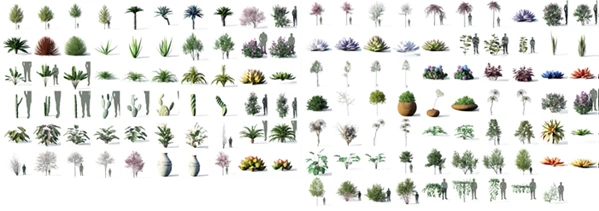
The library includes trees, shrubs, tropical vegetation, hedges, ornamental plants, garden plants, succulents, rocks, pots, and many other assets. The models use high-quality PBR textures while being specifically optimized for Blender.
One of its biggest advantages is variation. Instead of placing identical copies of the same tree throughout a scene, Tree Vegetation can vary properties such as size, position, and color. This makes forests, gardens, and landscapes feel much more organic.
For example, an architectural visualization artist can quickly surround a building with realistic trees and garden plants. A landscape artist can create a varied forest, while an animator can make branches and leaves react to simulated wind.
Four Seasons, One Landscape
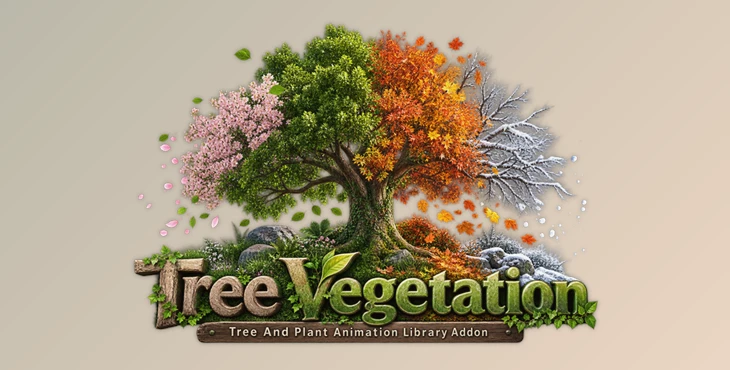
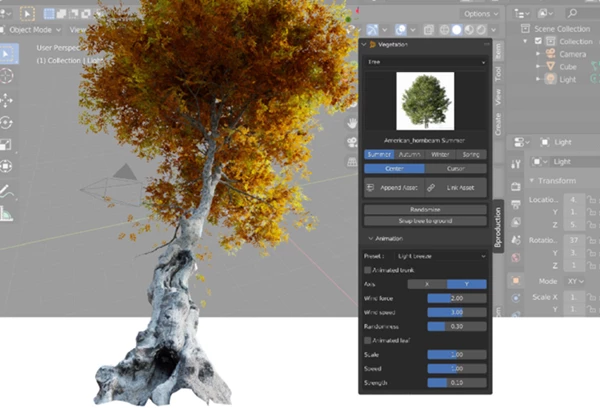
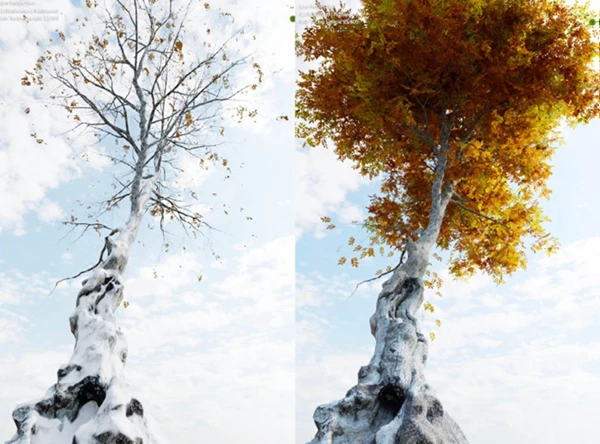
One of the standout features of Tree Vegetation is its 4 Seasons system. Plants and trees can be imported with different appearances for summer, spring, autumn, and winter.
In summer, trees can appear dense and green. Spring produces less dense foliage with more subdued colors. Autumn introduces yellow and translucent leaves, while winter can remove most foliage, darken the wet-looking trunk, and add snow.
The Random Season feature adds even more variation. For example, a winter forest can contain trees representing late autumn, early winter, mid-winter, and late winter. This prevents every plant from looking like it is at exactly the same seasonal stage and helps landscapes appear more natural.
Tree Vegetation Features
393 Assets and 1,500+ Variations
Tree Vegetation includes 393 assets with more than 1,500 variations, giving artists a broad collection for different environments.
Vegetation 6 adds 129 new assets, including:
- 8 Desert Plants
- 13 Fruit Trees
- 37 Garden Plants
- 4 Hanging Plants
- 12 Ornamental Plants
- 2 Pots
- 26 Succulents
- 22 Trees
- 5 Tropical Trees
This variety makes the addon useful for everything from dry desert environments and tropical scenes to residential gardens and dense forests.
Infinite Randomization
Every time you import a plant, the resulting model can have different size, position, and color properties. This means a single tree asset can be used repeatedly without producing an obviously duplicated forest.
For large environments, this is particularly valuable because natural variation makes the final composition much more convincing.
Animated Trees and Leaves
Tree Vegetation is not limited to static assets. Its animation functions allow branches and leaves to move, making it possible to create vegetation affected by wind.
You can manage wind strength or start with the included presets. Subtle movement can make an outdoor architectural visualization feel alive, while stronger motion can be useful for windy or dramatic environments.
High-Quality PBR Textures
The vegetation uses PBR textures that can include diffuse, translucency, roughness, normal or bump, ambient occlusion, and opacity maps. Some textures reach resolutions of up to 8K.
The textures are also optimized so highly visible areas retain strong visual quality while smaller details use memory more efficiently. This balance helps achieve detailed renders without unnecessarily increasing the weight of the scene.
Add Moss to Tree Trunks
The moss controls allow you to customize tree trunks by changing the amount, size, and direction of moss.
This small detail can make a significant difference in environments such as humid forests, old gardens, or naturally weathered landscapes. Instead of every trunk looking perfectly clean, moss helps introduce environmental history and variation.
Customize Rocks With Dirt, Moss, and Snow
The included rock shader provides additional customization options. Artists can add dirt, moss, or snow and adjust properties such as intensity and direction.
This makes it easier to visually connect rocks with the surrounding environment rather than having them appear as isolated 3D assets.
Mix Plants and Pots
Tree Vegetation also gives you flexibility when creating potted vegetation. Instead of being restricted to one predefined plant and pot combination, you can select a pot and place the plant you want inside it.
This is especially useful for garden design, patios, balconies, architectural visualization, and decorative exterior or interior scenes.
Snap Trees to the Ground
The Snap Tree to Ground function allows vegetation to be placed directly onto the ground surface with one click.
When populating larger landscapes, this can make placement faster and reduce the amount of manual adjustment required for each asset.
Real-World Scale
Trees are created at realistic scale in Blender. You can add them to a landscape without having to guess how large each species should be relative to buildings, characters, or surrounding objects.
Correct scale is particularly important in architectural visualization, where unrealistic tree proportions can immediately affect the credibility of a scene.
Optimized for Blender
High-quality vegetation can easily become resource-heavy because of complex meshes and large textures. Tree Vegetation addresses this by optimizing meshes, textures, and shaders specifically for Blender.
The goal is to maintain realistic visual quality while controlling polygon counts and memory requirements, making the assets more practical for real production scenes.
GeoScatter Biomes
Tree Vegetation is compatible with GeoScatter and includes 71 biomes across four categories. These ready-made ecosystems can help artists populate large environments much faster.
Instead of manually distributing every individual tree or plant, biomes can provide a practical starting point for creating more complex and believable ecosystems.
Blender Asset Browser Support
The vegetation library can also be organized and accessed through Blender’s Asset Browser. This is useful if you prefer keeping assets together in a directory and working through Blender’s native asset-management workflow.
However, the animation options are not compatible with the Asset Browser workflow, so the addon itself needs to be used when those animation features are required.
Practical Ways to Use Tree Vegetation
The addon can fit into many different Blender workflows. An archviz artist could populate a residential project with trees, ornamental plants, succulents, and potted vegetation. A landscape artist could generate a forest with randomized seasonal differences. A CG artist could build a tropical environment and animate the vegetation to react to wind.
It can also be useful for snowy winter scenes. Trees can be switched to their winter state while rocks receive snow through their shaders, helping different environmental elements share a consistent seasonal appearance.
Because the vegetation includes realistic scale, PBR materials, and controlled optimization, it can also provide a useful balance between visual detail and practical scene performance.
Tips for More Natural Results
Avoid filling a scene with completely identical vegetation. Take advantage of the randomization controls to introduce changes in scale, position, and color. Even subtle differences can dramatically reduce visible repetition.
When creating a forest, the Random Season control can also help. Mixing slightly different stages of the same season produces more believable color and foliage distribution than giving every tree exactly the same appearance.
Use moss strategically rather than applying the same amount to every tree. Trees in damp or shaded areas can have stronger moss coverage, while vegetation in more exposed locations can remain cleaner.
For animation, subtle wind is often enough to bring a scene to life. Adjust branch and leaf movement according to the environment instead of using identical motion everywhere.
Finally, consider the relationship between vegetation and surrounding assets. Matching moss, dirt, snow, and seasonal characteristics across trees and rocks can help the entire environment feel like one connected ecosystem.
A Faster Way to Build Living Environments
Tree Vegetation is an addon that uses a large vegetation library combined with features that solve some of the more time consuming tasks when creating natural environments in Blender. Tree Vegetation includes 1,500+ variations of 393 assets, infinite randomization, animation of leaves and trunks, four season support, PBR materials, moss support, Blender optimization, and support for GeoScatter. There are options to fit a wide variety of natural environments.
What makes Tree Vegetation stand out is that it does more than just offer tree assets. Features such as seasonal variation, randomization, wind animation, realistic scaling, and material editing can transform single assets into more diverse and natural looking environments.
Tree Vegetation can be used for architectural visualizations, tropical environments, forests, gardens, snow scenes, or any type of natural environment. By utilizing the features available in Tree Vegetation, you can create more realistic natural environments while decreasing the amount of repetitive manual work.
 Blender - Tree Vegetation – Tree And Plant Animation Library Addon v6.1 Pro.part2.rar (Size: 2.2 GB - Date: 9/5/2026 12:01:33 PM)
- Blender - Tree Vegetation – Tree And Plant Animation Library Addon v6.1 Pro.part1.rar (Size: 5.0 GB - Date: 9/5/2026 12:01:27 PM)
- Blender - Tree Vegetation – Tree And Plant Animation Library Addon v6 Pro.part2.rar (Size: 2.2 GB - Date: 2/10/2026 12:33:18 PM)
- Blender - Tree Vegetation – Tree And Plant Animation Library Addon v6 Pro.part1.rar (Size: 5.0 GB - Date: 2/10/2026 12:33:12 PM)
- Tree And Plant Animation Library Addon v5.1.rar (Size: 4.8 GB - Date: 10/17/2024 11:42:45 PM)
Files Password : gfxplugin.com OR 123456